 Index
> Tutorials and Examples > UEFI Test Bootloader |
| Author |
|


|
Core i7 09 Nov 2026, 06:51
I’ve been learning UEFI programming and have written a small bootloader.
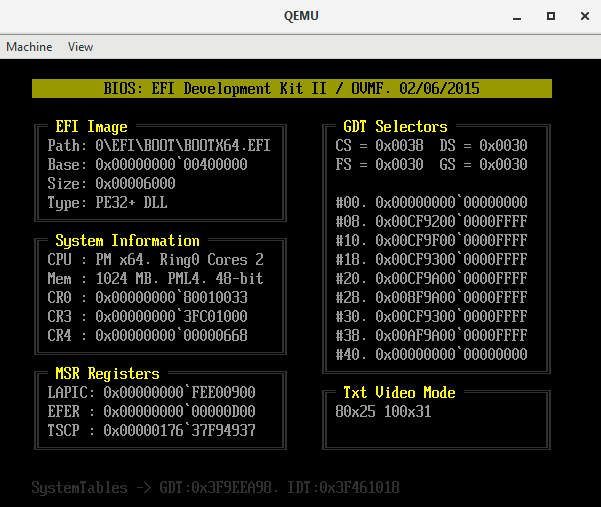
I’m running it in a QEMU virtual machine on Windows; if you have some time, could you please test the application on your end so I can fix any bugs? Attached is a screenshot of the bootloader window, along with the contents of my Windows batch file. It is important to include the "-smbios type=1" flag, as the code reads data from the SMBIOS table. The last line specifies a virtual disk to be used as the boot drive. You will need to create a directory structure—"\Bootdrv\EFI\Boot\"—anywhere on your system and place my bootloader image, "Bootx64.efi" (do not change the filename), inside it. Please run the batch file from within the QEMU folder so that it can locate the EFI firmware ("qemu\share\edk2-x86_64-code.fd") instead of the legacy BIOS. Thanks in advance! Code: qemu-system-x86_64 ^ -smp 2 -m 1024M -machine q35 -smbios type=1 ^ -netdev user,id=net0,hostfwd=tcp::5555-:80 ^ -device virtio-net-pci,netdev=net0,vectors=4 ^ -drive if=pflash,format=raw,readonly=on,file=share\edk2-x86_64-code.fd ^ -drive file=fat:rw:D:\_vm\bootdrv,format=raw,if=virtio
|
||||||||||||||||||||
 09 Nov 2026, 06:51 |
|
|||||||||||||||||||


|
bitRAKE 09 Nov 2026, 07:41
It worked in QEMU and real hardware.
QEMU looks exactly the same. Hardware boot has an orange title bar - no text, on titlebar - rest is good. |
|||
|
09 Nov 2026, 07:41 |
|

|
Core i7 13 Nov 2026, 22:18
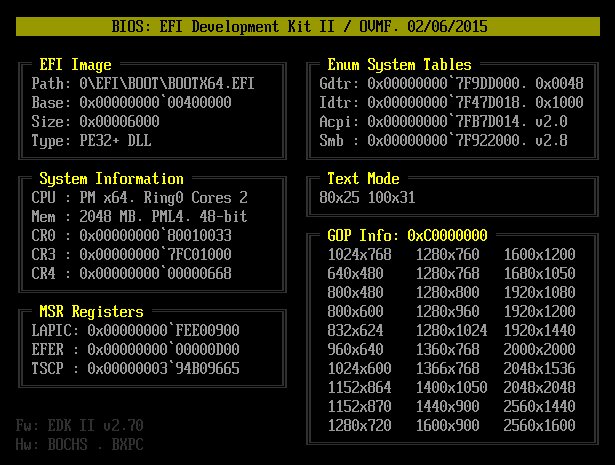
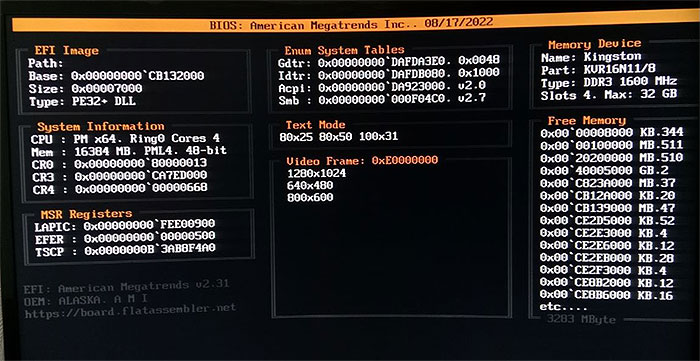
bitRAKE, It turns out that when searching for smbios tables, I didn’t reset the search descriptor to its default state, which is probably why the string wasn’t displayed in the header. I also added a list of the supported graphics modes by the video adapter and the firmware version from SystemTable -> FirmwareVendor to the footer. When testing in qemu, I get as many as 30 modes, but on real hardware there are only 3.
Last edited by Core i7 on 14 Nov 2026, 20:04; edited 1 time in total |
|||||||||||
|
13 Nov 2026, 22:18 |
|
|
HSE 14 Nov 2026, 01:00
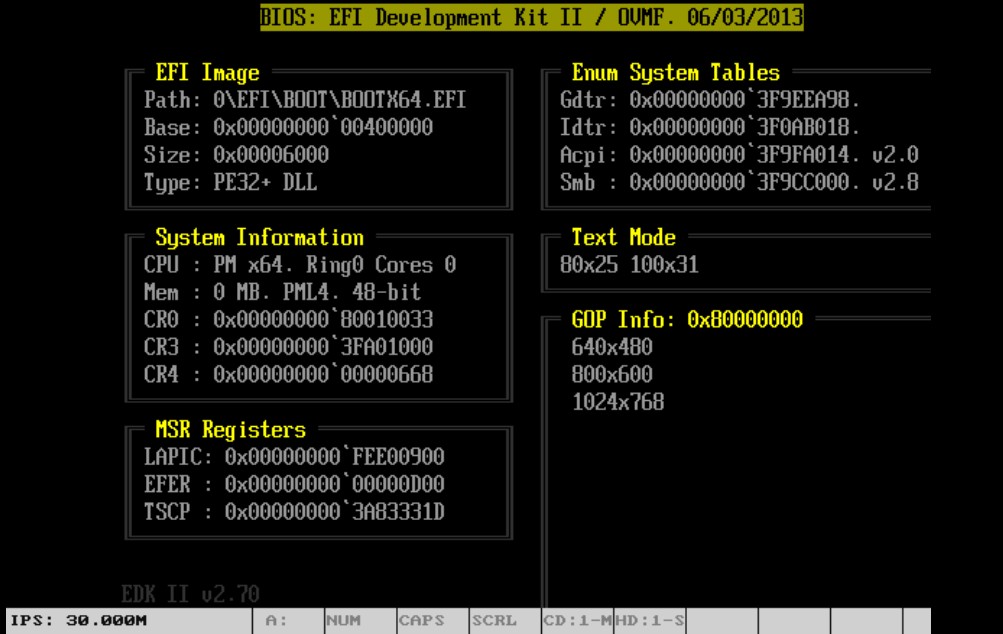
This capture is from lbochs running in the phone.
Perhaps is a wrong Bochs configuration, or a problem in OVMF (this is older)
|
||||||||||
|
14 Nov 2026, 01:00 |
|
|||||||||
|
bitRAKE 14 Nov 2026, 01:25
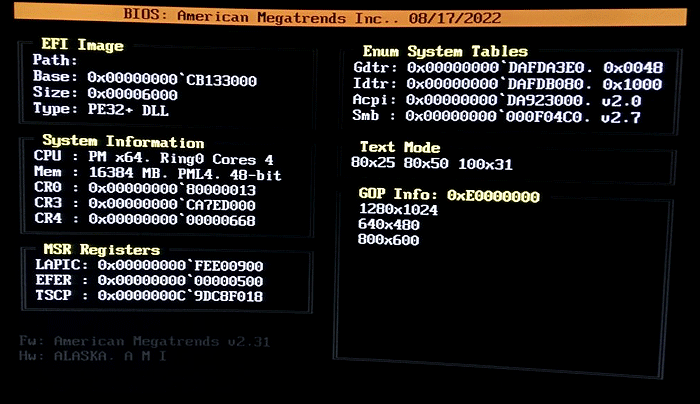
Updated, same hardware. Sorry for the image quality - this monitor is at an odd angle and not easy to get to. Notable:
- orange header, - SMB v3.5, - strange leading char on path, as before, - watchdog not disabled, - this machine actually has 96GB. 
The QEMU display is similar to yours, but dated 08/13/2024 - still EDK II v2.70 though. (I'm using the same command line settings suggested.) _________________ ¯\(°_o)/¯ AI understands the way 2+2 understands 4. |
|||
|
14 Nov 2026, 01:25 |
|
|
Core i7 14 Nov 2026, 12:35
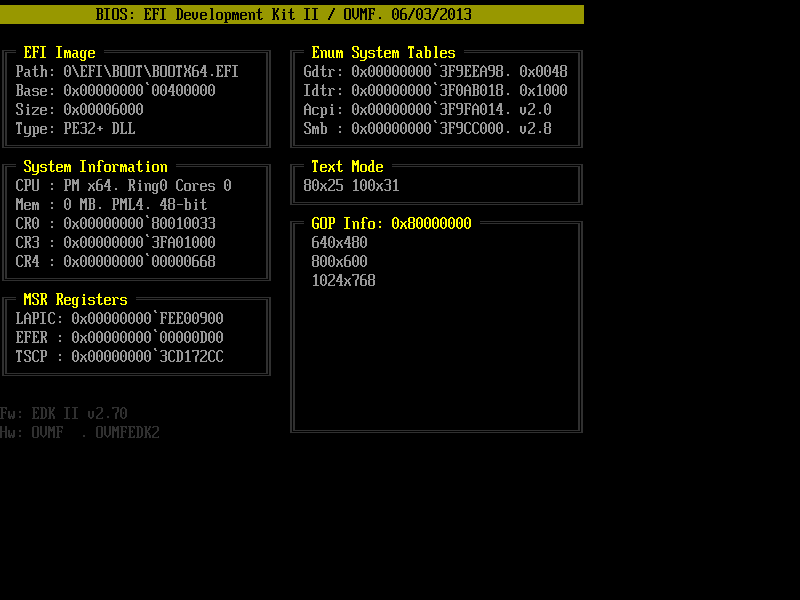
HSE, thanks for the test! When I used the standard firmware from the "qemu\share\edk2-x86_64-code.fd" folder in qemu, I also got the same display. In my bootloader, I manually set the text mode to 80x25 right at the start, but it turns out there's a bug in that firmware, and it's set to 70x22. Manually changing the mode to 100x31 solves the problem, but I still downloaded the release ovmf_code_4M + ovmf_vars_4M and now all modes work correctly. https://qemu.weilnetz.de/test/ovmf/usr/share/OVMF/ Here's a version of the bootloader with a 100x31 screen resolution - your screenshot shows that lbochs has this mode.
bitRAKE, thanks for finding the errors! 1. Smb here implies smbios - version 3.5 is current, although the latest is v3.10 from September 7, 2026. 2. On my real hardware, the path is completely empty, but that's what "EFI_LOADED_IMAGE_PROTOCOL.pFilePath" returns. 3. I fixed the memory size query - it used to only read the first smbios slot, but now it does. cycle. 4. In the very last line, I added the OEM-ID and OEM-Table-ID from the ACPI -> RSDT table. The Fw field is "firmware" and Hw is "hardware". My code works on a desktop with an H61 chipset, but on a Lenovo laptop, it crashes after the first four lines of "Efi-Image." I think the problem is that UEFI starts in graphics mode, and after I set the text resolution to 100x31, my SetCursorPosition function somehow doesn't return control at all (I can't verify the error). It's a shame there are no debuggers for EFI code, although IDA disassembles it just fine.
|
|||||||||||||||||||||||||||||
|
14 Nov 2026, 12:35 |
|
||||||||||||||||||||||||||||
|
HSE 14 Nov 2026, 23:52
This is last bootx64, look correct.
|
||||||||||
|
14 Nov 2026, 23:52 |
|
|||||||||
|
Core i7 15 Nov 2026, 22:40
HSE, great!
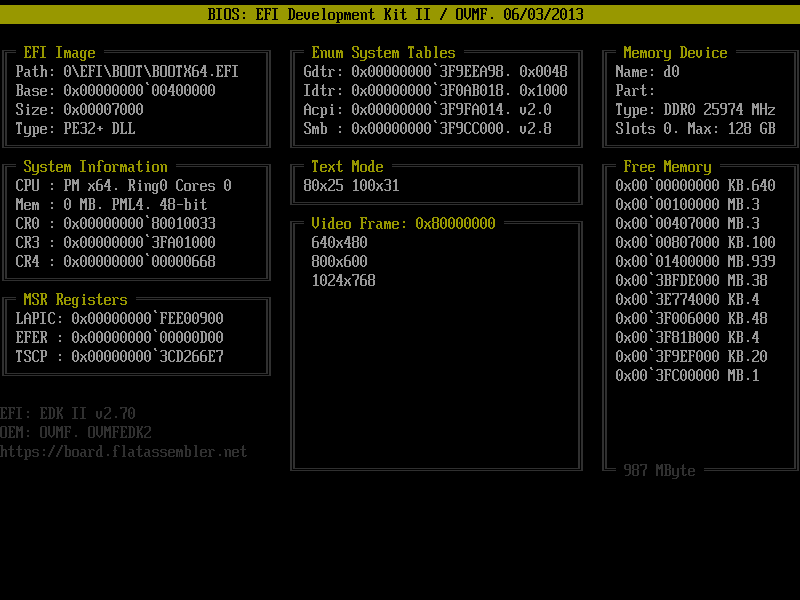
After changing the mode to 100x31, free space appeared on the right, so I added information about the DDR-SDRAM module there: Code: mov [smbiosHandle],0xfffe GetSmBiosTable 17 ;//<--------- MemDevice mov rdi,[pSmbRecord] movzx ebx,byte[rdi + SMBIOS_TABLE_TYPE_17.Manufacturer] or ebx,ebx jz @findPart dec ebx movzx eax,byte[rdi + 1] add rdi,rax GetSmbiosStringOffset @findPart: SetCursor 4,77 printf szMpart mov rdi,[pSmbRecord] movzx ebx,byte[rdi + SMBIOS_TABLE_TYPE_17.PartNumber] or ebx,ebx jz @findType dec ebx movzx eax,byte[rdi + 1] add rdi,rax GetSmbiosStringOffset @findType: SetCursor 5,77 printf szMtype mov rdi,[pSmbRecord] movzx ebx,byte[rdi + SMBIOS_TABLE_TYPE_17.MemoryType] mov eax,2 cmp bl,0x13 ;// DDR2 je @prnType inc eax cmp bl,0x18 ;// DDR3 je @prnType inc eax cmp bl,0x1A ;// DDR4 je @prnType cmp bl,0x1E ;// lpDDR4 je @prnType inc eax cmp bl,0x22 ;// DDR5 je @prnType cmp bl,0x23 ;// lpDDR5 je @prnType xor eax,eax @prnType: stdcall PrintDec,eax,buff mov dword[buff],0x20 printf buff mov rdi,[pSmbRecord] movzx eax,word[rdi + SMBIOS_TABLE_TYPE_17.ClockSpeed] stdcall PrintDec,eax,buff printf szMmhz SetCursor 6,77 printf szMslots mov [smbiosHandle],0xfffe GetSmBiosTable 16 ;//<-------- MemArray mov rax,[pSmbRecord] movzx eax,word[rax + SMBIOS_TABLE_TYPE_16.NumberOfMemDev] stdcall PrintDec,eax,buff printf szMmax mov rax,[pSmbRecord] mov eax,dword[rax + SMBIOS_TABLE_TYPE_16.MaxCapacity] shr eax,20 stdcall PrintDec,eax,buff printf szMgbt ..and a map of free memory using Efi_GetMemoryMap(), which turns out to be very large on real hardware, and I had to limit the dump to 14 lines: Code: mov rax,[sTable] mov rax,[rax + EFI_SYSTEM_TABLE.pBootServices] mov rbx,[rax + EFI_BOOT_SERVICES_TABLE.GetMemoryMap] ;//<---- request size stdcall rbx, MemMapSize,MemMap,MemKey,DescSize,DescVer mov rax,[DescSize] shl rax,2 add [MemMapSize],rax mov rax,[sTable] mov rax,[rax + EFI_SYSTEM_TABLE.pBootServices] mov rax,[rax + EFI_BOOT_SERVICES_TABLE.AllocatePool] ;//<------- stdcall rax,EfiLoaderData,[MemMapSize],MemMap mov rax,[sTable] mov rax,[rax + EFI_SYSTEM_TABLE.pBootServices] mov rbx,[rax + EFI_BOOT_SERVICES_TABLE.GetMemoryMap] ;//<---- fill the buff stdcall rbx, MemMapSize,[MemMap],MemKey,DescSize,DescVer SetCursor 9,77 mov [defRow],9 mov [rowCounter],0 mov [freeMemory],0 mov rax,[MemMapSize] mov rcx,[DescSize] xor edx,edx div ecx xchg rbx,rax mov rax,[MemMap] @@: push rax rbx cmp dword[rax],EfiConventionalMemory ;// = 7 jne @nextDesc push rax mov rax,[rax + EFI_MEMORY_DESCRIPTOR.PhysicalStart] stdcall PrintHex,rax,buff,40 pop rax mov rax,[rax + EFI_MEMORY_DESCRIPTOR.NumberOfPages] imul rax,4096 add [freeMemory],rax shr rax,10 mov rbx,szMkb cmp rax,1024 jb @prnMemSize shr rax,10 mov rbx,szMmb cmp rax,1024 jb @prnMemSize shr rax,10 mov rbx,szMgb @prnMemSize: push rax printf rbx pop rax stdcall PrintDec,rax,buff inc [defRow] SetCursor [defRow],77 inc [rowCounter] @nextDesc: pop rbx rax add rax,[DescSize] cmp [rowCounter],14 jne @@@ printf szMetc ;// etc... jmp @f @@@: dec rbx jnz @b @@: mov rax,[sTable] mov rax,[rax + EFI_SYSTEM_TABLE.pBootServices] mov rax,[rax + EFI_BOOT_SERVICES_TABLE.FreePool] ;<------- stdcall rax,[MemMap] I have a panoramic display, so the screenshots look out of place.
|
||||||||||||||||||||
|
15 Nov 2026, 22:40 |
|
|||||||||||||||||||
|
HSE 16 Nov 2026, 11:42
Look well!
|
||||||||||
|
16 Nov 2026, 11:42 |
|
|||||||||
|
Core i7 16 Nov 2026, 15:16
HSE You said you were running it on a smartphone, which is probably why you have some interesting data in the "Memory Device" section. Apparently, 128 GB is the smartphone's internal memory, not DDR-SDRAM.
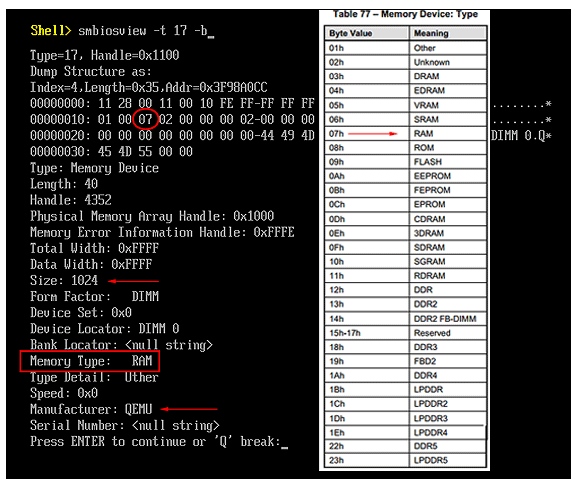
You can check your memory type with the command "smbiosview -t 17 -b" in the EFI Shell. In my code, I only check for DDR, and the smbios specifications list is quite long. If your firmware doesn't have a shell (check in the BIOS settings by pressing F2 in the Boot section), I've archived it. Even though the file name is the same, it's a shell, not my bootloader.
|
||||||||||||||||||||
|
16 Nov 2026, 15:16 |
|
|||||||||||||||||||
|
HSE 16 Nov 2026, 17:34
OVMF-pure-efi is a little limited. Your she'll fail or can't work.
Apparently 128 GB is a fantasy number that Bochs or OVMF theoretically can manage. The phone have 4GB.
|
||||||||||
|
16 Nov 2026, 17:34 |
|
|||||||||
|
Core i7 16 Nov 2026, 18:00
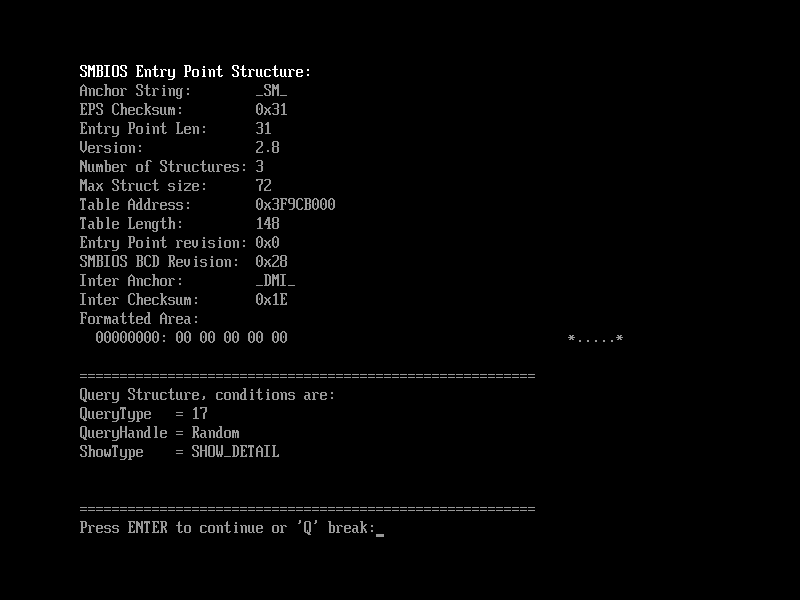
On your screenshot, this is the header of the SMBIOS database, and if you click Inter, the table itself will be displayed. But in general the header says "Number of struct = 3", so the table (17) may be missing.
>>> The phone have 4GB. ..this is RAM, and 128 is built-in memory, i.e. SSD hard drive. |
|||
|
16 Nov 2026, 18:00 |
|
|
HSE 16 Nov 2026, 19:13
Core i7 wrote: On your screenshot, this is the header of the SMBIOS database, and if you click Inter, the table itself will be displayed. But in general the header says "Number of struct = 3", so the table (17) may be missing. Yes, nothing more. And table 16 also is missing, then a random number for built-in storage. |
|||
|
16 Nov 2026, 19:13 |
|
|
Core i7 16 Nov 2026, 20:09
The good news is that you can even set a screen resolution in text mode that isn't listed in QueryMode(). However, you'll only be able to evaluate the effect on real hardware, not in qemu. To do this, simply enable graphics mode via GOP (graphics_output_protocol), and then output text as before in text mode via Simple_Text_Output_Protocol.
UEFI doesn't differentiate between text and video modes like the old BIOS—the screen is always graphical. However, standard text output via ConOut->OutputString() automatically converts characters to pixels. Therefore, the main thing is that the GOP supports the resolution, and text mode doesn't play a significant role. If the EFI firmware was created in EDK2 from TianoCore, the only default font is 8x19, and custom fonts must be loaded programmatically. Therefore, knowing the font size, you can calculate the correspondence between text and video modes using the following formula: Code: video = 640x480 = (640/8) x (480/19) = 80x25 text video = 800x600 = (800/8) x (600/19) = 100x31 text video = 1024x768 = (1024/8) x ( 768/19) = 128x40 text video = 1280x720 = (1280/8) x ( 720/19) = 160x37 text video = 1280x1024 = (1280/8) x (1024/19) = 160x53 text video = 1440x900 = (1440/8) x ( 900/19) = 180x47 text etc.. Ideally, in graphics mode, character glyphs should be displayed pixel-by-pixel. Then you can use absolutely any font, as is done in the manufacturer's UEFI interface. If the default EFI kernel font meets your needs, it's easier to use a hybrid approach, with the graphics mode and the Simple_Text function. I just tested my bootloader on real hardware with the GOP enabled, 1280x1024 = 160x53, and the entire bootloader interface took up only 1/4 of the display, leaving about 3/4 of the space free, in which an elephant can be placed. Moreover, unlike qemu, the font size also decreased.
|
||||||||||
|
16 Nov 2026, 20:09 |
|
|||||||||
< Last Thread | Next Thread > |
Forum Rules:
|