 Index
> Tutorials and Examples > UEFI Test Bootloader |
| Author |
|


|
Core i7 09 Nov 2026, 06:51
I’ve been learning UEFI programming and have written a small bootloader.
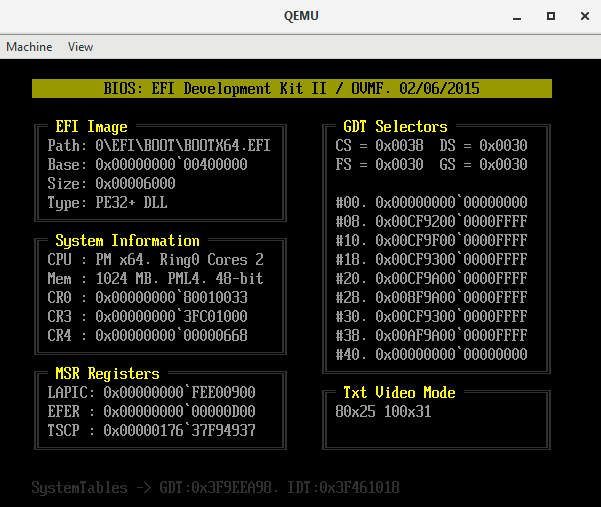
I’m running it in a QEMU virtual machine on Windows; if you have some time, could you please test the application on your end so I can fix any bugs? Attached is a screenshot of the bootloader window, along with the contents of my Windows batch file. It is important to include the "-smbios type=1" flag, as the code reads data from the SMBIOS table. The last line specifies a virtual disk to be used as the boot drive. You will need to create a directory structure—"\Bootdrv\EFI\Boot\"—anywhere on your system and place my bootloader image, "Bootx64.efi" (do not change the filename), inside it. Please run the batch file from within the QEMU folder so that it can locate the EFI firmware ("qemu\share\edk2-x86_64-code.fd") instead of the legacy BIOS. Thanks in advance! Code: qemu-system-x86_64 ^ -smp 2 -m 1024M -machine q35 -smbios type=1 ^ -netdev user,id=net0,hostfwd=tcp::5555-:80 ^ -device virtio-net-pci,netdev=net0,vectors=4 ^ -drive if=pflash,format=raw,readonly=on,file=share\edk2-x86_64-code.fd ^ -drive file=fat:rw:D:\_vm\bootdrv,format=raw,if=virtio
|
||||||||||||||||||||
 09 Nov 2026, 06:51 |
|
|||||||||||||||||||


|
bitRAKE 09 Nov 2026, 07:41
It worked in QEMU and real hardware.
QEMU looks exactly the same. Hardware boot has an orange title bar - no text, on titlebar - rest is good. |
|||
|
09 Nov 2026, 07:41 |
|

|
Core i7 13 Nov 2026, 22:18
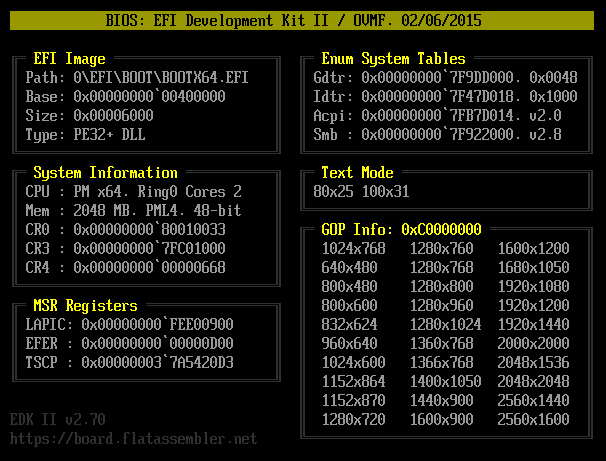
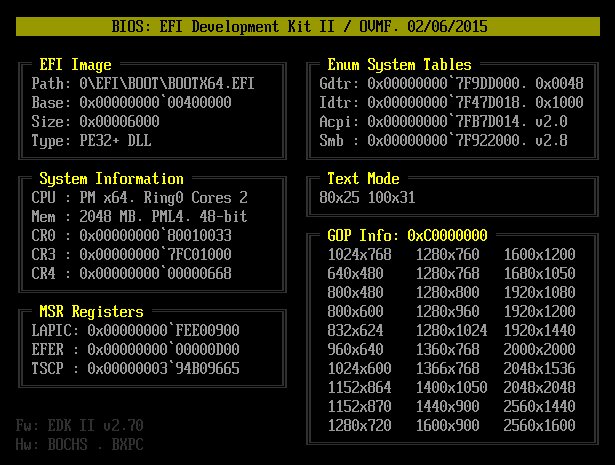
bitRAKE, It turns out that when searching for smbios tables, I didn’t reset the search descriptor to its default state, which is probably why the string wasn’t displayed in the header. I also added a list of the supported graphics modes by the video adapter and the firmware version from SystemTable -> FirmwareVendor to the footer. When testing in qemu, I get as many as 30 modes, but on real hardware there are only 3.
|
||||||||||||||||||||
|
13 Nov 2026, 22:18 |
|
|||||||||||||||||||
|
HSE 14 Nov 2026, 01:00
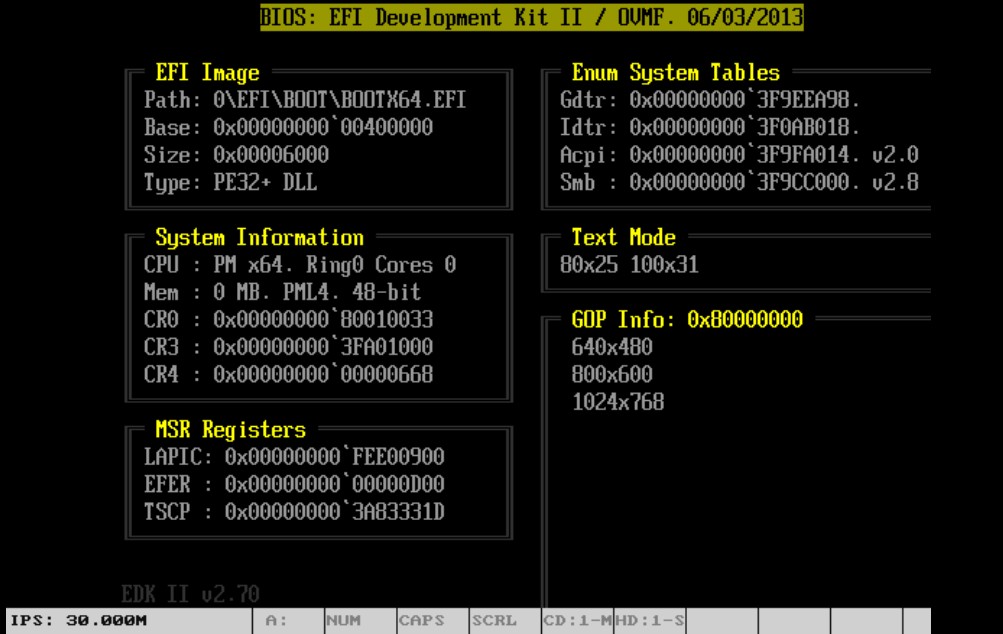
This capture is from lbochs running in the phone.
Perhaps is a wrong Bochs configuration, or a problem in OVMF (this is older)
|
||||||||||
|
14 Nov 2026, 01:00 |
|
|||||||||
|
bitRAKE 14 Nov 2026, 01:25
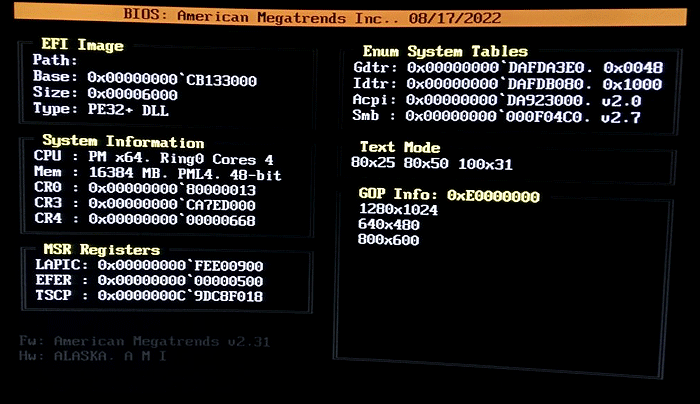
Updated, same hardware. Sorry for the image quality - this monitor is at an odd angle and not easy to get to. Notable:
- orange header, - SMB v3.5, - strange leading char on path, as before, - watchdog not disabled, - this machine actually has 96GB. 
The QEMU display is similar to yours, but dated 08/13/2024 - still EDK II v2.70 though. (I'm using the same command line settings suggested.) _________________ ¯\(°_o)/¯ AI understands the way 2+2 understands 4. |
|||
|
14 Nov 2026, 01:25 |
|
|
Core i7 14 Nov 2026, 12:35
HSE, thanks for the test! When I used the standard firmware from the "qemu\share\edk2-x86_64-code.fd" folder in qemu, I also got the same display. In my bootloader, I manually set the text mode to 80x25 right at the start, but it turns out there's a bug in that firmware, and it's set to 70x22. Manually changing the mode to 100x31 solves the problem, but I still downloaded the release ovmf_code_4M + ovmf_vars_4M and now all modes work correctly. https://qemu.weilnetz.de/test/ovmf/usr/share/OVMF/ Here's a version of the bootloader with a 100x31 screen resolution - your screenshot shows that lbochs has this mode.
bitRAKE, thanks for finding the errors! 1. Smb here implies smbios - version 3.5 is current, although the latest is v3.10 from September 7, 2026. 2. On my real hardware, the path is completely empty, but that's what "EFI_LOADED_IMAGE_PROTOCOL.pFilePath" returns. 3. I fixed the memory size query - it used to only read the first smbios slot, but now it does. cycle. 4. In the very last line, I added the OEM-ID and OEM-Table-ID from the ACPI -> RSDT table. The Fw field is "firmware" and Hw is "hardware". My code works on a desktop with an H61 chipset, but on a Lenovo laptop, it crashes after the first four lines of "Efi-Image." I think the problem is that UEFI starts in graphics mode, and after I set the text resolution to 100x31, my SetCursorPosition function somehow doesn't return control at all (I can't verify the error). It's a shame there are no debuggers for EFI code, although IDA disassembles it just fine.
|
|||||||||||||||||||||||||||||
|
14 Nov 2026, 12:35 |
|
||||||||||||||||||||||||||||
< Last Thread | Next Thread > |
Forum Rules:
|