 Index
> Windows > Windows version of chastehex
Index
> Windows > Windows version of chastehex |
| Author |
|


|
chastitywhiterose 06 Nov 2025, 10:57
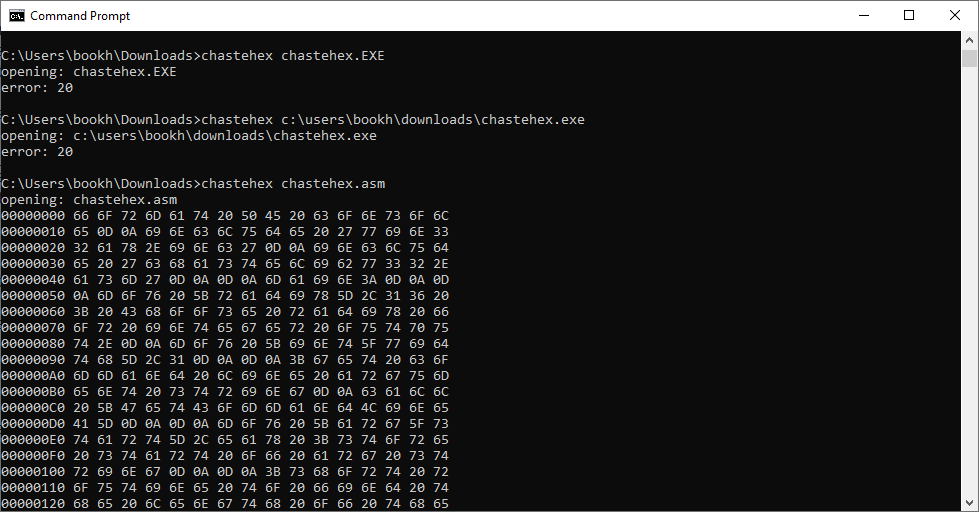
I managed to learn enough Windows API to rewrite my chastehex program for Windows. Fortunately, most of my functions in chastelib worked without any modification from the Linux version because they used 32 bit registers and didn't call any OS specific calls. After I changed putstring to use the WriteFile call for Windows, I was able to get the output I needed to write and debug the rest of the program while I learned how to open, seek, read, and write a file with the Windows API.
It works the same as the Linux and DOS versions that I posted on this forum in their sections. I was blown away with how much faster it executed compared to the C prototype I built first. main.asm Code: format PE console entry main include 'win32a.inc' ;includes standard Windows 32-bit definitions and macros include 'chastelib-w32.asm' ;include standard library functions by Chastity include 'getarg-w32.asm' ;include Chastity's getarg function for command line arguments main: mov [radix],16 ; Choose radix for integer output. mov [int_width],1 call getarg ;this first call will get the command string cmp eax,0 ;did the getarg function return 0? jz help ;if eax was zero, there are no args so we end the program safely after help message ;optionally display the command string ;call putstring ;call putline call getarg ;get next arg as file name cmp eax,0 ;did the getarg function return 0? jz help ;if eax was zero, there are no args so we end the program safely after help message ;print the filename call putstring call putline mov [filename], eax ;save the filename to a permanent address jmp open_sesame help: mov eax,help_message call putstring jmp main_end open_sesame: ;open a file with the CreateFileA function ;https://learn.microsoft.com/en-us/windows/win32/api/fileapi/nf-fileapi-createfilea ;call CreateFileA with Windows 32-bit calling convention push 0 ;hTemplateFile = NULL: We are not using a template file push 0x80 ;dwFlagsAndAttributes = FILE_ATTRIBUTE_NORMAL push 3 ;dwCreationDisposition = OPEN_EXISTING push 0 ;lpSecurityAttributes = NULL: No security attributes push 1 ;dwShareMode = FILE_SHARE_READ (other programs can read this file) push 0x10000000 ;dwDesiredAccess = GENERIC_ALL access mode (Read+Write+Execute) push [filename] ;lpFileName call [CreateFileA] ;check eax for file handle or error code ;call putint cmp eax,-1 jnz file_ok mov eax,file_error_message call putstring call [GetLastError] call putint jmp main_end ;end program if the file was not opened ;this label is jumped to when the file is opened correctly file_ok: mov [fd],eax ;before we proceed, we also check for more arguments. ;get next arg (first one after name of program) call getarg cmp eax,0 ;did the getarg function return 0? jz hexdump ;proceed to normal hex dump if no more args ;otherwise interpret the arg as a hex address to seek to call strint mov [offset],eax ;seek to 32-bit address of file with SetFilePointer function ;https://learn.microsoft.com/en-us/windows/win32/api/fileapi/nf-fileapi-setfilepointer push 0 ;seek from beginning of file (SEEK_SET) push 0 ;NULL: We are not using a 64 bit address push [offset] ;where we are seeking to push [fd] ;seek within this file call [SetFilePointer] ;check for more args after the address argument call getarg cmp eax,0 jz read_one_byte ;proceed to read one byte mode ;otherwise, write the rest of the arguments as bytes to the file! write_bytes: call strint mov [buf],al ;Windows 32-bit WriteFile system call ;https://learn.microsoft.com/en-us/windows/win32/api/fileapi/nf-fileapi-writefile push 0 ;lpOverlapped = NULL push 0 ;lpNumberOfBytesWritten = NULL push 1 ;nNumberOfBytesToWrite = 1 push buf ;lpBuffer = address of data to write push [fd] ;hFile = [fd] (copied there earlier) call [WriteFile] mov eax,[offset] inc [offset] mov [int_width],8 call putint_and_space mov eax,0 mov al,[buf] mov [int_width],2 call putint_and_line ;check for more args call getarg ;get next arg as potential bytes to write cmp eax,0 ;did the getarg function return 0? jnz write_bytes ;continue write if the args still exist ;otherwise end program jmp main_end read_one_byte: ;read only 1 byte using Win32 ReadFile system call. push 0 ;Optional Overlapped Structure push count ;Store Number of Bytes Read from this call push 1 ;Number of bytes to read push buf ;address to store bytes push [fd] ;handle of the open file call [ReadFile] cmp [count],1 jz print_byte ;if less than one bytes read, there is an error mov eax,[offset] mov [int_width],8 call putint_and_space mov eax,end_of_file call putstr_and_line jmp main_end print_byte: mov eax,[offset] mov [int_width],8 call putint_and_space mov eax,0 mov al,[buf] mov [int_width],2 call putint_and_line jmp main_end hexdump: ;read bytes using Win32 ReadFile system call. push 0 ;Optional Overlapped Structure push count ;Store Number of Bytes Read from this call push 16 ;Number of bytes to read push buf ;address to store bytes push [fd] ;handle of the open file call [ReadFile] ;all the data is in place, do the write thing! mov eax,[count] ;call putint ;mov eax,buf ;call putstring cmp eax,0 jnz read_ok ;if more than zero bytes read, proceed to display jmp eof_end read_ok: call print_bytes_row jmp hexdump print_EOF: mov eax,[offset] mov [int_width],8 call putint_and_space mov eax,end_of_file call putstr_and_line jmp main_end eof_end: ;before we end the program, let the user know End Of File was reached mov eax,end_of_file call putstr_and_line main_end: ;close the file push [fd] call [CloseHandle] ;Exit the process with code 0 push 0 call [ExitProcess] ;variables for displaying messages file_error_message db 'error: ',0 end_of_file db 'EOF',0 read_error_message db 'Failure during reading of file. Error number: ',0 help_message db 'chastehex by Chastity White Rose',0Ah,0Ah db 'hexdump a file:',0Ah,0Ah,9,'chastehex file',0Ah,0Ah db 'read a byte:',0Ah,0Ah,9,'chastehex file address',0Ah,0Ah db 'write a byte:',0Ah,0Ah,9,'chastehex file address value',0Ah,0Ah db 'The file must exist',0Ah,0 ;this function prints a row of hex bytes ;each row is 16 bytes print_bytes_row: mov eax,[offset] mov [int_width],8 call putint_and_space mov ebx,buf mov ecx,[count] add [offset],ecx next_byte: mov eax,0 mov al,[ebx] mov [int_width],2 call putint_and_space inc ebx dec ecx cmp ecx,0 jnz next_byte mov ecx,[count] pad_spaces: cmp ecx,0x10 jz pad_spaces_end mov eax,space_three call putstring inc ecx jmp pad_spaces pad_spaces_end: ;optionally, print chars after hex bytes call print_bytes_row_text call putline ret space_three db ' ',0 print_bytes_row_text: mov ebx,buf mov ecx,[count] next_char: mov eax,0 mov al,[ebx] ;if char is below '0' or above '9', it is outside the range of these and is not a digit cmp al,0x20 jb not_printable cmp al,0x7E ja not_printable printable: ;if char is in printable range,copy as is and proceed to next index jmp next_index not_printable: mov al,'.' ;otherwise replace with placeholder value next_index: mov [ebx],al inc ebx dec ecx cmp ecx,0 jnz next_char mov [ebx],byte 0 ;make sure string is zero terminated mov eax,buf call putstring ret ;variables for managing file IO. filename dd ? count dd ? ;how many bytes are read with ReadFile operation buf db 16 dup ?,0 fd dd ? offset dd ? ;FASM builds the Import Address Table (IAT) directly in the source file section '.idata' import data readable writeable library kernel32, 'KERNEL32.DLL' import kernel32,\ GetStdHandle, 'GetStdHandle',\ WriteFile, 'WriteFile',\ ExitProcess, 'ExitProcess',\ GetCommandLineA, 'GetCommandLineA',\ CreateFileA, 'CreateFileA',\ GetLastError, 'GetLastError',\ SetFilePointer, 'SetFilePointer',\ ReadFile, 'ReadFile',\ CloseHandle, 'CloseHandle' Also, on my system, I use the following batch file to set the path to the include files. fasmpath.bat Code: set path=C:\fasm set include=C:\fasm\INCLUDE
Last edited by chastitywhiterose on 18 Oct 2026, 09:23; edited 4 times in total |
|||||||||||||||||||||||||||||||
 06 Nov 2025, 10:57
 |
|



|
revolution 06 Nov 2025, 15:06
Windows doesn't allow altering a running exe file.
Code: push 0x10000000 ;GENERIC_ALL access mode (Read+Write) |
|||
|
06 Nov 2025, 15:06 |
|
|
Mаt Quasar 06 Nov 2025, 15:11
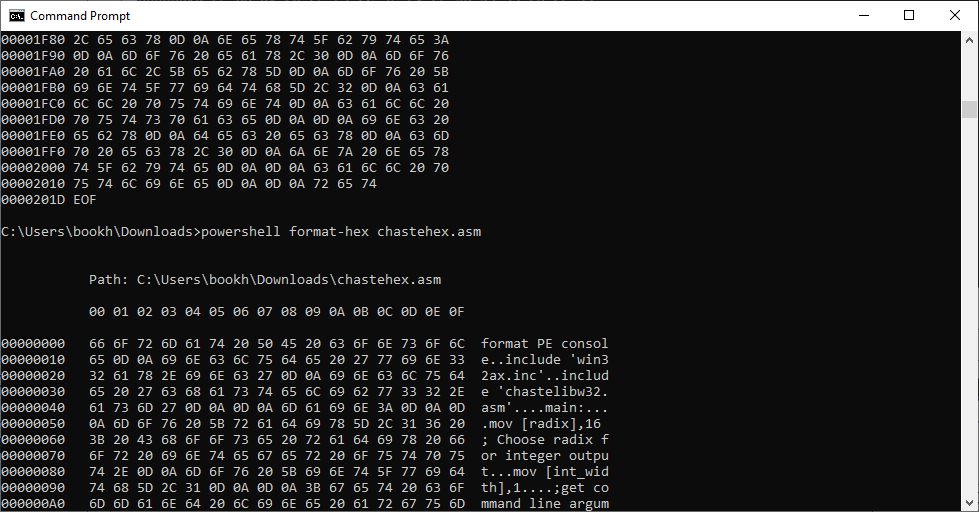
Oh, maybe it was designed such a way so that no ASCII characters are printed?
|
||||||||||
|
06 Nov 2025, 15:11 |
|
|||||||||
|
Mаt Quasar 06 Nov 2025, 15:13
revolution wrote: Windows doesn't allow altering a running exe file. You're right. I totally forgot chastehex.EXE can write to the opened file. It is a hexedit program for the command-line. |
|||
|
06 Nov 2025, 15:13 |
|
|
Mаt Quasar 06 Nov 2025, 15:30
I notice the use of CMP against zero value, can use OR as substitute so that 1 byte is saved:
Code: cmp ecx,0 jnz next_byte 6 bytes Code: or ecx,ecx
jnz next_byte 5 bytes Just being picky.  |
|||
|
06 Nov 2025, 15:30 |
|
|
Mаt Quasar 06 Nov 2025, 15:49
This is the shortest code for a hexdump program in Windows:
Code: invoke CreateFileA,...... invoke ReadFile,.... invoke CryptBinaryToStringA,....,0x0000000b,.. invoke GetStdHandle,....... invoke WriteConsoleA,........ invoke ExitProcess,...... |
|||
|
06 Nov 2025, 15:49 |
|
|
revolution 06 Nov 2025, 16:12
Mаt Quasar wrote: I notice the use of CMP against zero value, can use OR as substitute so that 1 byte is saved:... Or just use loop. Save even more bytes!!! |
|||
|
06 Nov 2025, 16:12 |
|
|
Mаt Quasar 08 Nov 2025, 05:21
revolution wrote:
I learned something new. Thanks. Code: dec ecx
jnz next_byte
4 bytes Code: loop next_byte
2 bytes Or 8 bytes (from original code) --> 2 bytes, a substantial 6-byte saving! |
|||
|
08 Nov 2025, 05:21 |
|
|
Mаt Quasar 08 Nov 2025, 07:54
This is an hex viewer program for Windows written by another flat assembler forum member:
https://github.com/vlabsc/file_in_hex |
|||
|
08 Nov 2025, 07:54 |
|
|
AsmGuru62 08 Nov 2025, 13:31
Can these HEX viewers search for patterns of bytes, like: "B8 00 ** ** ** A4 F5"?
|
|||
|
08 Nov 2025, 13:31 |
|
|
chastitywhiterose 09 Nov 2025, 01:43
revolution wrote:
My understanding was that inc and dec don't modify any flags. Also, everyone is funny when they explain how to save a few bytes but that is one of the reasons I love Assembly. Obviously I could write an optimized version later but I was just thrilled that I got it working and that it did exactly what I want! |
|||
|
09 Nov 2025, 01:43 |
|
|
chastitywhiterose 09 Nov 2025, 01:55
Mаt Quasar wrote:
Yes, the idea was that not only reading was possibly but also writing. Depending on the arguments you give it, you can read either the whole thing by only providing the file name, or the filename and the seek address to read that byte. If you add any other arguments after that, then they become bytes to write starting at that address. I had something specific in mind when I made it. I was thinking of learning how to make my own headers for executable files using chastehex so that I could generate them from scripts rather than relying on the defaults FASM uses. Perhaps I could even use NASM for some development and then use chastehex to make the headers since it can't do it on its own without a linker like FASM can. But also, chastehex can be used to cheat at some video games where save files have fixed addresses for data. I also have a file comparison tool that I wrote in C but I have not written it in Assembly yet. That might be something I do but for now I can use the C version just fine on any platform to find where the bytes differ. And yes, it doesn't currently display ASCII characters like some hex dumpers do. It was intended to be used on binary files which would not contain much text data, like Cave Story save files! |
|||
|
09 Nov 2025, 01:55 |
|
|
revolution 09 Nov 2025, 02:19
The x86 docs have this to say for DEC flags:
Quote: The CF flag is not affected. The OF, SF, ZF, AF, and PF flags are set according to the result. |
|||
|
09 Nov 2025, 02:19 |
|
|
chastitywhiterose 09 Nov 2025, 02:22
revolution wrote: The x86 docs have this to say for DEC flags: I will look more into this because this could allow removing cmp statements in some places. However, I tend to have them in my code even when not needed just for clarity because I am planning to put a lot of my source code into a book. |
|||
|
09 Nov 2025, 02:22 |
|
|
chastitywhiterose 18 Oct 2026, 09:34
I have an update. I learned enough of the 64-bit Windows calling convention to get chastehex working using the modern calling convention. It works the same way as the 32-bit edition which was in the original post of this threat.
The original post has also been updated with new attachments which should have corrected comments and my new library for handling command line arguments. I have also been writing a book on my discoveries of Assembly programming on Windows. It has a lot of code samples for 32 and 64 bit calling conventions. https://leanpub.com/assemblyarithmeticalgorithms-windows As usual, all my programs are command line tools that started out on Linux and then I worked hard to figure out the Windows API of doing the same tricks. Good thing there is only a tiny subset of the API functions I need to do my work.
|
|||||||||||||||||||||||||||||||
|
18 Oct 2026, 09:34 |
|
< Last Thread | Next Thread > |
Forum Rules:
|