 Index
> OS Construction > hypervisors - AMD, Intel
Index
> OS Construction > hypervisors - AMD, Intel |
| Author |
|



|
Hrstka 02 Sep 2026, 13:54
Unfortunately I don't have time for that. But I appreciate that you are willing to share your knowledge on this advanced topic.
|
|||
 02 Sep 2026, 13:54
 |
|
|
six_L 04 Sep 2026, 02:02
Hello,Feryno
I appreciate your ideal. but is this possible? This should be an act of the state, not the act of certain individuals. 1, You should maintain a development team of at least 5000 people per year, including an office and salary. this will run for 20 years. 2, M$ is there, preemptively occupied this track. Many CPU manufacturers have always supported him. could you done better than him? |
|||
|
04 Sep 2026, 02:02 |
|
|
Feryno 05 Sep 2026, 13:15
I would just like to share knowledge so more people will be educated and skilled.
Most of hypervisors are developed by a big team (hyper-v, KVM, VMware, virtualbox, xen, ...). I'm doing hypervisor development completely alone in the past 15 years although there are more people in the team, they are developing other parts (GUI, AI, ...). My part is single-person task since beginning. There are few guys on internet who share code written in C on github and similar platforms and these projects also seem to be one-man work, usually copy/paste an older work of someone else and then further improving (they always mention who was their ancestor). I do not expect to create a team or to develop here some commercial tool based on hypervisor. If few people start to develop their own hypervisor it would be great. It's hard to start by only reading CPU manuals or by analyzing something huge like hyper-v (closed source, only binary available) or KVM (open source). Better if someone become skilled by debugging/tracing something tiny to fully understand it so later can develop something advanced or be able to analyze something bigger and eventually find there mistakes/bugs. I do not expect this to become any commercial project. Better if everyone involved become skilled to play with hypervisors and be able to develop their own without necessity of copy someone' source code. I also do not like to make new posts if there will be no one interested. If there will be interest I will post some theory to understand paging, how to setup hypervisor structures, some small binaries to debug in emulators to understand what vm entry / vm exit does, how to start at every CPU/core/thread etc. Only x64 platform (AMD and Intel), not ARM. Only FASM, not C. |
|||
|
05 Sep 2026, 13:15 |
|
|
bitRAKE 12 Sep 2026, 01:26
The first question that comes to my mind: What does the hypervisor need? Memory manager, I/O support, etc ... We can't leave UEFI and create a hypervisor directly, or can we? Or you're suggesting starting a hypervisor in UEFI? What is the expected support, if any?
The other question would be simplification on modern hardware. We have UEFI, ECAM, etc. ... creating a modern OS is very simple code if we abandon all the legacy cruft. Is it the same with hypervisors? Traffic is low and specialized here. Gauging interest is difficult. (Most my hypervisor experience is through WHP in Windows - no concern for the low-level details is required, but it's really just a different abstraction. My current understanding is that a hypervisor cannot be created in user mode on Windows 11, but there are a number of Windows features that rely on hypervisors. This is why all the emulators in Windows are built on WHP.) SVM support for fasmg/2: Code: ; svm.inc -- AMD-V instruction encodings (APM vol.3) ; Requires CPUID Fn8000_0001_ECX[SVM] = 1. ; Add to start of `include\x86-2.inc`: ; ; CPUID.(EAX=80000001H):ECX ; SVM: ext | 224 + 2 calminstruction x86.store_address_prefix size* check (size = 2 & x86.mode = 32) | (size = 4 & x86.mode <> 32) jyes fix check size shl 3 = x86.mode jyes ok err 'invalid operand size' ok: exit fix: emit 1, 67h end calminstruction iterate <instr,opcode>, vmrun,0xD8, vmload,0xDA, vmsave,0xDB calminstruction instr? dest* call x86.require.SVM call x86.parse_operand@dest, dest check @dest.type = 'reg' & @dest.rm = 0 jno invalid call x86.store_address_prefix, @dest.size emit 3, 0x010F or (opcode shl 16) exit invalid: err 'only rAX register supported' end calminstruction end iterate iterate <instr,opcode>,\ vmmcall, 0xD9010F,\ stgi, 0xDC010F,\ clgi, 0xDD010F calminstruction instr? call x86.require.SVM emit 3, opcode end calminstruction end iterate calminstruction skinit? base:eax ; EAX = SLB base call x86.require.SVM call x86.parse_operand@dest, base check @dest.type = 'reg' & @dest.rm = 0 & @dest.size = 4 jno invalid emit 3, 0xDE010F exit invalid: err 'register EAX expected' end calminstruction calminstruction invlpga? addr:rax,asid:ecx call x86.require.SVM call x86.parse_operand@dest, addr call x86.parse_operand@src, asid check @dest.type = 'reg' & @dest.rm = 0 jno invalid check @src.type = 'reg' & @src.rm = 1 & @src.size = 4 jno invalid call x86.store_address_prefix, @dest.size emit 3, 0xDF010F exit invalid: err 'invlpga operands must be rAX and ECX' end calminstruction Last edited by bitRAKE on 12 Sep 2026, 23:42; edited 2 times in total |
|||
|
12 Sep 2026, 01:26 |
|
|
Feryno 12 Sep 2026, 12:09
Hi bitRAKE.
Mem manager - for simplest hypervisor it is unnecessary. During startup it is enough to create static paging tables and do not change them anymore. The pages could be constructed for identity mapping so hypervisor can access physical memory at the same linear/virtual memory address. For more advanced hypervisor (e.g. running more operating systems on the CPU) the hypervisor will require memory manager and adjusting paging tables on demand. IO support is not essential or only minimal, hypervisor can let it be almost fully handled by operating system. Hypervisor may reserve e.g. serial port IO to send diagnostic data and then prevent OS to access these io ports. I can post methods how to start hypervisor from UEFI, from BIOS, from running ms win x64 (as a driver). After the hypervisor starts the code execution returns back to UEFI/BIOS/running OS so the execution continues further (UEFI loads OS, BIOS loads MBR, running OS continues to run). From running OS the hypervisor can be started by a ring0 driver, never from only usermode. We can discuss here how to create and start hypervisor for AMD and also for Intel. I can create some small hypervisor samples to debug in emulators (Bochs, SimNow 4.6.2) to better understand how they operate. I can fix your mistakes / errors if someone will develop their own hypervisor. We can create here something like teaching course with lessons, where some basics will be explained with some trivial homework at the end to check whether you understood the topic and correct answers will be in the next post, you may ask if something not clear. The AMD support you posted is correct, the simplest AMD hypervisor may use 4 instructions clgi, vmsave, vmload, vmrun during startup and then instruction vmmcall to trigger vm exit to check whether everything is working well (the vm exit handler will execute vmsave, vmload, vmrun). On Intel the minimal instructions required are vmxon, vmclear, vmptrld, vmwrite, vmlaunch, then vmread, vmwrite, vmresume in exit handler and vmcall to trigger vm exit (but also cpuid is capable to cause vm exit). |
|||
|
12 Sep 2026, 12:09 |
|
|
Feryno 12 Sep 2026, 12:32
First step to start - you need CPU manuals.
AMD64 Architecture Programmer’s Manual Volume 2: System Programming it is here: https://docs.amd.com/v/u/en-US/24593_3.45_APM_Vol2_PUB Intel® 64 and IA-32 Architectures Software Developer’s Manual Volume 3 (3A, 3B, 3C, & 3D): System Programming Guide it is here: https://www.intel.com/content/www/us/en/developer/articles/technical/intel-sdm.html you can download the complete manual (Combined Volumes: 1, 2A, 2B, 2C, 2D, 3A, 3B, 3C, 3D, and 4) or only volume 3 (Combined Volumes 3A, 3B, 3C, and 3D) |
|||
|
12 Sep 2026, 12:32 |
|
|
Core i7 12 Sep 2026, 13:26
I think the main problem here isn't how to launch the hypervisor (the structures are well known), but rather how to implement its core functionality. Let's say the hypervisor code has gained control—what should it do next? For instance, consider the virtualization of a network adapter or some other device.
|
|||
|
12 Sep 2026, 13:26 |
|
|
Feryno 12 Sep 2026, 20:33
Core i7 - virtualization of a network adapter or some other device is possible. Hypervisor can catch OS reads/writes of certain IO ports, intercept and create an IRQ assigned to the virtualized device.
Around 10 years ago I tried to emulate SMC device of Apple machine (IO ports 300h-31Fh) on Intel non-apple machines (hackintosh), not fully functional, just to pretend to be present to cheat installer to install Apple OS to a non-apple machine without SMC. MS added support for last branch record and single step on branching instructions into kernel for older CPUs and later did not update the kernel for recent CPUs, I used hypervisor to pretend a recent CPU was an older model (suppored by ms kernel) so ms kernel enabled these debugging features for the new unsupported CPU (this was done be cheating some CPUID instructions by modifying their return values). You can do various cool things to the OS. We will start lessons from basics so even beginners understand. First lessons will be about paging, how to create paging structures. Then lessons how to setup hypervisor structures (which are well known but beginners do not know). Then lessons how to construct vm exit handler. Then few lessons with some binaries available which you can single step in emulators to understand how everything works together, what causes vm exit and how does it behave, how to do vm entry (intel) / vmrun (amd). Then some lessons how to do something advances which you asked in discussion. |
|||
|
12 Sep 2026, 20:33 |
|
|
Feryno 12 Sep 2026, 21:42
Paging.
This topic is split into 2 lessons. In the first lesson only pointers of paging tables will be explained and in the second lesson the remaining bits of paging structures. Abbreviation PA is used for Physical Address which is address somewhere in RAM. MBR is loaded by BIOS to PA 7C00h. Reset vector of BIOS is at PA FFFFFFF0h which is truncated in real mode to FFFF:0000 so the instruction 'jmp FFFF:0000' resets computer running in real mode. BIOS creates real mode IDT at PA in range 0000-03FFh. When paging is enabled CR0.PG=1 (bit 31.) which also requires CR0.PE=1 (bit 0.) the memory reference instructions, e.g. 'cmp gs:[rcx],esi' , 'mov [rdx],al' do not access directly physical memory PA (RAM) but the memory is translated through paging tables. These paging tables translate linear / virtual memory address (gs_base + rcx in the first previous sample, rdx in the second previous sample) into physical memory address. Abbreviation VA is used for Virtual Address which is equal to linear memory address in x64 as this architecture uses flat memory model. Correctly Linear Address should be used but everyone uses VA as they are equal. The x64 paging uses pages of size 4096 bytes (4 KiB) aligned at 4 KiB boundary. Every page contains 512 entries of qwords size (8 bytes = 64 bits). 512 * 8 = 4096 (decimal) = 1000h (hexadecimal). Not all 512 entries have to be set, but at least one entry properly set in every level of paging tables is necessary. If only one entry in every level is properly set then the memory translation is capable to translate only 1 page, the more entries are set the more virtual memory VA could be translated into physical memory PA. Default x64 paging uses 4 levels of paging tables. All pointers in paging structures contain physical memory addresses PA (RAM addresses), these pointer are in bits 12 and higher bits of each qword. Bits 11-0 are used as properties of pages translation (e.g. readonly, writeable, uncacheable), sometimes highest bits are used as attributes too (e.g. bit 63. to mark page as not executable). To make things simpler and easier to understand (for beginners) we will ignore bits 11-0 in the first lesson and here we focus only on pointer part (bits 63-12). The low bits 11-0 will be explained in the next lesson. CR3 register contains a pointer to first level of paging tables and the table has a name PML4. It is 4096 bytes table containing 512 entries, each entry of qword size = 8 bytes = 64 bits. The entries of PML4 are indexed from 0 to 511 so the first entry is PML4E[0], the second PML4E[1], the third PML4E[2] and the last PML4E[511]. Let at least one entry of PML4 is properly set so the PML4 entry with index 'a' PML4E[a] contains a pointer to the next level of paging tables. The next level of paging tables has a name PDP. The PDP has size 4096 bytes, is aligned at 4096 bytes boundary and contains 512 entries, each entry of qword size = 8 bytes = 64 bits. The entries are indexed from 0 to 511, so the first entry is PDPE[0], the second PDPE[1]... the last PDPE[511]. Let at least one entry of PDP is properly set, PDP entry with index 'b' PDPE[ b] contains a pointer to the next level of paging tables. The next level of paging tables has a name PD. The PD has size 4096 bytes, is aligned at 4096 bytes boundary, contains 512 entries, each entry of qword size = 8 bytes = 64 bits. Entries are indexed from 0 to 511, first entry PDE[0], the last entry PDE[511]. Let at least one entry of PD is properly set, PD entry with index 'c' PDE[c] contains a pointer to the next level of paging tables. The next level of paging tables has a name PT. The PT has size 4096 bytes, is aligned at 4096 bytes boundary, contains 512 entries, each entry of qword size = 8 bytes = 64 bits. Entries are indexed from 0 to 511, first entry PTE[0], the last entry PTE[511]. Let at least one entry of PT is properly set, PT entry with index 'd' PTE[d] contains the final physical memory address PA (RAM address) where the virtual memory is translated so the PT is the last level of paging structures. The indices a, b, c, d originate from VA and the formula is: 'shr x' means the same as FASM instruction shift to right by x bits = divide by 2^x 511 (decimal) = 111111111b (binary) a = (VA shr 39) and 511 b = (VA shr 30) and 511 c = (VA shr 21) and 511 d = (VA shr 12) and 511 bits 47-39 of VA are index 'a' bits 38-30 of VA are index 'b' bits 29-21 of VA are index 'c' bits 20-12 of VA are index 'd' bits 63-48 of VA are sign extension of bit 47, so if bit 47 is zero then also bits 63-48 of VA are all zeros, if bit 47 is 1 then bits 63-48 of VA are all 1 (canonical address form) bits 11-0 of VA are offset into PA (e.g. access of VA xyz62Ch is translated into accessing PA klm62Ch) now some examples you want to construct paging tables such that VA 0000h - 0FFFh (1 page of 4 KiB) is translated into physical memory address 0000h-0FFFh, this is an example of identity mapping where you constructed such paging tables where VA = PA so you can access a physical memory at the same virtual memory address then: a = (0 shr 39) and 511 = 0 and you need to properly set first entry of PML4 with index 0 which is PML4E[0] which is the first qword of the PML4 b = (0 shr 30) and 511 = 0 and you need to properly set first entry of PDP with index 0 which is PDPE[0] which is the first qword of the PDP c = (0 shr 21) and 511 = 0 and you need to properly set first entry of PD with index 0 which is PDE[0] which is the first qword of the PD d = (0 shr 12) and 511 = 0 and you need to properly set first entry of PT with index 0 which is PTE[0] which is the first qword of the PT and the entry will reference the physical memory (RAM) where is the memory access translated so the entry in bits 63-12 will contain the PA which is 0 you want to construct paging tables such that VA 1000h - 1FFFh (1 page of 4 KiB) is translated into physical memory address 1000h-1FFFh, this is an example of identity mapping where you constructed such paging tables where VA = PA so you can access physical memory at the same virtual memory address then: a = (1000h shr 39) and 511 = 0 and you need to properly set first entry of PML4 with index 0 which is PML4E[0] which is the first qword of the PML4 b = (1000h shr 30) and 511 = 0 and you need to properly set first entry of PDP with index 0 which is PDPE[0] which is the first qword of the PDP c = (1000h shr 21) and 511 = 0 and you need to properly set first entry of PD with index 0 which is PDE[0] which is the first qword of the PD d = (1000h shr 12) and 511 = 1 and you need to properly set second entry of PT with index 1 which is PTE[1] which is the second qword of the PT and the entry will reference the physical memory (RAM) = 1000h where is the memory access translated you want to construct paging tables such that VA 200000h - 200FFFh (1 page of 4 KiB) is translated into physical memory address 200000h-200FFFh, this is an example of identity mapping where you constructed such paging tables where VA = PA so you can access physical memory at the same virtual memory address then: a = (200000h shr 39) and 511 = 0 and you need to properly set first entry of PML4 with index 0 which is PML4E[0] which is the first qword of the PML4 b = (200000h shr 30) and 511 = 0 and you need to properly set first entry of PDP with index 0 which is PDPE[0] which is the first qword of the PDP c = (200000h shr 21) and 511 = 1 and you need to properly set second entry of PD with index 1 which is PDE[1] which is the second qword of the PD d = (200000h shr 12) and 511 = 0 and you need to properly set first entry of PT with index 0 which is PTE[0] which is the first qword of the PT and the entry will reference the physical memory (RAM) = 200000h where is the memory access translated you want to construct paging tables such that VA 201000h - 201FFFh (1 page of 4 KiB) is translated into physical memory address 201000h-201FFFh, this is an example of identity mapping where you constructed such paging tables where VA = PA so you can access physical memory at the same virtual memory address then: a = (201000h shr 39) and 511 = 0 and you need to properly set first entry of PML4 with index 0 which is PML4E[0] which is the first qword of the PML4 b = (201000h shr 30) and 511 = 0 and you need to properly set first entry of PDP with index 0 which is PDPE[0] which is the first qword of the PDP c = (201000h shr 21) and 511 = 1 and you need to properly set second entry of PD with index 1 which is PDE[1] which is the second qword of the PD d = (201000h shr 12) and 511 = 1 and you need to properly set second entry of PT with index 1 which is PTE[1] which is the second qword of the PT and the entry will reference the physical memory (RAM) = 201000h where is the memory access translated you want to construct paging tables such that VA 40000000h - 40000FFFh (1 page of 4 KiB) is translated into physical memory address 40000000h-40000FFFh, this is an example of identity mapping where you constructed such paging tables where VA = PA so you can access physical memory at the same virtual memory address then: a = (40000000h shr 39) and 511 = 0 and you need to properly set first entry of PML4 with index 0 which is PML4E[0] which is the first qword of the PML4 b = (40000000h shr 30) and 511 = 1 and you need to properly set second entry of PDP with index 1 which is PDPE[1] which is the second qword of the PDP c = (40000000h shr 21) and 511 = 0 and you need to properly set first entry of PD with index 0 which is PDE[0] which is the first qword of the PD d = (40000000h shr 12) and 511 = 0 and you need to properly set first entry of PT with index 0 which is PTE[0] which is the first qword of the PT and the entry will reference the physical memory (RAM) = 40000000h where is the memory access translated you want to construct paging tables such that VA 40001000h - 40001FFFh (1 page of 4 KiB) is translated into physical memory address 40001000h-40001FFFh, this is an example of identity mapping where you constructed such paging tables where VA = PA so you can access physical memory at the same virtual memory address then: a = (40001000h shr 39) and 511 = 0 and you need to properly set first entry of PML4 with index 0 which is PML4E[0] which is the first qword of the PML4 b = (40001000h shr 30) and 511 = 1 and you need to properly set second entry of PDP with index 1 which is PDPE[1] which is the second qword of the PDP c = (40001000h shr 21) and 511 = 0 and you need to properly set first entry of PD with index 0 which is PDE[0] which is the first qword of the PD d = (40001000h shr 12) and 511 = 1 and you need to properly set second entry of PT with index 1 which is PTE[1] which is the second qword of the PT and the entry will reference the physical memory (RAM) = 40001000h where is the memory access translated you want to construct paging tables such that VA 40200000h - 40200FFFh (1 page of 4 KiB) is translated into physical memory address 40200000h-40200FFFh, this is an example of identity mapping where you constructed such paging tables where VA = PA so you can access physical memory at the same virtual memory address then: a = (40200000h shr 39) and 511 = 0 and you need to properly set first entry of PML4 with index 0 which is PML4E[0] which is the first qword of the PML4 b = (40200000h shr 30) and 511 = 1 and you need to properly set second entry of PDP with index 0 which is PDPE[1] which is the second qword of the PDP c = (40200000h shr 21) and 511 = 1 and you need to properly set second entry of PD with index 1 which is PDE[1] which is the second qword of the PD d = (40200000h shr 12) and 511 = 0 and you need to properly set first entry of PT with index 0 which is PTE[0] which is the first qword of the PT and the entry will reference the physical memory (RAM) = 40200000h where is the memory access translated you want to construct paging tables such that VA 40201000h - 40201FFFh (1 page of 4 KiB) is translated into physical memory address 40201000h-40201FFFh, this is an example of identity mapping where you constructed such paging tables where VA = PA so you can access physical memory at the same virtual memory address then: a = (40201000h shr 39) and 511 = 0 and you need to properly set first entry of PML4 with index 0 which is PML4E[0] which is the first qword of the PML4 b = (40201000h shr 30) and 511 = 1 and you need to properly set second entry of PDP with index 0 which is PDPE[1] which is the second qword of the PDP c = (40201000h shr 21) and 511 = 1 and you need to properly set second entry of PD with index 1 which is PDE[1] which is the second qword of the PD d = (40201000h shr 12) and 511 = 1 and you need to properly set second of PT with index 1 which is PTE[1] which is the second qword of the PT and the entry will reference the physical memory (RAM) = 40201000h where is the memory access translated you want to construct paging tables such that VA 40202000h - 40202FFFh (1 page of 4 KiB) is translated into physical memory address 40202000h-40202FFFh, this is an example of identity mapping where you constructed such paging tables where VA = PA so you can access physical memory at the same virtual memory address then: a = (40200000h shr 39) and 511 = 0 and you need to properly set first entry of PML4 with index 0 which is PML4E[0] which is the first qword of the PML4 b = (40200000h shr 30) and 511 = 1 and you need to properly set second entry of PDP with index 0 which is PDPE[1] which is the second qword of the PDP c = (40200000h shr 21) and 511 = 1 and you need to properly set second entry of PD with index 1 which is PDE[1] which is the second qword of the PD d = (40200000h shr 12) and 511 = 2 and you need to properly set third entry of PT with index 2 which is PTE[2] which is the third qword of the PT and the entry will reference the physical memory (RAM) = 40202000h where is the memory access translated your tiny kernel written in FASM has size not more than 4 KiB (so it fits into 1 memory page), it is loaded in physical memory (RAM) address 9000h-9FFFh and you want to construct paging tables such that it is accessed from VA FFFF800000000000h - FFFF800000000FFFh (1 page of 4 KiB) then: a = (FFFF800000000000h shr 39) and 511 = 256 (decimal) = 100h (hexadecimal) and you need to properly set 257th entry of PML4 with index 256 which is PML4E[256] which is the 257th qword of the PML4 b = (FFFF800000000000h shr 30) and 511 = 0 and you need to properly set first entry of PDP with index 0 which is PDPE[0] which is the first qword of the PDP c = (FFFF800000000000h shr 21) and 511 = 0 and you need to properly set first entry of PD with index 0 which is PDE[0] which is the first qword of the PD d = (FFFF800000000000h shr 12) and 511 = 0 and you need to properly set first entry of PT with index 0 which is PTE[0] which is the first qword of the PT and the entry will reference the physical memory (RAM) = 9000h where is the memory access translated for example CR3 contains value 2000h which is PA of PML4 the PML4 is thus located at PA=2000h and it looks like this: PML4E[0] qword at PA 2000h = 0 (not used) PML4E[1] qword at PA 2008h = 0 (not used) ... PML4E[255] qword at PA 27F8h = 0 (not used) PML4E[256] qword at PA 2800h = 3000h which is PA of next level of paging tables = address of PDP PDPE[0] qword at PA 3000h = 4000h which is PA of next level of paging tables = address of PD PDE[0] qword at PA 4000h = 5000h which is PA of next level of paging tables = address of PT PTE[0] qword at PA = 9000h which is PA of the kernel loaded in physical memory (RAM) at 9000h your kernel written in FASM has size not more than 8 KiB (so it fits into 2 memory pages), it is already loaded in physical memory (RAM) address 5000h-6FFFh, you want your kernel be located at VA FFFF800000000000h - FFFF800000001FFFh (2 pages of 4 KiB), you want to construct paging tables such that CR3 contains value 1000h so PML4E is located at PA=1000h-1FFFh, you want to create PDP at PA=2000h-2FFFh, PD at 3000-3FFFh, PT at 4000h-4FFFh then: a = (FFFF800000000000h shr 39) and 511 = 256 (decimal) = 100h (hexadecimal) and you need to properly set 257th entry of PML4 with index 256 which is PML4E[256] which is the 257th qword of the PML4 b = (FFFF800000000000h shr 30) and 511 = 0 and you need to properly set first entry of PDP with index 0 which is PDPE[0] which is the first qword of the PDP c = (FFFF800000000000h shr 21) and 511 = 0 and you need to properly set first entry of PD with index 0 which is PDE[0] which is the first qword of the PD d = (FFFF800000000000h shr 12) and 511 = 0 and you need to properly set first and second entry of PT with indices 0, 1 which are PTE[0], PTE[1] which are the first and second qwords of the PT and the entries will reference the physical memory (RAM) = 5000h (PTE[0]) and 6000h (PTE[1]) into which is the memory access translated CR3 = 1000h which is PA of PML4 the PML4 is located at PA=1000h and it looks like this: PML4E[0] qword at PA 1000h = 0 PML4E[1] qword at PA 1008h = 0 ... PML4E[255] qword at PA 17F8h = 0 PML4E[256] qword at PA 1800h = 2000h which is PA of next level of paging tables = address of PDP PDPE[0] qword at PA 2000h = 3000h which is PA of next level of paging tables = address of PD PDE[0] qword at PA 3000h = 4000h which is PA of next level of paging tables = address of PT PTE[0] qword at PA 4000h = 5000h which is PA of the first page of the kernel loaded in physical memory (RAM) at 5000h PTE[1] qword at PA 4008h = 6000h which is PA of the second page of the kernel loaded in physical memory (RAM) 2 pages of kernel are loaded in PA range 5000h-6FFFh so the second page starts from PA 6000h your kernel fits into 12 KiB (3 memory pages), it is already loaded in physical memory (RAM) address 5000h-7FFFh, you want your kernel be located at VA FFFFFFFFFFFFD000h - FFFFFFFFFFFFFFFFh (3 pages of 4 KiB), you want to construct paging tables such that CR3 contains value 1000h so PML4E is located at PA=1000h-1FFFh, you want to create PDP at PA=2000h-2FFFh, PD at 3000-3FFFh, PT at 4000h-4FFFh then: a = (FFFFFFFFFFFFD000h shr 39) and 511 = 511 (decimal) = 1FFh (hexadecimal) and you need to properly set 512th entry of PML4 with index 511 which is PML4E[511] which is the 512th qword of the PML4E b = (FFFFFFFFFFFFD000h shr 30) and 511 = 0 and you need to properly set first entry of PDP with index 0 which is PDPE[0] which is the second qword of the PDP c = (FFFFFFFFFFFFD000h shr 21) and 511 = 0 and you need to properly set first entry of PD with index 0 which is PDE[0] which is the second qword of the PD d = (FFFFFFFFFFFFD000h shr 12) and 511 = 509 and you need to properly set entries of PT with indices 509, 510, 511 which are PTE[509], PTE[510], PTE[511] which are the last 3 qwords of the PT and the entries will reference the physical memory (RAM) 5000h (PTE[509]), 6000h (PTE[510]), 7000h (PTE[511]) into which is the memory access translated CR3 = 1000h which is PA of PML4 the PML4 is located at PA=1000h and it looks like this: PML4E[0] qword at PA 1000h = 0 (not used) PML4E[1] qword at PA 1008h = 0 (not used) ... PML4E[510] qword at PA 1FF0h = 0 (not used) PML4E[511] qword at PA 1FF8h = 2000h which is PA of next level of paging tables = address of PDP PDPE[0] qword at PA 2000h = 0 (not used) ... PDPE[510] qword at PA 2FF0h = 0 (not used) PDPE[511] qword at PA 2FF8h = 3000h which is PA of next level of paging tables = address of PD PDE[0] qword at PA 3000h = 0 (not used) ... PDE[510] qword at 3FF0h = 0 (not used) PDE[511] qword at 3FF8h = 4000h which is PA of next level of paging tables = address of PT PTE[0] qword at 4000h = 0 (not used) ... PTE[508] qword at 4FE0h = 0 (not used) PTE[509] qword at PA 4FE8h = 5000h which is PA of the first page of the kernel loaded in physical memory (RAM) range 5000h-7FFFh PTE[510] qword at PA 4FF0h = 6000h which is PA of the second page of the kernel loaded in physical memory (RAM) range 5000h-7FFFh PTE[511] qword at PA 4FF8h = 7000h which is PA of the third page of the kernel loaded in physical memory (RAM) range 5000h-7FFFh now we will play with live OS and explore its paging tables using different sight, we will perform paging tables walk from CR3 to the last level and find at which VA is APIC mapped Code: Microsoft (R) Windows Debugger Version 10.0.22621.1778 AMD64 Connected to Windows Server 2003 3790 x64 target at (Sat Sep 12 17:14:16.963 2026 (UTC + 2:00)), ptr64 TRUE 0: kd> r cr3 cr3=0000000000146000 0: kd> dq /p 0146000+FF8 L1 00000000`00146ff8 00000000`00124063 0: kd> dq /p 124000+FF8 L1 00000000`00124ff8 00000000`00086063 0: kd> dq /p 86000+FF8 L1 00000000`00086ff8 00000000`0001e163 0: kd> dq /p 1e000+f00 L1 00000000`0001ef00 00000000`fee0017b 0: kd> dq /p 00000000fee00000 L40 00000000`fee00000 00000000`00000000 00000000`00000000 00000000`fee00010 00000000`00000000 00000000`00000000 00000000`fee00020 00000000`00000000 00000000`00000000 00000000`fee00030 00000000`00050015 00000000`00050015 00000000`fee00040 00000000`00000000 00000000`00000000 00000000`fee00050 00000000`00000000 00000000`00000000 00000000`fee00060 00000000`00000000 00000000`00000000 00000000`fee00070 00000000`00000000 00000000`00000000 00000000`fee00080 00000000`000000f0 00000000`000000f0 00000000`fee00090 00000000`00000000 00000000`00000000 00000000`fee000a0 00000000`000000f0 00000000`000000f0 00000000`fee000b0 00000000`00000000 00000000`00000000 00000000`fee000c0 00000000`00000000 00000000`00000000 00000000`fee000d0 00000000`01000000 00000000`01000000 00000000`fee000e0 00000000`ffffffff 00000000`ffffffff 00000000`fee000f0 00000000`0000013f 00000000`0000013f 00000000`fee00100 00000000`00000000 00000000`00000000 00000000`fee00110 00000000`00000000 00000000`00000000 00000000`fee00120 00000000`00000000 00000000`00000000 00000000`fee00130 00000000`00000000 00000000`00000000 00000000`fee00140 00000000`00000000 00000000`00000000 00000000`fee00150 00000000`00000000 00000000`00000000 00000000`fee00160 00000000`00020000 00000000`00020000 00000000`fee00170 00000000`00000000 00000000`00000000 00000000`fee00180 00000000`00000000 00000000`00000000 00000000`fee00190 00000000`00000000 00000000`00000000 00000000`fee001a0 00000000`00000000 00000000`00000000 00000000`fee001b0 00000000`00000002 00000000`00000002 00000000`fee001c0 00000000`00040000 00000000`00040000 00000000`fee001d0 00000000`00020004 00000000`00020004 00000000`fee001e0 00000000`00000000 00000000`00000000 00000000`fee001f0 00000000`00000000 00000000`00000000 0: kd> dq FFFFFFFFFFFE0000 L40 ffffffff`fffe0000 00000000`00000000 00000000`00000000 ffffffff`fffe0010 00000000`00000000 00000000`00000000 ffffffff`fffe0020 00000000`00000000 00000000`00000000 ffffffff`fffe0030 00000000`00050015 00000000`00050015 ffffffff`fffe0040 00000000`00000000 00000000`00000000 ffffffff`fffe0050 00000000`00000000 00000000`00000000 ffffffff`fffe0060 00000000`00000000 00000000`00000000 ffffffff`fffe0070 00000000`00000000 00000000`00000000 ffffffff`fffe0080 00000000`000000f0 00000000`000000f0 ffffffff`fffe0090 00000000`00000000 00000000`00000000 ffffffff`fffe00a0 00000000`000000f0 00000000`000000f0 ffffffff`fffe00b0 00000000`00000000 00000000`00000000 ffffffff`fffe00c0 00000000`00000000 00000000`00000000 ffffffff`fffe00d0 00000000`01000000 00000000`01000000 ffffffff`fffe00e0 00000000`ffffffff 00000000`ffffffff ffffffff`fffe00f0 00000000`0000013f 00000000`0000013f ffffffff`fffe0100 00000000`00000000 00000000`00000000 ffffffff`fffe0110 00000000`00000000 00000000`00000000 ffffffff`fffe0120 00000000`00000000 00000000`00000000 ffffffff`fffe0130 00000000`00000000 00000000`00000000 ffffffff`fffe0140 00000000`00000000 00000000`00000000 ffffffff`fffe0150 00000000`00000000 00000000`00000000 ffffffff`fffe0160 00000000`00020000 00000000`00020000 ffffffff`fffe0170 00000000`00000000 00000000`00000000 ffffffff`fffe0180 00000000`00000000 00000000`00000000 ffffffff`fffe0190 00000000`00000000 00000000`00000000 ffffffff`fffe01a0 00000000`00000000 00000000`00000000 ffffffff`fffe01b0 00000000`00000002 00000000`00000002 ffffffff`fffe01c0 00000000`00040000 00000000`00040000 ffffffff`fffe01d0 00000000`00020004 00000000`00020004 ffffffff`fffe01e0 00000000`00000000 00000000`00000000 ffffffff`fffe01f0 00000000`00000000 00000000`00000000 command 'r cr3' prints the value of CR3 register which contains pointer to PML4 which is located at PA 146000h command 'dq /p' prints the value of qword located at some PA, 'L1' tells to print only 1 qword while 'L40' tells to print 40h = 64d qwords command 'dq /p 0146000+FF8 L1' prints the last qword of PML4E located at PA=146000 + offset FF8 (FF8 hexadecimal / 8 = 511 decimal so it is PML4E[511]), it contains value 124063h, we will neglect for now lowest bits containing value 63h (they will be explained in the next lesson) and are insterested only in bits 63-12 which contain physical address of next level of paging tables, the value is 124000h, so the PDP is located at PA=124000h command 'dq /p 124000+FF8 L1' prints the last qword of PDP located at PA=124000 + offset FF8 (FF8 hexadecimal / 8 = 511 decimal so it is PDPE[511]), it contains value 86063h, we will neglect for now lowest bits containing value 63h (they will be explained in the next lesson) and are insterested only in bits 63-12 which contain physical address of next level of paging tables, the value is 86000h, so the PD is located at PA=86000h command 'dq /p 86000+FF8 L1' prints the last qword of PD located at PA=86000 + offset FF8 (FF8 hexadecimal / 8 = 511 decimal so it is PDE[511]), it contains value 1e163h, we will neglect for now lowest bits containing value 163h (they will be explained in the next lesson) and are insterested only in bits 63-12 which contain physical address of next level of paging tables, the value is 1e000h, so the PT is located at PA=1e000h command 'dq /p 1e000+f00 L1' prints the 481th qword of PT located at PA=1e000 + offset F00 (F00 hexadecimal / 8 = 480 decimal so it is PTE[480]), it contains value 00000000`fee0017b, we will neglect lowest bits 11-0 containing value 17Bh (they will be explained in the next lesson) and are interested only in bits 63-12 which contain physical address with value 00000000fee00000 which is typical PA of APIC command 'dq /p 00000000fee00000 L40' prints first 40h qwords of the APIC page from the above it is possible to reconstruct VA where the APIC page is mapped: a = 0FF8h / 8 = 1FFh (bits 47-39 of VA) = 111111111b (binary) b = 0FF8h / 8 = 1FFh (bits 38-30 of VA) = 111111111b (binary) c = 0FF8h / 8 = 1FFh (bits 29-21 of VA) = 111111111b (binary) d = 0F00h / 8 = 1E0h (bits 20-12 of VA) = 111100000b (binary) VA = (a shl 39) + (b shl 30) + (c shl 21) + (d shl 12) VA = (111111111b shl 39) + (111111111b shl 30) + (111111111b shl 21) + (111100000b shl 12) VA = 111111111111111111111111111111100000000000000000b VA = FFFFFFFE0000h but because highest bit 47. is set to 1, we must sign extend the bit 47. into bits 63-48 so all these bits are also 1 (canonical address form) so the cannonical address of VA is: VA = 1111111111111111111111111111111111111111111111100000000000000000b VA = FFFFFFFFFFFE0000h we decoded the VA where is APIC mapped so we can access it by the VA, the command is also 'dq' just without the '/p' switch, the '/p' switch means physical address and without the switch the dump is by virtual address command 'dq FFFFFFFFFFFE0000 L40' prints first 40h qwords of the APIC page using its VA as you can see, the output of dq commands using PA and VA is the same (well some of the values may meanwhile change as OS writes values into the APIC) homework: you already obtained physical memory address of APIC by this code: Code: MSR_AMD64_APIC_BASE = 0000001Bh ; Support for an enabled APIC feature is indicated by EDX bit 9 as returned by CPUID function 0000_0001h. xor eax,eax cpuid cmp eax,1 jc APIC_missing ; we can't execute CPUID with input eax=1 mov eax,1 cpuid test dh,1 shl (9-8 ) jz APIC_missing mov ecx,MSR_AMD64_APIC_BASE rdmsr and eax,0FFFFF000h shl rdx,32 ; shift edx into upper half of RDX (bits 63-32) and erase low part of RDX (bits 31-0) or rax,rax ; RAX now contains APIC base which is PA of the APIC page your paging tables are constructed as such: CR3 contains value 3000h so PML4 is located at PA 3000h PDP is located at PA 4000h PD is located at PA 5000h PT is located at PA 6000h you want to access APIC page (1 page of 4 kB which PA is now in RAX) at virtual address FFFF800000000000h - FFFF800000000FFFh calculate the indices a, b, c, d what value of pointer will be at qword PML4E[a] which is qword at PA [3000h + a*8] what value of pointer will be at qword PDPE[ b] which is qword at PA [4000h + b*8] what value of pointer will be at qword PDE[c] which is qword at PA [5000h + c*8] what value of pointer will be at qword PTE[d] which is qword at PA [6000h + d*8] answer the same above questions when you want to create paging tables such that APIC is accessed from VA FFFFFFFFFFE00000h - FFFFFFFFFFE00FFFh answer the same above questions when you want to create paging tables such that APIC is accessed at VA FFFFFFFFFFFFF000h - FFFFFFFFFFFFFFFFh (highest possible last 4KiB page of virtual address space) |
|||
|
12 Sep 2026, 21:42 |
|
|
Ali.Z 15 Sep 2026, 04:48
why not take existing hypervisor and modify it?
e.g. Cheat Engine hypervisor (windows-only) starts in ring0 and virtualizes the whole OS. _________________ Asm For Wise Humans |
|||
|
15 Sep 2026, 04:48 |
|
|
Core i7 17 Sep 2026, 19:40
Feryno, allow me to express my opinion on this matter.
Hypervisors are certainly not a topic intended for beginners. Those who don't know what a byte, word, or qword is won't understand a thing you've said here, no matter how much they might want to. Therefore, I think you should address users who already have the necessary background knowledge and avoid getting sidetracked by basics. Otherwise, you end up with a lot of text but very little substance. Now, regarding the homework assignment... Code: format pe64 console include 'win64ax.inc' entry start ;-------------- section '.text' code readable executable start: sub rsp,8 mov rcx,0xFFFF800000000000 call GetIndex mov rcx,0xFFFFFFFFFFE00000 call GetIndex mov rcx,0xFFFFFFFFFFFFF000 call GetIndex cinvoke getch cinvoke exit,0 ;-------------- proc GetIndex uses rax rbx r10 r11, va mov [va],rcx xchg rax,rcx push rax rax rax shr rax,39 and rax,511 pop rbx shr rbx,30 and rbx,511 pop r10 shr r10,21 and r10,511 pop r11 shr r11,12 and r11,511 cinvoke printf,<10,' %p: a=%03d, b=%03d, c=%03d, d=%03d',0>,\ [va],rax,rbx,r10,r11 ret endp ;-------------- section '.idata' import data readable library msvcrt,'msvcrt.dll' import msvcrt,printf,'printf',scanf,'scanf',\ getch,'_getch',exit,'exit'
|
||||||||||
|
17 Sep 2026, 19:40 |
|
|||||||||

|
Core i7 17 Sep 2026, 19:46
Incidentally, the Windows kernel employs a "Self-Reference Entry" technique within x64 page tables. Thanks to this trick, the entire page table hierarchy becomes accessible to the kernel as a contiguous array of virtual addresses.
This is achieved by having one of the entries in the PML4 (or PXE) point back to the PML4 table itself. Consequently, when accessing a virtual address that uses the same index across all four levels (PML4, PDPT, PD, PT), the processor traverses the hierarchy and lands back in the PML4. This allows the directory to reference itself, enabling access to the tables just like a standard array in memory. In Win7_x64, this self-referential entry is located at index 0x1ED, corresponding to the virtual address 0xFFFFF6FB7DBED000. In newer versions like Win10/11, this index is selected randomly during system boot, in conjunction with KASLR randomization. This specific entry was the root cause of the CVE-2018-1038 vulnerability ("Total Meltdown"), where a patch erroneously permitted user-mode access to it. https://www.bleepingcomputer.com/news/microsoft/meltdown-patch-opened-bigger-security-hole-on-windows-7/#1 I happen to be running Win7, and by using the `!cmkd` extension from the Codemachine group, I can generate a map like this: https://codemachine.com/downloads/cmkd.html Code: 0: kd> !cmkd.ptelist -v 0xFFFFF6FB7DBED000 ptelist : Using fffff6fb7dbed000 as VA VA=FFFFF6FB7DBED000 PXE Idx=1ED Va=FFFFF6FB7DBEDF68 Contents=000000000001B063 Hard Pfn=0000001B Attr=---DA--KWEV PPE Idx=1ED Va=FFFFF6FB7DBEDF68 Contents=000000000001B063 Hard Pfn=0000001B Attr=---DA--KWEV PDE Idx=1ED Va=FFFFF6FB7DBEDF68 Contents=000000000001B063 Hard Pfn=0000001B Attr=---DA--KWEV PTE Idx=1ED Va=FFFFF6FB7DBEDF68 Contents=000000000001B063 Hard Pfn=0000001B Attr=---DA--KWEV 0: kd> |
|||
|
17 Sep 2026, 19:46 |
|
|
Feryno 26 Sep 2026, 21:16
Core i7 - well done, correct results!
Ali.Z - we won't copy here someone else' work. We would like to be able to understand what we are doing and develop from complete beginning by ourselves. If you want to copy you can download source code from github or similar. Written in HLL. Nothing in FASM. Now paging part 2 - things not included in the part 1 of paging (which was focused only on pointer part of paging table entries). Another fact specific for hypervisors. Similarly as operating system uses paging tables to translate VA to PA, hypervisor usually uses another extra paging structures to virtualize physical memory to run more operating systems at one CPU (e.g. under VMware, QEMU, KVM, Xen you can run Linux + MS-DOS + win95 win NT + win XP + win 7 and so on). That way hypervisor creates an illusion of a physical memory exposed to every running OS. Every running OS will have its own physical memory (guest PA) starting from PA=0 and gradually increasing to top of guest physical memory (how much physical memory will be allocated to every OS running in the system). This mechanism is named NP (Nested Paging AMD) / EPT (Extended Page Table mechanism Intel). Hypervisors use NP / EPT to translate guest PA (guest thinks it is RAM and for guest it looks like real RAM) to system physical address (SPA = real RAM). So finally there will be 2 paging structures used to do these 2 translations while guest is running: guest VA to guest PA (using guest CR3 which points to guest PML4) guest PA to system PA (using nested paging NP / EPT which points to different paging tables) Hypervisor do not need to do anything with the first translation (by guest CR3), these paging tables are managed by guest = by running OS. An advanced hypervisor may want to lookup these translation tables e.g. to read/write some guest VA but that is an extended technique and it is not necessary for the simplest hypervisor, this advanced technique could be incorporated later after having some simple hypervisor running well and stable. Hypervisor needs to setup the tables for translation of guest PA to system PA (or it is possible to not enable this translation and expose the whole system PA to the guest so guest PA = system PA but such hypervisor would be very limited and unprotected). For NP (AMD) the paging structures and all bits for translation of guest PA to system PA are identical with paging structures for translation of guest VA to guest PA (guest CR3 points to the translation tables) For EPT (Intel) the tables differ in control bits (pointer part = bits 12. and higher are luckily kept the similar principle without any difference). Hypervisor also lives in its own virtual address space it needs to setup its own paging tables, when hypervisor is running (host mode) its VA is directly translated to system PA (using host CR3). When guest is running (guest mode, OS is running), there are 2 translations active, first one translates guest VA to guest PA (using guest CR3) and the second translates guest PA to system PA (NP on AMD / EPT on Intel). Transitions from guest (running OS) into host (hypervisor) is named VM exit. Transition from host (hypervisor) to guest (running OS) is named VM entry. VM entry is done by executing the VMRUN instruction on AMD or by VMLAUNCH or VMRESUME on Intel (the first time it needs to be VMLAUNCH and subsequently could be done by VMRESUME, the VMRESUME is a little faster but for the first time it needs to be VMLAUNCH). Examples which cause vm exit which is transition from guest (running OS) into host (hypervisor) could be instructions like CPUID, RDMSR/WRMSR, VMCALL (Intel) / VMMCALL (AMD) and much more. Some of them could be disabled/enabled. Every vm exit + vm entry consume some CPU time so hypervisor usually enables only as little of vm exit instructions as it requires. Our first simplest hypervisor will typically use only like 3-4 instructions for vm exits (e.g. instructions RDMSR, WRMSR, VMMCALL on AMD, instructions CPUID, RDMSR, WRMSR, VMCALL on Intel). So now we will discus control bits identical in paging translation on AMD (guest VA to guest PA translation using guest CR3, guest PA to system PA translation using NP) and Intel (guest VA to guest PA translation using guest CR3) and then what is different (guest PA to guest VA on Intel using EPT). NP (AMD) and EPT (Intel) translation is active when enabled (a hypervisor typically needs it to be enabled although it could be also disabled) and guest is running = in guest mode = after VM entry. The translation using hypervisor CR3 behaves as standard translation (as if you are writing your own OS). This translation is active when hypervisor is running = in host mode (guest execution is temporarily suspended) = after VM exit. Hypervisor VA is then directly translated to system PA (RAM). Bit 0. of paging table entry is Present bit. If this bit is set to 1 the entry is valid and its pointer part is used for the translation. If this bit is 0 the entry is not valid and is not used for pages translation. You need this bit to be set to 1 for pages translation to work. Bit 1. pf paging table entry is Writeable bit. If it is set to 1 the translation allows writing into the VA. If it is 0 the translation is only for read only. Bit 2. is User/Supervisor. If 0 only supervisor can access the page. If 1 everything is allowed to access the page. For AMD NP you need to enable this bit. For Intel the EPT uses different schema which will be discussed later. Bits 3., 4., bit 7. or 12. select PAT (in the last level of paging tables: in 4-level 4 KiB it is bit 7. of PTE, in 3-level 2 MiB it is bit 12. of PDE, in 2-level 1 GiB it is bit 12. of PDPE) e.g. in my previous post and the sample from running windows server 2003 the last level entry was PTE and contained value 00000000`fee0017b where bit 7. was 0, bit 4. was 1, bit 3. was 1 so in binary form it was 011b = 3h which selects uncacheable memory type by PA3 (bits 26-24 of MSR PAT). Writing into APIC must be performed instantly and directly into hardware and not temporarily into memory caches like L1, L2, L3 CPU caches. Guest PA to system PA translation where is allocated RAM for guest is on AMD done using PA0 (lowest bits of MSR PAT) which is writeback (the best performance for memory) so then all bits 7, 4, 3 are all 0. Translation where are gaps in RAM (usually holes in RAM like 3 GiB to 4 GiB) are mapped uncacheable (there is e.g. APIC, BIOS shadowed to RAM and so on). The memory where is graphics linear framebuffer (LFB) should be mapped WC (write combining) After reset the default value of MSR_PAT_0277h = 0007040600070406h (PA7=00h, PA6=07h, PA5=04h, PA4=06h, PA3=00h, PA2=07h, PA1=04h, PA0=06h) memory types: Uncacheable (UC) 00H Write Combining (WC) 01H Write-through (WT) 04H Write-protected (WP) 05H Writeback (WB) 06H Uncached (UC-) 07h the PA0-PA7 from the PAT is selected using PAT, PCD, PWT bits of page translation entry from the last level of page translation: Code: PAT PCD PWT result 0 0 0 PA0 0 0 1 PA1 0 1 0 PA2 0 1 1 PA3 1 0 0 PA4 1 0 1 PA5 1 0 0 PA6 1 0 1 PA7 Bit 5. (A, Accessed) and 6. (D, Dirty) are set when there was already memory access (bit 5) or memory write (bit 6). When only read the bit 5. is set to 1, when write both bits 5. and 6. are set to 1). If a hypervisor initially sets all paging entries bits A, D to 0, it can trace which memory pages were written or read. This slows down execution a little because CPU has to change these bits from 0 to 1 after access/write. If you want to make a little speedup favor for a hypervisor and do not need to watch which pages were read/written, setting these both bits A, D to 1 makes some tiny speedup advantage as CPU does not need to modify these bits from 0 to 1. CPU may also execute instructions speculatively so some of the bits may be flipped from 0 to 1 by a CPU even there was no memory access e.g. Code: test eax,eax jz L1 mov cl,[rdx] L1: in the above sample the CPU may touch the memory referenced by RDX even in case eax=0, it may speculatively execute the instruction and be prepared for the case eax is not 0, the CPU may even touch the memory referenced by RDX few instruction prior executing the test eax,eax instruction Inspecting A, D bits is never 100% proof that the memory was really accessed or written. Bit 8. (G, Global) you do not need to enable this bit, it is used by OS, because when OS executes mov to CR3 instruction that instruction execution erases from TLB (Translation Lookaside Buffer) all translations which are not global and keeps in TLB global translations. Bit 63. no execute bit - you typically do not need this bit and let i 0, OS uses it for making pages not executable to prevent some malware from execution Bit 7. PS (page size) in paging tables is used to select to bigger pages - typical translations uses 4 levels (PML4, PDP, PD, PT) which maps 4 KiB page, enabling this bit changes paging from 4-level 4 KiB to 3-level 2 MiB (bit 7. of PDE is enabled) or even 2-level 1 GiB translation (bit 7. of PDPE is enabled). Using bigger pages you can save memory space and map more memory using less paging tables which also a little speeds up whole system performance. 4-level 4 KiB translation is present at every x64 CPU, 3-level 2 MiB paging is also present since first x64 CPU generation but you should consult CPUID instruction whether 3-level 2 MiB paging is present. 2-level 1 GiB paging is not present in the first generation of x64 AMD CPUs (Athlon), you need to consult CPUID instruction whether it is present. IIRC 2-level 1 GiB paging is already present since Bulldozer CPUs like FX-4100. Anyway in any case you need to consult CPUID instruction whether the feature is present. When 3-level 2 MiB paging is present you can enable bit 7. (PS bit) in PD entry, so then the PD is the last level of paging and points into final physical memory (it does not point to PT). When 2-level 1 GiB paging is present you can enable bit 7, (PS bit) in PDP entry, so then the PDP is the last level of paging and points into final physical memory (it does not point to PD). Enabling this bit when CPUID does not report that this feature is present will lead into CPU exception (or vm exit by violation of NP/EPT) here the CPUID detection: Code: check_2MB_paging: ; out: CF=0 if feature present, CF=1 if not present ; destroys RAX, RCX, RDX push rbx xor eax,eax cpuid ; destroys RBX !!! cmp eax,1 jc check_2MB_paging_epi mov eax,1 cpuid ; edx bit 3. PSE: page-size extensions and dl,1 shl 3 sub dl,1 shl 3 ; CF=0 ZF=1 if PSE bit of EDX was 1 ; CF=1 ZF=0 if PSE bit of EDX was 0 check_2MB_paging_epi: pop rbx ret check_1GB_paging: ; out: CF=0 if feature present, CF=1 if not present ; destroys RAX, RCX, RDX push rbx mov eax,80000000h cpuid ; destroys RBX !!! cmp eax,80000001h jc check_1GB_paging_epi mov eax,80000001h cpuid ; EDX bit 26 as returned by CPUID function 8000_0001h indicates 1-Gbyte page support. bt edx,26 cmc ; CF=0 if Page1GB bit of EDX was 1 ; CF=1 if Page1GB bit of EDX was 0 check_1GB_paging_epi: pop rbx ret Now about Intel EPT. Here the bits in paging structures differ from standard paging. Currently everything is described in Intel CPU manual in these chapters (the number will change in future as CPU manuals will grow up) 30.3 The Extended Page Table Mechanism (EPT). 26.6.11 Extended-Page-Table Pointer (EPTP) For EPTP pointer (which is an analogy of CR3 used by operating system) set bits 2-0 to 6 = 110b allow writeback memory (highest performance) - if you set them to 0 the guest will run but extremely slowly (like 100 times slower) in uncacheable memory. Bits 5-3 must be set to the EPT page table walk length minus one (that's value 3 for 4-level paging or value 4 for 5-level paging) e.g. RAX holds the value of EPTP (pointer part = bits 12. and higher) and you want to construct EPT using 4-level 4-KiB page size (4-1) and writeback memory type (6) Code: or rax,((4-1) shl 3) or 6 note you can still use 3-level 2 MiB and 2-level 1 GiB translation by setting corresponding bit 7. (PS bit) in PD and PDP bit 0. read bit 1. write bit 2. execute (this bit differs from standard paging and differs from NP used by AMD) you typically need to enable all these bits for the simplest hypervisor bits 5-3 memory type, e.g. Writeback=6 for most of guest physical memory, then some guest physical memory ranges uncacheable, write combining etc 0 = UC; 1 = WC; 4 = WT; 5 = WP; and 6 = WB Intel is very sensitive for this field and it should be not messed with MTRR settings, read all MTRR registers (MSR) and set bits 5-3 appropriately. I got Machine check exceptions (#MC) when did not care and set all NP entries writeback, the #MC occurred when guest used realmode int 10h to write text to screen, #MC was triggered from inside of int 10h handler from VGA BIOS somewhere behind C000:0000) There are much more bits in EPT translation but they are not required in simplest hypervisor. You can add them later after having some basic simple hypervisor running and stable. Most recent CPUs even support 5-level paging where highest level table is PML5, an entry from PML5 (which has name PML5E and there are 512 entries from PML5E[0] to PML5E[1FFh]) points into PML4. You need to consult CPUID whether it is present and then enable corresponding bit in CR4 (CR4.LA57, bit 12.) The simplest hypervisor runs only 1 guest where operating system is running (e.g. Linux, ms win etc.), creates NP / EPT with identity map (so it exposes whole RAM to guest and is constructed in a way that guest PA = system PA), it just hides its own SPA where hypervisor body is present). The mapping and translation of guest PA to system PA is by this paging size and principle: mem 0-2 MB using 4-level 4 KiB pages (and consulting Fixed-Range MTRR to setup caching type correctly) mem 2 MB and above using 3-level 2 MiB paging mem above 512 GB using 2-level 1 GiB paging the pages where is real RAM should be writeback where hardware memory type should be uncacheable = usually memory in range like 3-4 GiB, LFB video buffer WC (write combining) - these types need to be obtained by reading corresponding variable range MTRRs, on AMD you can also consult these 2 MSRs: MSR_AMD64_TOP_MEM = 0C001001Ah MSR_AMD64_TOP_MEM2 = 0C001001Dh the memory on AMD between 0-TOP_MEM is read RAM and should be writeback range from TOP_MEM to 4 GiB is not RAM (should not be writeback and should be obtained from variable range MTRRs the memory on AMD above TOP_MEM2 is not RAM and should not be writeback (consult MTRRs or if not found in MTRRs set it as uncacheable, some hardware devices may still use this memory range like graphic cards) In the next lesson we will discuss how to prepare, read, write hypervisor structures: VMCB on AMD and VMCS on Intel. Homework Near the end of my previous post there is a code to obtain physical address of APIC, the address is in RAX register, this is a PA of the APIC. You want to map the APIC using NP (AMD) / EPT (Intel) and thus expose the APIC (system PA) to guest (guest PA) so guest is able read/write the APIC. APIC is a hardware feature, it is not in RAM so you need to map it uncacheable (memory existing in RAM needs to be mapped with fastest performance which is writeback type = 6 but that's not the case of APIC). The PA of APIC is already in the RAX register and you are going to write the value from RAX into PT table into the corresponding entry (as Core i7 calculated where to write it). Before writing the PTE (PT entry) you need to setup some bits in the RAX: - enable bit 0. so the entry translation will be present thus also readable (NP on AMD Present bit, EPT on Intel Readable bit) - enable bit 1. (W = writeable) so the memory translation will allow writing into the memory - for AMD enable bit 2. so the entry will be accessible from not only supervisor (hypervisor, ring -1) but also from less privileged level (guest OS, ring 0), for Intel the bit 2. is executable and you do not need to enable it, on Intel set it to zero because the memory of APIC is never executed, it is only read or written - the value of MSR PAT is now 0007040600070406h so uncacheable memory type (0) is at position of PA3 (bits 26-24 of PAT, or as well bits 56-59 = PA7 could be used as they are also 0) so you need to set the PT entry to use PA3, so 3 in binary form is 011b so the PTE bit 7. has to be 0, bit 4. has to be 1, bit 3. has to be 1 (erase RAX bit 7., set bit 4. of RAX to one, set bit 3. of RAX to one) Write the FASM instructions with the RAX register to do the necessary operations with these bits 7., 4., 3., 2., 1., 0. for AMD using NP Nested Paging and for Intel using EPT Extended Page Translation. Write the FASM instructions with the RAX register for AMD platform using NP Nested paging when you want to do the same as above plus you want to enable also the bits 6. (D, dirty = already written) and 5. (A, accessed = already read or written). |
|||
|
26 Sep 2026, 21:16 |
|
|
Core i7 02 Oct 2026, 07:30
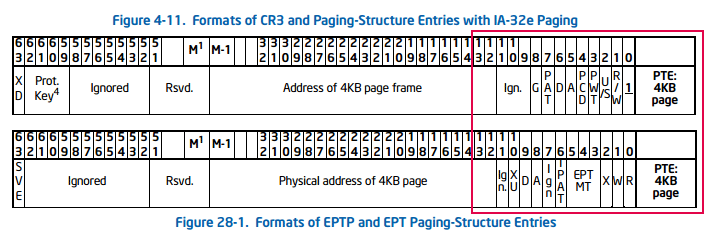
1. I don't think setting the bitmask using an OR operation is difficult; the only uncertainty is which entry type is involved—a standard PT or an extended EPT entry? Their corresponding bit positions differ, as confirmed by the figure below from the Intel SDM.
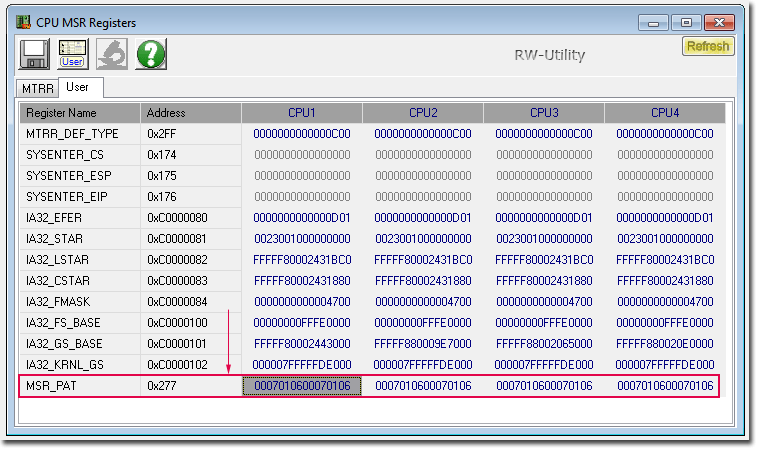
2. I have an Intel processor, and the MSR_PAT register (address 277h) holds a slightly different value—0x0007010600070106—though I assume Windows modified it from the default state. By the way, why are the 32 bits duplicated in the PAT? 3. Here are the attributes of a standard PTE as shown in the WinDbg debugger. You can see that only bits 0, 1, 3, and 4 are set, resulting in a mask of 0x01B: Code: 0: kd> !cmkd.ptelist -v fffffffffee00000 <---- APIC ptelist : Using fffffffffee00000 as VA VA=FFFFFFFFFEE00000 PXE Idx=1FF Va=FFFFF6FB7DBEDFF8 Contents=00000000001EB:063 Hard Pfn=000001EB Attr=---DA--KWEV PPE Idx=1FF Va=FFFFF6FB7DBFFFF8 Contents=00000000001EA:063 Hard Pfn=000001EA Attr=---DA--KWEV PDE Idx=1F7 Va=FFFFF6FB7FFFFFB8 Contents=00000000003B1:063 Hard Pfn=000003B1 Attr=---DA--KWEV PTE Idx=000 Va=FFFFF6FFFFFF7000 Contents=00000000FB852:01B Hard Pfn=000FB852 Attr=-----NTKWEV 0: kd> | v 0: kd> dt _mmpte_hardware FFFFF6FFFFFF7000 nt!_MMPTE_HARDWARE +0x000 Valid : 0y1 +0x000 Write : 0y1 +0x000 Owner : 0y0 +0x000 WriteThrough : 0y1 +0x000 CacheDisable : 0y1 +0x000 Accessed : 0y0 +0x000 Dirty : 0y0 +0x000 LargePage : 0y0 +0x000 Global : 0y0 +0x000 CopyOnWrite : 0y0 +0x000 PageFrameNumber : 0y000000000000000011111011100001010010 (0xfb852) +0x000 NoExecute : 0y0 0: kd>
|
|||||||||||||||||||
|
02 Oct 2026, 07:30 |
|
||||||||||||||||||
|
Feryno 10 Oct 2026, 13:04
Core i7 - correct. The OR instruction sets the required bits.
Alternatively if you do not want to destroy the original value, e.g. in RAX and obtain the result in another register, it could be done like: Code: lea rcx,[rax+1Bh] which just adds the value 1Bh to rax and stores the result in rcx you correctly looked up the PAT MSR to obtain which of PA[0]... PA[7] contained uncacheable memory type = 0 which is at position PA[3]. MS win may modify the default PAT value after transition from UEFI/BIOS phase into running OS. Some samples of default MSR PAT values: ASROCK RACK B650D4U_2.11.ROM UEFI value of MSR PAT 00000000 00070406h ms win 10 00070106 00070106h so (PWT = 1, PCD = 1) = bits 31-24 of PAT = 0 = MEM_TYPE_UC so (PWT = 0, PCD = 0) = bits 7- 0 of PAT = 6 = MEM_TYPE_WB hyper-v (hvax64.exe) from winsrv2008, winsrv2008R2 HkpPatAttributes dq 606050400070106h hyper-v (hvax64.exe) from winsrv2022 HkpPatAttributes dq 0504060600070106h The only one difference of paging structures is Intel EPT where these bits differ, here you need to set the memory type directly into the required bits without consulting MSR PAT. That means setting EPT last level tables entry bits 5-3 as uncacheable is writing mem_type_UC = 0 there, or making writeback would require writing mem_type_WB = 6 into bits 5-3 of the entry. |
|||
|
10 Oct 2026, 13:04 |
|
|
Feryno 10 Oct 2026, 15:29
Now howto setup structures for AMD SVM.
At first it is necessary to detect whether the CPU supports SVM and if it does, enable it. Code: align 10h check_and_reprogram_CPU: ; returns CF=0 for CPU OK, CF=1 for CPU unsupporting this SVM design ; procedure destroys rax, rcx, rdx push rbx ; CPUID destroys RBX register so we must preserve it ; discovering AuthenticAMD CPU mov eax,80000000h cpuid sub ebx,'Auth' sub edx,'enti' sub ecx,'cAMD' or ebx,edx or ebx,ecx jnz check_and_reprogram_CPU_wrong ; DISCOVERING SUPPORT FOR SVM cmp eax,8000000Ah jc check_and_reprogram_CPU_wrong ; we can not cpuid with eax=80000001h, eax=8000000Ah mov eax,80000001h cpuid test cl,1 shl 2 ; SVM bit jz check_and_reprogram_CPU_wrong ; SVM not available mov ecx,MSR_AMD64_VM_CR rdmsr test al,MSR_AMD64_VM_CR_SVMDIS_mask ; SVMDIS bit ; When this bit is set, writes to EFER treat the SVME bit as MBZ. When this bit is clear, EFER.SVME can be written normally. jz check_and_reprogram_CPU_OK ; SVM allowed ; trying to reprogram MSR_AMD64_VM_CR ; Support for SVM-Lock is indicated by EDX bit 2 as returned by CPUID function 8000_000Ah. On processors that support the SVM-Lock feature, SKINIT and STGI can be executed even if EFER.SVME=0. When the SVM-Lock feature is not available, hypervisors can use the read-only VM_CR.SVMDIS bit to detect SVM. mov eax,8000000Ah cpuid test dl,1 shl 2 jz check_and_reprogram_CPU_wrong ; When the SVM-Lock feature is not available, hypervisors can use the read-only VM_CR.SVMDIS bit to detect SVM ; we have already checked VM_CR.SVMDIS which is 1 so we are done, we can't do anything more... mov ecx,MSR_AMD64_VM_CR rdmsr test al,MSR_AMD64_VM_CR_LOCK_mask jnz check_and_reprogram_CPU_unlock_reprogram check_and_reprogram_CPU_reprogram: ; ecx = MSR_AMD64_VM_CR ; edx:eax content of MSR_AMD64_VM_CR, MSR_AMD64_VM_CR_LOCK_bit set to 0 and al,not MSR_AMD64_VM_CR_SVMDIS_mask wrmsr ; check whether it succeeded ; xor eax,eax rdmsr test al,MSR_AMD64_VM_CR_SVMDIS_mask jnz check_and_reprogram_CPU_wrong check_and_reprogram_CPU_OK: ; signaling success: ; clc ; The above instruction is commented out because we go here after the TEST instruction which always clears Carry Flag. check_and_reprogram_CPU_epi: pop rbx ret check_and_reprogram_CPU_unlock_reprogram: ; SVM_KEY MSR (C001_0118h) ; The write-only SVM_KEY MSR is used to create a password-protected mechanism to clear VM_CR.LOCK. ; When VM_CR.LOCK is zero, writes to SVM_KEY MSR set the 64-bit SVM Key value. ; When VM_CR.LOCK is one, writes to SVM_KEY MSR compare the written value to the SVM Key value; if the values match and are non-zero, the VM_CR.LOCK bit is cleared. If the values mismatch or the SVM Key value is zero, the write to SVM_KEY is ignored, and VM_CR.LOCK is unmodified. ; Software should read VM_CR.LOCK after writing SVM_KEY to determine whether the unlock succeeded. ; If SVM Key is zero when VM_CR.LOCK is one, VM_CR.LOCK can only be cleared by a processor reset. ; To preserve the security of the SVM key, reading the SVM_KEY MSR always returns zero. mov rax,[unlock_key] test rax,rax jz check_and_reprogram_CPU_wrong shld rdx,rax,32 mov ecx,MSR_AMD64_SVM_KEY wrmsr ; check whether we succeeded mov ecx,MSR_AMD64_VM_CR rdmsr test al,MSR_AMD64_VM_CR_LOCK_mask jz check_and_reprogram_CPU_reprogram check_and_reprogram_CPU_wrong: stc jmp check_and_reprogram_CPU_epi definition of MSRs and their bits: Code: MSR_AMD64_PAT = 00000277h MSR_AMD64_EFER = 0C0000080h EFER_SVME_bit = 12 EFER_SVME_mask = 1 shl EFER_SVME_bit EFER_NXE_bit = 11 EFER_NXE_mask = 1 shl EFER_NXE_bit EFER_LMA_bit = 10 EFER_LMA_mask = 1 shl EFER_LMA_bit EFER_LME_bit = 8 EFER_LME_mask = 1 shl EFER_LME_bit EFER_SCE_bit = 0 EFER_SCE_mask = 1 shl EFER_SCE_bit MSR_AMD64_FS_BASE = 0C0000100h MSR_AMD64_GS_BASE = 0C0000101h MSR_AMD64_VM_CR = 0C0010114h MSR_AMD64_VM_CR_SVMDIS_bit = 4 MSR_AMD64_VM_CR_SVMDIS_mask = 1 shl MSR_AMD64_VM_CR_SVMDIS_bit MSR_AMD64_VM_CR_LOCK_bit = 3 MSR_AMD64_VM_CR_LOCK_mask = 1 shl MSR_AMD64_VM_CR_LOCK_bit MSR_AMD64_VM_CR_DIS_A20M_bit = 2 MSR_AMD64_VM_CR_DIS_A20M_mask = 1 shl MSR_AMD64_VM_CR_DIS_A20M_bit MSR_AMD64_VM_CR_R_INIT_bit = 1 MSR_AMD64_VM_CR_R_INIT_mask = 1 shl MSR_AMD64_VM_CR_R_INIT_bit MSR_AMD64_VM_CR_DPD_bit = 0 MSR_AMD64_VM_CR_DPD_mask = 1 shl MSR_AMD64_VM_CR_DPD_bit MSR_AMD64_VM_HSAVE_PA = 0C0010117h MSR_AMD64_SVM_KEY = 0C0010118h then the CPU needs to enable EFER.SVME Code: mov ecx,MSR_AMD64_EFER rdmsr or al,EFER_SVME_mask wrmsr every CPU/core/thread needs few of its own 4 KiB pages, other CPUs must be prevented from destroying/modifying them: 1 page for HSAVE 1 page for VMCB 1 or more pages for stack space inside which host RSP will point every CPU needs to setup its VMSAVE by writing its physical address into the MSR, it is 4 KiB region aligned at 4 KiB boundary Code:
        mov     ecx,MSR_AMD64_VM_HSAVE_PA
        rdmsr
        mov     rax,this_CPU_VMSAVE_PA
        test    ax,0FFFh                ; is page aligned at 4 KiB?
        jnz     run_SVM_failed
        shld    rdx,rax,32
        wrmsr
then setup VMCB which is again 4KiB region aligned at 4KiB boundary note the instruction operating with the VMCB region use its physical address PA as input parameter in RAX, but for reading/writing the region it must be mapped somewhere into virtual address VA the region should be filled with all zeros earlier there are hundreds of fields in the VMCB and we need an included file with the offsets like this Code: struc VMCB_SELECTOR { .selector dw ? .attributes dw ? .limit dd ? .base dq ? } struc V_INTR { .v_tpr db ? .v_irq db ? ; bit 8 V_IRQ-If nonzero, virtual INTR is pending, bit 9 VGIF value (0 – Virtual interrupts are masked, 1 – Virtual Interrupts are unmasked), bit 11 V_NMI (If nonzero, virtual NMI is pending), bit 12 V_NMI_MASK (if nonzero, virtual NMI is masked) .v_intr_prio_ign_tpr db ? .v_intr_masking db ? ; bit 24 V_INTR_MASKING, bit 25 AMD Virtual GIF enabled for this guest (0 - Disabled, 1 - Enabled), bit 26 V_NMI_ENABLE, bit 31 AVIC Enable .v_intr_vector db ? rb 3 ; reserverd, SBZ } struc VMCB { ; Control Area .cr_intercepts dd ? .dr_intercepts dd ? .exception_intercepts dd ? .general1_intercepts dd ? .general2_intercepts dd ? .caches_intercept dd ? ; newer CPUs rd 9 ; reserved, SBZ rw 1 ; reserved, SBZ .pause_filter_count dw ? .iopm_base_pa dq ? .msrpm_base_pa dq ? .tsc_offset dq ? .guest_asid dd ? .tlb_control db ? rb 3 .v_intr V_INTR .interrupt_shadow db ?,?,?,?,?,?,?,? ; bit 0. INTERRUPT_SHADOW - Guest is in an interrupt shadow, bit 1. GUEST_INTERRUPT_MASK - Value of the RFLAGS.IF bit for the guest. Note: This value is written back to the VMCB on #VMEXIT. It is not used during VMRUN., bits 63-1 are reserved, SBZ (should be zero) .exitcode dq ? .exitinfo1 dq ? .exitinfo2 dq ? .exitintinfo dq ? .np_enable db ? ; bit 0. NP_ENABLE-Enable nested paging, bit 1. Enable Secure Encrypted Virtualization, bit 2. Enable Encrypted State for Secure Encrypted Virtualization, bit 3. Guest Mode Execute Trap, bit 4. SSSCheckEn - Enable supervisor shadow stack restrictions in nested page tables., bit 5. Virtual Transparent Encryption, bit 6. RESERVED, SBZ, bit 7. Enable INVLPGB/TLBSYNC. 0 - INVLPGB and TLBSYNC will result in #UD. 1 - INVLPGB and TLBSYNC can be executed in guest. rb 7 ; padding .avic_apic_bar dq ? .guest_PA_of_GHCB dq ? .eventinj dq ? .n_cr3 dq ? .lbr_virtualization_enable db ? ; bit 0. LBR_VIRTUALIZATION_ENABLE, bit 1. Virtualized_VMSAVE_VMLOAD (0-disabled, 1-enabled) rb 7 .VMCB_clean_bits dd ? dd ? ; reserved, SBZ .nRIP dq ? .guest_instruction: .guest_number_of_bytes_fetched db ? ; only bits 3-0 .guest_instruction_bytes rb 15 .avic_apic_backing_page_ptr dq ? dq ? ; reserved, SBZ .avic_logical_table_ptr dq ? .avic_physical_table_ptr dq ? dq ? ; reserved, SBZ .vmsa_ptr dq ? rq (3E0h-110h)/8 .reserved_for_host_usage rq 4 ; State Save Area, starts at offset 400h .es VMCB_SELECTOR ; Only lower 32 bits of the base are implemented. .cs VMCB_SELECTOR ; Only lower 32 bits of the base are implemented. .ss VMCB_SELECTOR ; Only lower 32 bits of the base are implemented. .ds VMCB_SELECTOR ; Only lower 32 bits of the base are implemented. .fs VMCB_SELECTOR .gs VMCB_SELECTOR .gdtr VMCB_SELECTOR ; selector = reserved, attributes = reserved, limit = only lower 16 bits are implemented. .ldtr VMCB_SELECTOR .idtr VMCB_SELECTOR ; selector = reserved, attributes = reserved, limit = only lower 16 bits are implemented. .tr VMCB_SELECTOR rq 5 ; reserved rb 3 ; reserved .cpl db ? dd ? ; reserved .efer dq ? rq 14 .cr4 dq ? .cr3 dq ? .cr0 dq ? .dr7 dq ? .dr6 dq ? .rflags dq ? .rip dq ? rq 11 .rsp dq ? .s_cet dq ? .ssp dq ? .isst_addr dq ? .rax dq ? .star dq ? .lstar dq ? .cstar dq ? .sfmask dq ? .kerngsbase dq ? .sysenter_cs dq ? .sysenter_esp dq ? .sysenter_eip dq ? .cr2 dq ? .pdpe0 dq ? .pdpe1 dq ? .pdpe2 dq ? .pdpe3 dq ? .g_pat dq ? ; only used when nested paging enabled .DBGCTL dq ? .BR_FROM dq ? .BR_TO dq ? .LASTEXCPFROM dq ? .LASTEXCPTO dq ? rq 9 .spec_ctrl dq ? rq (400h-2E8h)/8 ; reserved } struct VMCB ; VMCB.cr_intercepts CR_INTERCEPT_CR0_READ = 1 shl 0 CR_INTERCEPT_CR1_READ = 1 shl 1 CR_INTERCEPT_CR2_READ = 1 shl 2 CR_INTERCEPT_CR3_READ = 1 shl 3 CR_INTERCEPT_CR4_READ = 1 shl 4 CR_INTERCEPT_CR5_READ = 1 shl 5 CR_INTERCEPT_CR6_READ = 1 shl 6 CR_INTERCEPT_CR7_READ = 1 shl 7 CR_INTERCEPT_CR8_READ = 1 shl 8 CR_INTERCEPT_CR9_READ = 1 shl 9 CR_INTERCEPT_CR10_READ = 1 shl 10 CR_INTERCEPT_CR11_READ = 1 shl 11 CR_INTERCEPT_CR12_READ = 1 shl 12 CR_INTERCEPT_CR13_READ = 1 shl 13 CR_INTERCEPT_CR14_READ = 1 shl 14 CR_INTERCEPT_CR15_READ = 1 shl 15 CR_INTERCEPT_CR0_WRITE = 1 shl 16 CR_INTERCEPT_CR1_WRITE = 1 shl 17 CR_INTERCEPT_CR2_WRITE = 1 shl 18 CR_INTERCEPT_CR3_WRITE = 1 shl 19 CR_INTERCEPT_CR4_WRITE = 1 shl 20 CR_INTERCEPT_CR5_WRITE = 1 shl 21 CR_INTERCEPT_CR6_WRITE = 1 shl 22 CR_INTERCEPT_CR7_WRITE = 1 shl 23 CR_INTERCEPT_CR8_WRITE = 1 shl 24 CR_INTERCEPT_CR9_WRITE = 1 shl 25 CR_INTERCEPT_CR10_WRITE = 1 shl 26 CR_INTERCEPT_CR11_WRITE = 1 shl 27 CR_INTERCEPT_CR12_WRITE = 1 shl 28 CR_INTERCEPT_CR13_WRITE = 1 shl 29 CR_INTERCEPT_CR14_WRITE = 1 shl 30 CR_INTERCEPT_CR15_WRITE = 1 shl 31 ; VMCB.dr_intercepts DR_INTERCEPT_DR0_READ = 1 shl 0 DR_INTERCEPT_DR1_READ = 1 shl 1 DR_INTERCEPT_DR2_READ = 1 shl 2 DR_INTERCEPT_DR3_READ = 1 shl 3 DR_INTERCEPT_DR4_READ = 1 shl 4 DR_INTERCEPT_DR5_READ = 1 shl 5 DR_INTERCEPT_DR6_READ = 1 shl 6 DR_INTERCEPT_DR7_READ = 1 shl 7 DR_INTERCEPT_DR8_READ = 1 shl 8 DR_INTERCEPT_DR9_READ = 1 shl 9 DR_INTERCEPT_DR10_READ = 1 shl 10 DR_INTERCEPT_DR11_READ = 1 shl 11 DR_INTERCEPT_DR12_READ = 1 shl 12 DR_INTERCEPT_DR13_READ = 1 shl 13 DR_INTERCEPT_DR14_READ = 1 shl 14 DR_INTERCEPT_DR15_READ = 1 shl 15 DR_INTERCEPT_DR0_WRITE = 1 shl 16 DR_INTERCEPT_DR1_WRITE = 1 shl 17 DR_INTERCEPT_DR2_WRITE = 1 shl 18 DR_INTERCEPT_DR3_WRITE = 1 shl 19 DR_INTERCEPT_DR4_WRITE = 1 shl 20 DR_INTERCEPT_DR5_WRITE = 1 shl 21 DR_INTERCEPT_DR6_WRITE = 1 shl 22 DR_INTERCEPT_DR7_WRITE = 1 shl 23 DR_INTERCEPT_DR8_WRITE = 1 shl 24 DR_INTERCEPT_DR9_WRITE = 1 shl 25 DR_INTERCEPT_DR10_WRITE = 1 shl 26 DR_INTERCEPT_DR11_WRITE = 1 shl 27 DR_INTERCEPT_DR12_WRITE = 1 shl 28 DR_INTERCEPT_DR13_WRITE = 1 shl 29 DR_INTERCEPT_DR14_WRITE = 1 shl 30 DR_INTERCEPT_DR15_WRITE = 1 shl 31 ; VMCB.exception_intercepts EXCEPTION_INTERCEPT_DE = 1 shl 0 ; #DE Divide by zero EXCEPTION_INTERCEPT_DB = 1 shl 1 ; #DB Debug ; EXCEPTION_INTERCEPT_ = 1 shl 2 ; reserved EXCEPTION_INTERCEPT_BP = 1 shl 3 ; #BP Breakpoint EXCEPTION_INTERCEPT_OF = 1 shl 4 ; #OF Overflow EXCEPTION_INTERCEPT_BR = 1 shl 5 ; #BR Bound range EXCEPTION_INTERCEPT_UD = 1 shl 6 ; #UD Invalid opcode EXCEPTION_INTERCEPT_NM = 1 shl 7 ; #NM Device not available EXCEPTION_INTERCEPT_DF = 1 shl 8 ; #DF Double fault ;EXCEPTION_INTERCEPT_ = 1 shl 9 ; reserverd EXCEPTION_INTERCEPT_TS = 1 shl 10 ; #TS Invalid TSS EXCEPTION_INTERCEPT_NP = 1 shl 11 ; #NP Segment not present EXCEPTION_INTERCEPT_SS = 1 shl 12 ; #SS Stack fault EXCEPTION_INTERCEPT_GP = 1 shl 13 ; #GP General protection EXCEPTION_INTERCEPT_PF = 1 shl 14 ; #PF Page fault ; EXCEPTION_INTERCEPT_ = 1 shl 15 ; reserved EXCEPTION_INTERCEPT_MF = 1 shl 16 ; #MF X87 floating point EXCEPTION_INTERCEPT_AC = 1 shl 17 ; #AC Alignment check EXCEPTION_INTERCEPT_MC = 1 shl 18 ; #MC Machine check EXCEPTION_INTERCEPT_XF = 1 shl 19 ; #XF SIMD floating point EXCEPTION_INTERCEPT_CP = 1 shl 21 ; #CP Control-Protection Exception EXCEPTION_INTERCEPT_HV = 1 shl 28 ; #HV Hypervisor injection exception EXCEPTION_INTERCEPT_VC = 1 shl 29 ; #VC VMM Communication exception EXCEPTION_INTERCEPT_SX = 1 shl 30 ; #SX Security exception ; VMCB.general1_intercepts GENERAL1_INTERCEPT_INTR = 1 shl 0 GENERAL1_INTERCEPT_NMI_bit = 1 GENERAL1_INTERCEPT_NMI = 1 shl GENERAL1_INTERCEPT_NMI_bit GENERAL1_INTERCEPT_SMI = 1 shl 2 GENERAL1_INTERCEPT_INIT = 1 shl 3 GENERAL1_INTERCEPT_VINTR = 1 shl 4 GENERAL1_INTERCEPT_CR0_SEL_WRITE= 1 shl 5 GENERAL1_INTERCEPT_IDTR_READ = 1 shl 6 GENERAL1_INTERCEPT_GDTR_READ = 1 shl 7 GENERAL1_INTERCEPT_LDTR_READ = 1 shl 8 GENERAL1_INTERCEPT_TR_READ = 1 shl 9 GENERAL1_INTERCEPT_IDTR_WRITE = 1 shl 10 GENERAL1_INTERCEPT_GDTR_WRITE = 1 shl 11 GENERAL1_INTERCEPT_LDTR_WRITE = 1 shl 12 GENERAL1_INTERCEPT_TR_WRITE = 1 shl 13 GENERAL1_INTERCEPT_RDTSC = 1 shl 14 GENERAL1_INTERCEPT_RDPMC = 1 shl 15 GENERAL1_INTERCEPT_PUSHF = 1 shl 16 GENERAL1_INTERCEPT_POPF = 1 shl 17 GENERAL1_INTERCEPT_CPUID = 1 shl 18 GENERAL1_INTERCEPT_RSM = 1 shl 19 GENERAL1_INTERCEPT_IRET = 1 shl 20 GENERAL1_INTERCEPT_SWINT = 1 shl 21 GENERAL1_INTERCEPT_INVD = 1 shl 22 GENERAL1_INTERCEPT_PAUSE = 1 shl 23 GENERAL1_INTERCEPT_HLT = 1 shl 24 GENERAL1_INTERCEPT_INVLPG = 1 shl 25 GENERAL1_INTERCEPT_INVLPGA = 1 shl 26 GENERAL1_INTERCEPT_IOIO_PROT = 1 shl 27 GENERAL1_INTERCEPT_MSR_PROT = 1 shl 28 GENERAL1_INTERCEPT_TASK_SWITCH = 1 shl 29 GENERAL1_INTERCEPT_FERR_FREEZE = 1 shl 30 GENERAL1_INTERCEPT_SHUTDOWN_EVT = 1 shl 31 ; VMCB.general2_intercepts GENERAL2_INTERCEPT_VMRUN = 1 shl 0 GENERAL2_INTERCEPT_VMMCALL = 1 shl 1 GENERAL2_INTERCEPT_VMLOAD = 1 shl 2 GENERAL2_INTERCEPT_VMSAVE = 1 shl 3 GENERAL2_INTERCEPT_STGI = 1 shl 4 GENERAL2_INTERCEPT_CLGI = 1 shl 5 GENERAL2_INTERCEPT_SKINIT = 1 shl 6 GENERAL2_INTERCEPT_RDTSCP = 1 shl 7 GENERAL2_INTERCEPT_ICEBP = 1 shl 8 GENERAL2_INTERCEPT_WBINVD = 1 shl 9 GENERAL2_INTERCEPT_MONITOR = 1 shl 10 GENERAL2_INTERCEPT_MWAIT = 1 shl 11 GENERAL2_INTERCEPT_MWAIT_CONDITIONAL = 1 shl 12 ; MWAIT instruction, if Monitor hardware is armed. GENERAL2_INTERCEPT_XSETBV = 1 shl 13 GENERAL2_INTERCEPT_RDPRU = 1 shl 14 GENERAL2_INTERCEPT_WRMSR_EFER_AFTER = 1 shl 15 ; after guest instruction finishes GENERAL2_INTERCEPT_CR0_WRITE_AFTER = 1 shl 16 ; after guest instruction finishes GENERAL2_INTERCEPT_CR1_WRITE_AFTER = 1 shl 17 GENERAL2_INTERCEPT_CR2_WRITE_AFTER = 1 shl 18 GENERAL2_INTERCEPT_CR3_WRITE_AFTER = 1 shl 19 GENERAL2_INTERCEPT_CR4_WRITE_AFTER = 1 shl 20 GENERAL2_INTERCEPT_CR5_WRITE_AFTER = 1 shl 21 GENERAL2_INTERCEPT_CR6_WRITE_AFTER = 1 shl 22 GENERAL2_INTERCEPT_CR7_WRITE_AFTER = 1 shl 23 GENERAL2_INTERCEPT_CR8_WRITE_AFTER = 1 shl 24 GENERAL2_INTERCEPT_CR9_WRITE_AFTER = 1 shl 25 GENERAL2_INTERCEPT_CR10_WRITE_AFTER = 1 shl 26 GENERAL2_INTERCEPT_CR11_WRITE_AFTER = 1 shl 27 GENERAL2_INTERCEPT_CR12_WRITE_AFTER = 1 shl 28 GENERAL2_INTERCEPT_CR13_WRITE_AFTER = 1 shl 29 GENERAL2_INTERCEPT_CR14_WRITE_AFTER = 1 shl 30 GENERAL2_INTERCEPT_CR15_WRITE_AFTER = 1 shl 31 ; VMCB.caches_intercept CACHES_INTERCEPT_INVLPGB_ALL = 1 shl 0 CACHES_INTERCEPT_INVLPGB_ILLEGAL = 1 shl 1 CACHES_INTERCEPT_INVPCID = 1 shl 2 CACHES_INTERCEPT_MCOMMIT = 1 shl 3 CACHES_INTERCEPT_TLBSYNC = 1 shl 4 ; VMCB.tlb_control TLB_CONTROL_DO_NOTHING = 000b ; Do nothing TLB_CONTROL_FLUSH_ENTIRE = 001b ; Flush entire TLB on VMRUN (all entries, all ASIDs, should only be used by legacy hypervisors.) TLB_CONTROL_FLUSH_GUEST = 011b ; Flush this guest’s TLB entries. TLB_CONTROL_FLUSH_GUEST_NONGLOBAL = 111b ; Flush this guest’s non-global TLB entries. ; VMEXIT codes: VMEXIT_CR0_READ = 00h VMEXIT_CR1_READ = 01h VMEXIT_CR2_READ = 02h VMEXIT_CR3_READ = 03h VMEXIT_CR4_READ = 04h VMEXIT_CR5_READ = 05h VMEXIT_CR6_READ = 06h VMEXIT_CR7_READ = 07h VMEXIT_CR8_READ = 08h VMEXIT_CR9_READ = 09h VMEXIT_CR10_READ = 0Ah VMEXIT_CR11_READ = 0Bh VMEXIT_CR12_READ = 0Ch VMEXIT_CR13_READ = 0Dh VMEXIT_CR14_READ = 0Eh VMEXIT_CR15_READ = 0Fh VMEXIT_CR0_WRITE = 10h VMEXIT_CR1_WRITE = 11h VMEXIT_CR2_WRITE = 12h VMEXIT_CR3_WRITE = 13h VMEXIT_CR4_WRITE = 14h VMEXIT_CR5_WRITE = 15h VMEXIT_CR6_WRITE = 16h VMEXIT_CR7_WRITE = 17h VMEXIT_CR8_WRITE = 18h VMEXIT_CR9_WRITE = 19h VMEXIT_CR10_WRITE = 1Ah VMEXIT_CR11_WRITE = 1Bh VMEXIT_CR12_WRITE = 1Ch VMEXIT_CR13_WRITE = 1Dh VMEXIT_CR14_WRITE = 1Eh VMEXIT_CR15_WRITE = 1Fh VMEXIT_DR0_READ = 20h VMEXIT_DR1_READ = 21h VMEXIT_DR2_READ = 22h VMEXIT_DR3_READ = 23h VMEXIT_DR4_READ = 24h VMEXIT_DR5_READ = 25h VMEXIT_DR6_READ = 26h VMEXIT_DR7_READ = 27h VMEXIT_DR8_READ = 28h VMEXIT_DR9_READ = 29h VMEXIT_DR10_READ = 2Ah VMEXIT_DR11_READ = 2Bh VMEXIT_DR12_READ = 2Ch VMEXIT_DR13_READ = 2Dh VMEXIT_DR14_READ = 2Eh VMEXIT_DR15_READ = 2Fh VMEXIT_DR0_WRITE = 30h VMEXIT_DR1_WRITE = 31h VMEXIT_DR2_WRITE = 32h VMEXIT_DR3_WRITE = 33h VMEXIT_DR4_WRITE = 34h VMEXIT_DR5_WRITE = 35h VMEXIT_DR6_WRITE = 36h VMEXIT_DR7_WRITE = 37h VMEXIT_DR8_WRITE = 38h VMEXIT_DR9_WRITE = 39h VMEXIT_DR10_WRITE = 3Ah VMEXIT_DR11_WRITE = 3Bh VMEXIT_DR12_WRITE = 3Ch VMEXIT_DR13_WRITE = 3Dh VMEXIT_DR14_WRITE = 3Eh VMEXIT_DR15_WRITE = 3Fh VMEXIT_EXCEPTION_DE = 40h ; divide-by-zero-error VMEXIT_EXCEPTION_DB = 41h ; debug VMEXIT_EXCEPTION_NMI = 42h ; non-maskable-interrupt, !!! note this cannot be used, use GENERAL1_INTERCEPT_NMI and VMEXIT_NMI which works !!! VMEXIT_EXCEPTION_BP = 43h ; breakpoint VMEXIT_EXCEPTION_OF = 44h ; overflow VMEXIT_EXCEPTION_BR = 45h ; bound-range VMEXIT_EXCEPTION_UD = 46h ; invalid-opcode VMEXIT_EXCEPTION_NM = 47h ; device-not-available VMEXIT_EXCEPTION_DF = 48h ; double-fault VMEXIT_EXCEPTION_09 = 49h ; unsupported (reserved) VMEXIT_EXCEPTION_TS = 4Ah ; invalid-tss VMEXIT_EXCEPTION_NP = 4Bh ; segment-not-present VMEXIT_EXCEPTION_SS = 4Ch ; stack VMEXIT_EXCEPTION_GP = 4Dh ; general-protection VMEXIT_EXCEPTION_PF = 4Eh ; page-fault VMEXIT_EXCEPTION_15 = 4Fh ; reserved VMEXIT_EXCEPTION_MF = 50h ; x87 floating-point exception-pending VMEXIT_EXCEPTION_AC = 51h ; alignment-check VMEXIT_EXCEPTION_MC = 52h ; machine-check VMEXIT_EXCEPTION_XF = 53h ; simd floating-point VMEXIT_EXCEPTION_20 = 54h ; reserved VMEXIT_EXCEPTION_21 = 55h ; reserved VMEXIT_EXCEPTION_22 = 56h ; reserved VMEXIT_EXCEPTION_23 = 57h ; reserved VMEXIT_EXCEPTION_24 = 58h ; reserved VMEXIT_EXCEPTION_25 = 59h ; reserved VMEXIT_EXCEPTION_26 = 5Ah ; reserved VMEXIT_EXCEPTION_27 = 5Bh ; reserved VMEXIT_EXCEPTION_28 = 5Ch ; reserved VMEXIT_EXCEPTION_29 = 5Dh ; reserved VMEXIT_EXCEPTION_SX = 5Eh ; Security-sensitive event in host VMEXIT_EXCEPTION_31 = 5Fh ; reserved VMEXIT_INTR = 60h VMEXIT_NMI = 61h VMEXIT_SMI = 62h VMEXIT_INIT = 63h VMEXIT_VINTR = 64h VMEXIT_CR0_SEL_WRITE = 65h VMEXIT_IDTR_READ = 66h VMEXIT_GDTR_READ = 67h VMEXIT_LDTR_READ = 68h VMEXIT_TR_READ = 69h VMEXIT_IDTR_WRITE = 6Ah VMEXIT_GDTR_WRITE = 6Bh VMEXIT_LDTR_WRITE = 6Ch VMEXIT_TR_WRITE = 6Dh VMEXIT_RDTSC = 6Eh VMEXIT_RDPMC = 6Fh VMEXIT_PUSHF = 70h VMEXIT_POPF = 71h VMEXIT_CPUID = 72h VMEXIT_RSM = 73h VMEXIT_IRET = 74h VMEXIT_SWINT = 75h VMEXIT_INVD = 76h VMEXIT_PAUSE = 77h VMEXIT_HLT = 78h VMEXIT_INVLPG = 79h VMEXIT_INVLPGA = 7Ah VMEXIT_IOIO = 7Bh VMEXIT_MSR = 7Ch VMEXIT_TASK_SWITCH = 7Dh VMEXIT_FERR_FREEZE = 7Eh VMEXIT_SHUTDOWN = 7Fh VMEXIT_VMRUN = 80h VMEXIT_VMMCALL = 81h VMEXIT_VMLOAD = 82h VMEXIT_VMSAVE = 83h VMEXIT_STGI = 84h VMEXIT_CLGI = 85h VMEXIT_SKINIT = 86h VMEXIT_RDTSCP = 87h VMEXIT_ICEBP = 88h VMEXIT_WBINVD = 89h VMEXIT_MONITOR = 8Ah VMEXIT_MWAIT = 8Bh VMEXIT_MWAIT_CONDITIONAL = 8Ch ; MWAIT instruction, if Monitor hardware is armed. VMEXIT_XSETBV = 8Dh VMEXIT_RDPRU = 8Eh VMEXIT_EFER_WRITE_TRAP = 8Fh ; Write of EFER MSR (occurs after guest instruction finishes) VMEXIT_CR0_WRITE_TRAP = 90h ; Write of CR0 (occurs after guest instruction finishes) VMEXIT_CR1_WRITE_TRAP = 91h VMEXIT_CR2_WRITE_TRAP = 92h VMEXIT_CR3_WRITE_TRAP = 93h VMEXIT_CR4_WRITE_TRAP = 94h VMEXIT_CR5_WRITE_TRAP = 95h VMEXIT_CR6_WRITE_TRAP = 96h VMEXIT_CR7_WRITE_TRAP = 97h VMEXIT_CR8_WRITE_TRAP = 98h VMEXIT_CR9_WRITE_TRAP = 99h VMEXIT_CR10_WRITE_TRAP = 9Ah VMEXIT_CR11_WRITE_TRAP = 9Bh VMEXIT_CR12_WRITE_TRAP = 9Ch VMEXIT_CR13_WRITE_TRAP = 9Dh VMEXIT_CR14_WRITE_TRAP = 9Eh VMEXIT_CR15_WRITE_TRAP = 9Fh VMEXIT_INVLPGB = 0A0h VMEXIT_INVLPGB_ILLEGAL = 0A1h VMEXIT_INVPCID = 0A2h VMEXIT_MCOMMIT = 0A3h VMEXIT_TLBSYNC = 0A4h VMEXIT_NPF = 400h ; Nested paging: host-level page fault occurred. EXITINFO1 contains fault error code; EXITINFO2 contains the guest physical address causing the fault. VMEXIT_INVALID = -1 ; Invalid guest state in VMCB most of the VMCB may stay zeroed and not used, right now I will discuss how to setup only the bare minimum first 4 dwords of VMCB may stay zeros for the simplest hypervisor (after having running and stable hypervisor we may later play with them and enable them) the fifth dword must enable intercepting VMRUN otherwise VMRUN will fail: Code: lea rsi,this_VMCB_VA ; virtual address of VMCB where it is mapped as writeback memory type test si,0FFFh ; is page aligned at 4 KiB? jnz run_SVM_failed mov [rsi+VMCB.general2_intercepts],GENERAL2_INTERCEPT_VMRUN to enable also vm exits by instruction VMMCALL the dword should be set this way: Code: mov [rsi+VMCB.general2_intercepts],GENERAL2_INTERCEPT_VMRUN or GENERAL2_INTERCEPT_VMMCALL so then the guest is allowed to call hypervisor by executing the VMMCALL instruction which will cause vm exit (if this bit not enabled the execution of VMMCALL would trigger an exception in guest and there won't be any vm exit from guest to host) ASID must not be zero (zero is dedicated for host) otherwise VMRUN fails, it is OK to set it to 1 on every CPU, the highest possible value could be obtained by cpuid with input eax=8000000Ah, output of maximal ASID is returned in ebx Code: mov [rsi+vmcb.guest_asid],1 then v_intr: Code: mov rax,cr8 and eax,1111b ; currently bits 3:0 are used for a 4-bit virtual TPR value; bits 7:4 should be zero mov [rsi+vmcb.v_intr],eax it is possible to write a lot of VMCB fields all at onece using a VMSAVE instruction, note its input is in RAX and it is physical memory of the VMCB, not the VA as used currently in RSI register Code: mov rax,this_CPU_VMCB_PA vmsave rax ; VMSAVE: ; Store to a VMCB at physical address rAX: ; FS, GS, TR, LDTR (including all hidden state) ; KernelGsBase ; STAR, LSTAR, CSTAR, SFMASK ; SYSENTER_CS, SYSENTER_ESP, SYSENTER_EIP the rest must be written by more instructions like this: Code: sub rsp,enough_of_stack_space ... sgdt [rsp+6] sidt [rsp+16+6] movzx r8d,word [rsp+6] ; GDT limit mov rdx,[rsp+6+2] ; GDT base movzx eax,word [rsp+16+6] ; IDT limit mov rcx,[rsp+16+6+2] ; IDT base mov [rsi+vmcb.gdtr.limit],r8d mov [rsi+vmcb.gdtr.base],rdx mov [rsi+vmcb.idtr.limit],eax mov [rsi+vmcb.idtr.base],rcx ; rdx = gdt base ; r8 = gdt limit mov ecx,es mov [rsi+vmcb.es.selector],es lar eax,cx jnz guest_es_L0 ; The doubleword is masked by 00FXFF00H before it is loaded into the destination operand. ; segment attributes are stored as 12-bit values formed by the concatenation of bits 55-52 and 47-40 from the original 64-bit (in-memory) segment descriptors; the descriptor "P" bit is used to signal NULL segments (P==0) where permissible and/or relevant shr eax,8 shr ah,4 mov [rsi+vmcb.es.attributes],ax guest_es_L0: lsl eax,cx jnz guest_es_L2 mov [vmcb.es.limit],eax guest_es_L1: call get_segment_base_32_bit jc guest_es_L2 mov dword [vmcb.es.base],eax guest_es_L2: ; the same for CS, SS, DS (note FS and GS were all already written by the VMSAVE instruction, no need to deal with them again) ; subproc align 10h get_segment_base_32_bit: ; in: ecx = segment selector (currently only these selectors are used as input parameters: CS, DS, ES, SS) ; rdx = gdt base ; r8d = gdt limit ; out: CF=0 eax=segment base ; CF=1 requested selector is beyond gdt/ldt limit ; destroys: nothing ; note: LAR, LSL instructions were already executed before calling this procedure, so that ensured that the input selector is valid (we don't need to validate it again) ; segment selector: ; bits 15-3 index ; bit 2 TI table indicator ; bits 1-0 RPL requested privilege level ; descriptor structure ; word +0 Segment Limit (bits 15-0) ; word +2 Base Address (bits 15-0) ; word +4 bits 0-7 Base Address (bits 23-16) ; bit 11-8 Type ; bit 12 S (system descriptor) ; bits 14-13 DPL (Privilege level) ; bit 15 P (Present) ; word +6 bits 0-3 Segment limit (bits 19-16) ; bit 4 AVL (Available to software) ; bit 5 L (Long: L=1 64-bit mode, L=0 compatibility mode) ; bit 6 D (Default operand size) ; bit 7 G (Granularity) ; bits 15-8 Base Address (bits 31-24) ; the above is all for code and data segments, but system segments are wider to support 64 bit bases: ; dword + 8 bits 31-0 Base Address (bits 63-32) - only for system descriptors (S = 1, bit 12 of word+4) ; dword + 12 nothing usefull, system selector just occupies this dword but it is not used for anythig ; system descriptors are: Local descriptor-table (LDT) segment descriptor, Task-state segment (TSS) descriptor, Call-gate descriptor, Interrupt-gate descriptor, Trap-gate descriptor, Task-gate descriptor. push rcx rdx rbx lea ebx,[r8+1] ; GDT_size = GDT_limit + 1 test cl,1 shl 2 ; TI bit, table indicator, 0 = GDT, 1 = LDT jz get_segment_base_32_bit_L5 ; Local descriptor-table (LDT) segment descriptor is 16 bytes wide because it is system descriptor. sldt eax ; EAX = LDTR lsl ebx,ax ; load segment limit, EBX = LDT_limit stc jnz get_segment_base_32_bit_epi inc ebx ; LDT_size = LDT_limit + 1 mov eax,[rdx + rcx*1 + 2] mov rdx,[rdx + rcx*1 + 4] ; now bit 12 of RDX should be 1 indicating system descriptor and eax, 00FFFFFFh ; base address bits 23-0 and rdx,0FFFFFFFFFF000000h ; base address bits 63-24 or rdx,rax ; put base address together ; rdx = base of local descriptor table ; ebx = size of local descriptor table get_segment_base_32_bit_L5: ; rdx = base of table (GDT/LDT) ; ebx = size of table (GDT/LDT) ; ecx = selector and cl,not 111b ; mask off TI and RPL bits of segment selector ; stc ; jrcxz get_segment_base_32_bit_epi ; null selector cannot be used ; note: LAR, LSL instructions were already executed before calling this procedure, so that ensured that the input selector is valid (we don't need to validate it again) cmp ebx,ecx jc get_segment_base_32_bit_epi ; check the result of the CMP EBX,ECX instruction, whether selector is not beyond Descriptor Table limit mov eax,[rdx + rcx*1 + 2] mov ecx,[rdx + rcx*1 + 4] and eax, 00FFFFFFh ; base address bits 23-0 and ecx,0FF000000h ; base address bits 31-24 or eax,ecx ; put base address together ; CF=0 now (the OR instruction always clears Carry flag) get_segment_base_32_bit_epi: pop rbx rdx rcx ret VMCB.CPL during hypervisor statup is always 0 as it is impossible to start hypervisor from usermode CPL=3 as whole VMCB was already zeroed there is no need to again write zero to the VMCB.CPL then write more VMCB fields: Code: mov ecx,MSR_AMD64_EFER rdmsr mov dword [rsi+vmcb.efer],eax mov dword [rsi+vmcb.efer+4],edx mov rax,cr0 mov rcx,cr3 mov rdx,cr4 mov [rsi+vmcb.cr0],rax mov [rsi+vmcb.cr3],rcx mov [rsi+vmcb.cr4],rdx pushf mov rax,dr7 mov rcx,dr6 lea rdx,[guest_start_addr] ; RIP where guest starts to run when executing VMRUN mov [rsi+vmcb.dr7],rax mov [rsi+vmcb.dr6],rcx pop [rsi+vmcb.rflags] mov [rsi+vmcb.rip],rdx mov [rsi+vmcb.rsp],rsp ; [vmcb.rax]=0 mov rax,cr2 mov [rsi+vmcb.cr2],rax mov ecx,MSR_AMD64_PAT rdmsr and eax,07070707h and edx,07070707h mov dword [rsi+vmcb.g_pat],eax mov dword [rsi+vmcb.g_pat+4],edx ; It is assumed that VMM software cleared GIF some time before executing the VMRUN instruction, to ensure an atomic state switch. clgi mov rax,this_CPU_VMCB_PA vmrun rax you won't receive any homework at the end of this lesson, because this lesson is quite long and complicated, full of various information do not try to understand everything at the first reading, let the time for the information to soak into you this lesson will help you to later understanding, when I post for you some small hypervisor binaries to debug under emulator(s) the next lesson will be how to construct VM exit handler for AMD and after that in the next lesson you'll receive some binaries to single step/debug to understand everything practically |
|||
|
10 Oct 2026, 15:29 |
|
< Last Thread | Next Thread > |
Forum Rules:
|