 Index
> Tutorials and Examples > Hobby BASIC, a simple yet powerful BASIC interpreter
Index
> Tutorials and Examples > Hobby BASIC, a simple yet powerful BASIC interpreterGoto page Previous 1, 2, 3, 4, 5, 6, 7 |
| Author |
|


|
Picnic 25 Apr 2026, 00:34
► New Game in Version 2.5.6
Gobble Rush! is a faithful Hobby BASIC port of a PuzzleScript game, featuring ANSI graphics for the Windows 11 console. Original concept by Mark Richardson (Gobble Rush!) Your goal in this puzzle is to guide your character to the exit, while avoiding or trapping the yellow crab-like creatures. The creatures become alert as soon as they spot you and keep charging until they crash into a wall — or into you! Remember: the enemies always get the final move. It's a simple yet surprisingly entertaining puzzle that demands strategic thinking. The game also features: Holes: Only enemies can cross over them Chickens: Enemies prioritize chasing them — use them as bait Lettuces: Enemies will devour them if they get in the way Features: • Tile‑based ANSI graphics with 16‑color palette • Turn‑based movement on a 9x9 grid • Optimized drawing (only changed tiles) • Enemy AI with line‑of‑sight detection • Alert state system: enemies charge until blocked • Smart simultaneous enemy movement • Chickens and lettuces as distractions / lures • Holes that remain intact under moving entities • Multi‑step undo system (30‑move history) • Persistent progress: solved levels are saved All of this runs directly inside the Windows 11 CMD.EXE console. 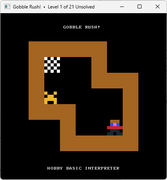 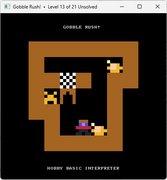 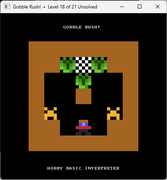
[updated 1/5/2026] Fixed bug with ++ (post-increment) and += (addition assignment) operators on TYPE members Due to oversight, a logical jump was missing in the assembly code, causing certain games (such as Pacman) to crash. The operation of these operators on TYPE members has now been fully restored. Example Code:
type T
    x=0
    y=0
endt 10

for i = 0 to 9
    T:[i].x ++
    T:[i].x += i * 10
    debug(T:[i].x)
next
▶ New game in Version 2.5.7 Sticky Candy is a faithful port to Hobby BASIC of a PuzzleScript game, featuring ANSI graphics designed for the Windows 11 console. Original concept by Alan Hazelden (Sticky Candy Puzzle Saga) Your goal: Move the candies to the collection areas. Caution! Don't let different candies stick together! A sweet, simple, but... tricky puzzle! Features: • Tile-based graphics with ANSI/16-color palette • Smooth redraw (only changed tiles are updated) • Candy sticking mechanics (adjacent candies merge into sticky groups) • Push any candy: single or entire connected sticky group • Color‑matching targets: YTG, RTG, BTG • Victory when every sticky candy sits on its matching target • Full undo system with unlimited stack (uses dynamic arrays) • Save game progress (solved levels are remembered) • Sound effects for sticky conversion and level win • Wall edge highlighting (3D visual effect) All of this runs directly inside the Windows 11 CMD.EXE console. 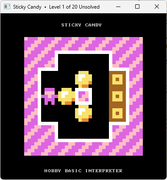 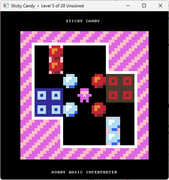 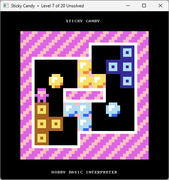
[updated 13/5/2026] ► New Game in Version 2.5.8 A simple yet deceptively challenging puzzle. In Magnetic, your goal is to bring together blocks of the same colour and form one unified group for each colour. Inspired by Magnetic Blocks by Andrea Gilbert, featuring 13 redesigned levels with a gradually increasing difficulty curve. Features: • Tile-based graphics with 16-color palette • Smooth redraw (only changed tiles are updated) • Magnetic grouping (mergeable colors) and non‑merge spheres (individual blocks) • Tilt mechanics: all bodies move simultaneously step by step (left/right/up/down) • Step‑by‑step animation with adjustable speed (WAIT DELAY) • Victory condition: each color forms exactly one connected cluster • Full undo system with unlimited stack (dynamic arrays) • Save game progress (solved levels are remembered) • Wall edge highlighting (3D visual effect) All of this runs directly inside the Windows 11 CMD.EXE console. 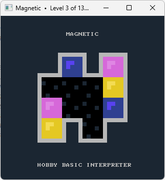 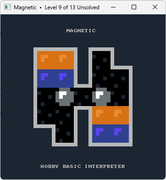
Hobby BASIC – Internal improvements at the heart of the console. This new release 2.5.8 introduces no new features, but focuses on fixing and optimizing important parts of the core. Most changes affect console routines, memory management, and the overall responsiveness of the system. Console Core Several internal routines were cleaned up and optimized, with fewer redundant checks, better register utilization, and safer memory access. Memory Management Resource cleanup was improved in several parts of the core, eliminating rare leaks and edge-case memory faults. The code now spans thousands of lines of assembly, and every optimization takes time, testing, and patience. Step by step, piece by piece. The fact that a BASIC runs reliably inside CMD.EXE on Windows 7, 10, and 11 is already a small victory. We keep moving forward. Useful links: • Online Guide — learn Hobby BASIC the easy way • Full Feature Overview — all capabilities in one page • YouTube Video Tour — see it in action • Chrome blocking? — fix here • Download — the latest version Last edited by Picnic on 01 Jul 2026, 22:46; edited 4 times in total |
|||
 25 Apr 2026, 00:34
 |
|


|
Picnic 21 May 2026, 10:46
Hello everyone,
Enhancements in Hobby BASIC Version 2.5.9 A bug in comment preprocessing was fixed where the ! character could be incorrectly recognized as a comment marker when used inside string literals after empty string literals ("" or ''). The comment stripping mechanism was redesigned. The new implementation correctly handles escaped quotes, empty strings, Unicode text, and preserves comment characters inside string literals. This fix also improves preprocessing reliability and performance, eliminating several edge-case parsing inconsistencies in complex string expressions. Example: Code: ! ------------------------------------------------------------ ! STRING / QUOTE / COMMENT STRESS TEST ! ------------------------------------------------------------ DEBUG("") ! Output: DEBUG(" ") ! Output: [space] DEBUG("Hello") ! Output: Hello DEBUG('Hello') ! Output: Hello DEBUG("Africa!") ! Output: Africa! DEBUG('Africa!') ! Output: Africa! DEBUG("Hello ! world") ! Output: Hello ! world DEBUG('! ! !') ! Output: ! ! ! DEBUG("""") ! Output: " DEBUG('''') ! Output: ' DEBUG("Hello ""world""") ! Output: Hello "world" DEBUG('Hello ''world''') ! Output: Hello 'world' DEBUG("""Africa!""") ! Output: "Africa!" DEBUG('''Africa!''') ! Output: 'Africa!' DEBUG("a ""b"" c ""d"" e!") ! Output: a "b" c "d" e! DEBUG('a ''b'' c ''d'' e!') ! Output: a 'b' c 'd' e! DEBUG("", "", "") ! Output: [empty][empty][empty] DEBUG("Hello", "", "Africa!") ! Output: Hello Africa! DEBUG("Hello", " ", "Africa!") ! Output: Hello Africa! DEBUG("This is not ! a comment") ! Output: This is not ! a comment DEBUG("Hello") ! this IS a real comment DEBUG("γειά σου!") ! Output: γειά σου! DEBUG("こんにちは!") ! Output: こんにちは! DEBUG("""") ! Output: " DEBUG("''''") ! Output: '''' DEBUG('""""') ! Output: """" DEBUG("abc""""def") ! Output: abc""def DEBUG('abc''''def') ! Output: abc''def DEBUG("one","two","three") ! Output: one two three DEBUG("","Africa!") ! Output: Africa! DEBUG("",\ "Africa!") ! Output: Africa! DEBUG("Hello ""amazing"" world!") ! Output: Hello "amazing" world! DEBUG('Hello ''amazing'' world!') ! Output: Hello 'amazing' world! In short: The tokenizer is now significantly more robust when handling string literals, passing difficult edge-case tests without breaking on comments, whitespace, or continued lines. Enhancements in Hobby BASIC Version 2.6.0 ────────────────────────────────── A large part of the ANSI module was rewritten from scratch. It is now much closer to what one would expect from a compact VT100/ANSI terminal emulator, especially regarding CUP, ED, EL, SGR, SU, SD, save/restore cursor handling, and more. The ANSI parser is written entirely in x86 assembly and implements a substantial portion of the ANSI X3.64 / ECMA-48 standard (roughly 75–80% of the sequences commonly used in ANSI art). It was designed to open and render ANSI images and support colored console applications across Windows XP through Windows 11. ANSI files can be loaded from either local disk or URLs. Supported features: • Colors: 16 foreground/background colors (8 standard + 8 bright) • Graphic attributes (SGR): bold, underline, blink, reverse video, conceal, reset • Cursor movement: CUP, HVP, CUU, CUD, CUF, CUB, CNL, CPL, HOM • Screen scrolling: full-screen scroll up (SU) and scroll down (SD) • Erase operations: screen (ED) and line (EL) with parameters 0/1/2 • Cursor management: save/restore (SCOSC/SCORC), cursor position reporting (CPR/DSR) • Input/Output: load ANSI from file or URL, export screen regions to .ans files (capture/export) • Flow control: ignores control characters, optional delay support for animated ANSI art In short: A major portion of the Hobby BASIC ANSI/VT100 engine was redesigned, introducing new scrolling functionality (SU/SD), improved SGR/color handling, optimized screen buffering, and significantly better compatibility with the ANSI X3.64 / ECMA-48 ecosystem. ► New Game in Version 2.6.0 Puzzle Adventure is a clever tile-based puzzle game with simple rules but challenging puzzles. The game is a faithful Hobby BASIC port of a PuzzleScript title, featuring ANSI graphics designed specifically for the Windows 11 console. Original concept by Space Monkey (Puzzle Adventure) Explore a maze-like world, move objects, and overcome obstacles to progress. Solve the puzzles. Escape the temple. Features: • Tile-based ANSI graphics with a 16-color palette • Turn-based movement on dynamically sized grids • Optimized rendering (only changed tiles are redrawn) • Pushable objects: Crates, Keys, Rocks, LTurns, RTurns • Chain pushing: multiple objects move together in a line • LTurns (left-turn) and RTurns (right-turn) with special redirection behavior • Pull mechanic: LTN/RTN pull the object behind them while moving • Key + Door interaction (both standalone and inside push chains) • Skull trigger: unlocks all doors in the level simultaneously • Flag: level completion condition (reached by player) • Player/Grass and Flag/Grass variants for additional visual variety • Level progress saving across 22 levels • Level-specific story messages shown at startup • Unlimited undo system with stack-based history • Sound effects: victory, skull trigger, door opening • Window title displays current level and solved status • Automatic console window resizing based on level dimensions All of this runs directly inside the Windows 11 CMD.EXE console. 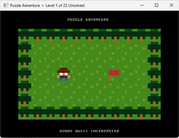 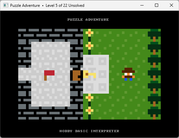 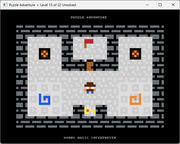
Useful links: • Online Guide — learn Hobby BASIC the easy way • Full Feature Overview — all capabilities in one page • YouTube Video Tour — see it in action • Chrome blocking? — fix here • Download — the latest version Last edited by Picnic on 01 Jul 2026, 21:25; edited 3 times in total |
|||
|
21 May 2026, 10:46 |
|
|
revolution 26 May 2026, 12:46
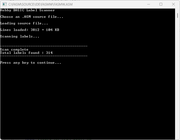
It is also possible to define labels like this:
Code: label foo_bar |
|||
|
26 May 2026, 12:46 |
|
|
Picnic 26 May 2026, 18:08
revolution wrote: It is also possible to define labels like this: Correct, fasm support this syntax for labels as well. It's a straightforward task, so I'll leave it open for anyone who wants to play around with the Hobby BASIC code and add their own touch. Enhancements in Hobby BASIC Version 2.6.2 ────────────────────────────────── Bug Fixes: • Fixed a bug in Hobby BASIC's FIND() function. • Fixed a sneaky bug in the FOR/NEXT loop handler that could cause programs to crash unexpectedly without warning. • Super Tiny BASIC (the BASIC interpreter written in Hobby BASIC) has been upgraded to v1.24. • DRAW (the ANSI drawing program for Hobby BASIC) has been upgraded to v0.9.6. • Several Hobby BASIC internal routines were cleaned up and optimized. Super Tiny BASIC is an '80s-style BASIC interpreter written entirely in Hobby BASIC – a great showcase of the interpreter's capabilities. With its latest v1.24 update, the code has been significantly streamlined, dropping from 1,200 to around 900 lines of Hobby BASIC. The codebase was also simplified, making it much easier to read. 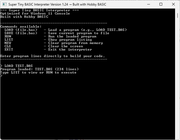
The program, TEST.BAS, showcases all the features of Super Tiny BASIC. Code: 10 REM ============================= 20 REM SUPER TINY BASIC TEST 30 REM (ALL COMMANDS + OPERATORS) 40 REM ============================= 50 CLS 60 COLOR 0, 7 70 PRINT "=============================" 80 COLOR 0, 14 90 PRINT " SUPER TINY BASIC TEST" 100 COLOR 0, 7 110 PRINT "=============================" 120 PRINT 130 PRINT "Testing all commands..." 140 PRINT 150 WAIT 1500 160 REM ----- TEST 1: LET AND PRINT ----- 170 COLOR 0, 11 180 PRINT "--- 1. LET AND PRINT ---" 190 COLOR 0, 7 200 LET A = 10 210 LET B = 20 220 LET C = A + B 230 PRINT "A=10, B=20, A+B=", C 240 PRINT "Expected: 30" 250 PRINT 260 REM ----- TEST 2: ARITHMETIC ----- 270 COLOR 0, 11 280 PRINT "--- 2. ARITHMETIC ---" 290 COLOR 0, 7 300 LET A = 50 310 LET B = 7 320 PRINT "50 + 7 = ", A + B 330 PRINT "50 - 7 = ", A - B 340 PRINT "50 * 7 = ", A * B 350 PRINT "50 / 7 = ", A / B 360 PRINT "50 % 7 = ", A % B 370 PRINT 380 REM ----- TEST 3: NEGATIVE NUMBERS ----- 390 COLOR 0, 11 400 PRINT "--- 3. NEGATIVE NUMBERS ---" 410 COLOR 0, 7 420 LET A = -15 430 LET B = -4 440 PRINT "-15 + -4 = ", A + B 450 PRINT "-15 * -4 = ", A * B 460 PRINT "-15 / -4 = ", A / B 470 PRINT "-15 % -4 = ", A % B 480 PRINT "0 - -15 = ", 0 - A 490 PRINT 500 REM ----- TEST 4: COMPARISONS ----- 510 COLOR 0, 11 520 PRINT "--- 4. COMPARISONS (5 vs 10) ---" 530 COLOR 0, 7 540 LET A = 5 550 LET B = 10 560 IF A < B THEN PRINT "5 < 10 -> TRUE" 570 IF A > B THEN PRINT "5 > 10 -> (not printed)" 580 IF A <> B THEN PRINT "5 <> 10 -> TRUE" 590 IF A <= B THEN PRINT "5 <= 10 -> TRUE" 600 IF A >= B THEN PRINT "5 >= 10 -> (not printed)" 610 PRINT 620 REM ----- TEST 5: LOGICAL OPERATORS ----- 630 COLOR 0, 11 640 PRINT "--- 5. LOGICAL OPERATORS ---" 650 COLOR 0, 7 660 PRINT "(1 AND 1) = ", 1 AND 1 670 PRINT "(1 AND 0) = ", 1 AND 0 680 PRINT "(1 OR 0) = ", 1 OR 0 690 PRINT "(0 OR 0) = ", 0 OR 0 700 PRINT 710 REM ----- TEST 6: IF THEN ELSE ----- 720 COLOR 0, 11 730 PRINT "--- 6. IF / THEN / ELSE ---" 740 COLOR 0, 7 750 LET A = 7 760 IF A > 5 THEN PRINT "A>5 -> TRUE" 770 IF A < 3 THEN PRINT "(not printed)" ELSE PRINT "ELSE clause -> works" 780 PRINT 790 PRINT "Press a key to continue..." 800 INKEY 810 CLS 820 REM ----- TEST 7: FOR/NEXT ----- 830 COLOR 0, 11 840 PRINT "--- 7. FOR / NEXT (1 TO 5) ---" 850 COLOR 0, 7 860 FOR I = 1 TO 5 870 PRINT " I = ", I 880 NEXT I 890 PRINT 900 REM ----- TEST 8: FOR/NEXT WITH STEP ----- 910 COLOR 0, 11 920 PRINT "--- 8. FOR / NEXT / STEP ---" 930 COLOR 0, 7 940 PRINT "Counting up by 2:" 950 FOR I = 0 TO 10 STEP 2 960 PRINT " I = ", I 970 NEXT I 980 PRINT "Counting down by -3:" 990 FOR I = 9 TO 0 STEP -3 1000 PRINT " I = ", I 1010 NEXT I 1020 PRINT 1030 REM ----- TEST 9: NESTED FOR LOOPS ----- 1040 COLOR 0, 11 1050 PRINT "--- 9. NESTED FOR LOOPS ---" 1060 COLOR 0, 7 1070 FOR R = 1 TO 3 1080 FOR K = 1 TO 4 1090 PRINT " R=", R, " K=", K 1100 NEXT K 1110 NEXT R 1120 PRINT 1130 REM ----- TEST 10: WHILE/WEND ----- 1140 COLOR 0, 11 1150 PRINT "--- 10. WHILE / WEND ---" 1160 COLOR 0, 7 1170 LET X = 5 1180 WHILE X > 0 1190 PRINT " X = ", X 1200 LET X = X - 1 1210 WEND 1220 PRINT 1230 REM ----- TEST 11: GOSUB/RETURN ----- 1240 COLOR 0, 11 1250 PRINT "--- 11. GOSUB / RETURN ---" 1260 COLOR 0, 7 1270 GOSUB 3000 1280 PRINT "Back from subroutine A" 1290 PRINT 1300 REM ----- TEST 12: NESTED GOSUB ----- 1310 COLOR 0, 11 1320 PRINT "--- 12. NESTED GOSUB ---" 1330 COLOR 0, 7 1340 GOSUB 3100 1350 PRINT "Back from outer subroutine" 1360 PRINT 1370 PRINT "Press a key to continue..." 1380 INKEY 1390 CLS 1400 REM ----- TEST 13: GOTO ----- 1410 COLOR 0, 11 1420 PRINT "--- 13. GOTO ---" 1430 COLOR 0, 7 1440 PRINT "Jumping to line 1480..." 1450 GOTO 1480 1460 PRINT "(this line should never appear)" 1470 GOTO 1490 1480 PRINT "Arrived at line 1480. GOTO works!" 1490 PRINT 1500 REM ----- TEST 14: INPUT ----- 1510 COLOR 0, 11 1520 PRINT "--- 14. INPUT ---" 1530 COLOR 0, 7 1540 INPUT "Enter a number: ", A 1550 PRINT "You entered: ", A 1560 PRINT 1570 REM ----- TEST 15: INKEY ----- 1580 COLOR 0, 11 1590 PRINT "--- 15. INKEY ---" 1600 COLOR 0, 7 1610 PRINT "Press any key..." 1620 LET K = INKEY 1630 PRINT "Key code: ", K 1640 PRINT 1650 REM ----- TEST 16: RND() ----- 1660 COLOR 0, 11 1670 PRINT "--- 16. RND() ---" 1680 COLOR 0, 7 1690 PRINT "Five random numbers (0-99):" 1700 FOR I = 1 TO 5 1710 PRINT " ", RND() % 100 1720 NEXT I 1730 PRINT 1740 REM ----- TEST 17: CHR() ----- 1750 COLOR 0, 11 1760 PRINT "--- 17. CHR() ---" 1770 COLOR 0, 7 1780 FOR I = 65 TO 72 1790 PRINT " ASCII ", I, " = ", CHR(I) 1800 NEXT I 1810 PRINT 1820 REM ----- TEST 18: WAIT ----- 1830 COLOR 0, 11 1840 PRINT "--- 18. WAIT ---" 1850 COLOR 0, 7 1860 PRINT "Waiting 1 second..." 1870 WAIT 1000 1880 PRINT "Done!" 1890 PRINT 1900 PRINT "Press a key for the grand finale..." 1910 INKEY 1920 CLS 1930 REM ----- TEST 19: LOCATE + COLOR BOXES ----- 1940 COLOR 0, 11 1950 LOCATE 1, 1 1960 PRINT "--- 19. LOCATE + COLOR (16 color grid) ---" 1970 COLOR 0, 7 1980 LET C = 0 1990 FOR R = 0 TO 3 2000 FOR K = 0 TO 3 2010 LET C = C + 1 2020 LET X = 5 + K * 9 2030 LET Y = 5 + R * 4 2040 FOR J = 0 TO 3 2050 LOCATE X, Y + J 2060 COLOR C, C 2070 PRINT " " 2080 NEXT J 2090 NEXT K 2100 NEXT R 2110 COLOR 0, 7 2120 LOCATE 1, 26 2130 PRINT "All 16 colors displayed above." 2140 LOCATE 1, 28 2150 COLOR 0, 14 2160 PRINT "=============================" 2170 COLOR 0, 10 2180 PRINT " ALL TESTS COMPLETE!" 2190 COLOR 0, 14 2200 PRINT "=============================" 2210 COLOR 0, 7 2220 PRINT 2230 END 3000 REM ----- SUBROUTINE A ----- 3010 PRINT " Inside subroutine A (line 3000)" 3020 RETURN 3100 REM ----- OUTER SUBROUTINE ----- 3110 PRINT " Inside outer subroutine (line 3100)" 3120 GOSUB 3200 3130 PRINT " Back in outer subroutine" 3140 RETURN 3200 REM ----- INNER SUBROUTINE ----- 3210 PRINT " Inside inner subroutine (line 3200)" 3220 RETURN 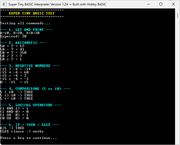 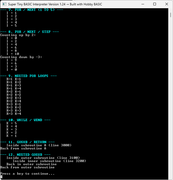 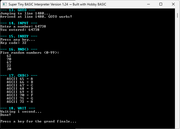 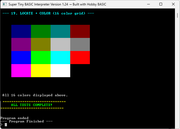
► New Game in Version 2.6.2 A classic Same Game with full gravity and column shift mechanics. Features: • Recursive flood fill for group detection and removal • Optimized drawing (only changed tiles) • Pre-rendered tile sprites using BSAVE/BLOAD for fast drawing • Custom RGB palette for tile colors • Classic (n-2)² scoring formula • Persistent high score and game counter • Sound effects for remove, gravity and win events All of this runs directly inside the Windows 11 CMD.EXE console. 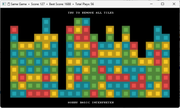
Useful links: • Online Guide — learn Hobby BASIC the easy way • Full Feature Overview — all capabilities in one page • YouTube Video Tour — see it in action • Chrome blocking? — fix here • Download — the latest version |
|||
|
26 May 2026, 18:08 |
|
|
Picnic 08 Jun 2026, 11:08
► New Game in Version 2.6.2
Reverse Sisyphus is a faithful port to Hobby BASIC of a PuzzleScript game, featuring ANSI graphics designed for the Windows 11 console. Original concept by flummox3d (Reverse Sisyphus) A clever, block-pushing puzzle game where you do the exact opposite of the mythical Greek king. Instead of rolling a boulder up a mountain, your goal is to manipulate the environment to push boulders down the cliff. Features: • Tile‑based ANSI graphics with 16‑color palette • Turn‑based movement (push, pull, jump) with gravity • Push and pull boulders horizontally (Ctrl for pull) • Jump mechanic: player can step up one tile and stay • Gravity affects both player and boulders • Boulder crush: player loses if boulder falls on him • Walkable tiles: background, clouds, target, flag • Solid tiles: walls, boulders, ground • Level progress saved across 16 levels • Undo system (key 4) with unlimited history • Sound effects for push, jump, and crush • Window title shows current level and solved status • Auto‑resizing console based on map dimensions All of this runs directly inside the Windows 11 CMD.EXE console. 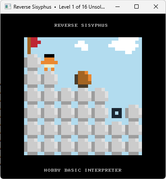 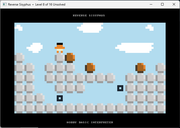
Enhancements in Hobby BASIC Version 2.6.3 ────────────────────────────────── In the latest version 2.6.3, a compatibility check has been added for the execution environment. Hobby BASIC requires the classic Windows Console Host to run correctly. On Windows 11, Windows Terminal is the default execution environment, which causes issues. From now on, if Hobby BASIC is launched inside Windows Terminal, an informative message will appear automatically with instructions on how to change the system settings. This avoids confusion from unexpected behavior of the interpreter. Enhancements in Hobby BASIC Version 2.6.4 ────────────────────────────────── Bug Fixes: • Resolved a minor bug in the FORMAT() function. • Optimized the SWAP command routine (mitigated application crashes under extreme parameter values). • Fixed a minor visual bug in FormatMessage (corrected message display behavior during API errors). ► New Game in Version 2.6.4 Birdwatching Puzzles is a faithful port to Hobby BASIC of a PuzzleScript game, featuring ANSI graphics designed for the Windows 11 console. Take a peaceful walk through a beautiful garden filled with colorful birds. Your goal is simple: enter from the left, exit on the right, never retrace your steps, and observe exactly the same number of birds of each color along the way. Sounds easy? Every puzzle has a unique solution, and finding the perfect route requires careful planning and logical thinking. Features: • Tilebased ANSI graphics with 16-color palette • Birdwatching puzzle concept by Erich Friedman • Trail rendering with clean corners and backtrack support • Percolor bird quota enforced via toprow indicator strip • Victory only when full quota met and player reaches the exit • Undo system (key 4) with full state snapshot • Level progress saved across 18 levels • Random ambient birdsong on level start • Autoresizing console based on map dimensions All of this runs directly inside the Windows 11 CMD.EXE console. 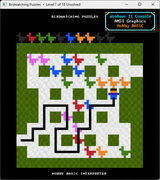
► New Game in Version 2.6.4 Connection is an expansion of Let's All Hold Hands by tess (beekie), originally made for the Confounding Calendar in PuzzleScript. Rebuilt and expanded from scratch in Hobby BASIC. The player starts as a single tile. By pressing Ctrl, all adjacentboxes are absorbed into your body, expanding your shape. The challengelies in pushing boxes into the right positions before absorbing them, since your shape determines where you can move and what you can reach next. Clear the board by absorbing every last box. Features: • Tile-based ANSI graphics with custom color palette • Sokoban-style movement with multi-box chain pushing • Player body grows dynamically by absorbing adjacent boxes • Entire player shape moves as one rigid body • Connection flash: inner and outer links visualized on Ctrl press • Level progress saved across 5 levels • Undo system (key 4) with unlimited history • Sound effects and victory sequence • Window title shows current level and solved status • Auto-resizing console based on map dimensions All of this runs directly inside the Windows 11 CMD.EXE console. 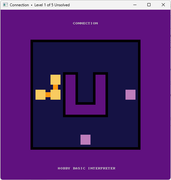
Useful links: • Online Guide — learn Hobby BASIC the easy way • Full Feature Overview — all capabilities in one page • YouTube Video Tour — see it in action • Chrome blocking? — fix here • Download — the latest version |
|||
|
08 Jun 2026, 11:08 |
|
|
Picnic 19 Aug 2026, 13:30
New in Hobby BASIC: MOVS — flicker-free sprite movement
Added MOVS x, y, w, h, xdest, ydest, arr[], a smarter sibling of MOVE. It relocates a screen region using ScrollConsoleScreenBuffer for the actual move, then restores the background underneath using a snapshot array captured earlier with GRAB, but only repaints the part of the original rectangle that the move actually exposed, not the whole thing. The practical effect: what used to take three separate steps (erase, redraw background, redraw sprite) now happens in a single call, with no intermediate half-drawn frame visible on screen. That gave HB a lightweight form of double buffering almost for free, noticeably faster, and flickering is gone. Handles arbitrary movement direction (including diagonal), correctly clipping the restore to only the exposed area even when source and destination rectangles overlap. Short demo video. https://www.youtube.com/watch?v=Kde-D_sXpnk ► New Games in Version 2.6.6 Hello everyone, New console-based puzzle games have been added to the Hobby BASIC folder. 🔹Four-room tilt mazes - Tilt-based logic mazes spread across four interconnected rooms. Original concept by Andrea Gilbert (Four-room tilt mazes). 🔹Bolo Box - Flip all the tiles on the game board back to the color white in as few moves as possible. (Original concept by Soleau Software). 🔹Subway Cleaner - Push and pull crates across the floor to turn every last blue tile green. (Orignal concept by Increpare). 🔹Flip - A small version of the classic Flip / Lights Out puzzle. Supports grids from 3×3 up to 10×10, with adjustable tile sizes. 🔹Tick Tackle - A tic-tac-toe variant on a 4x4 board with a CPU opponent. All of this runs directly inside the Windows 10/11 CMD.EXE console. 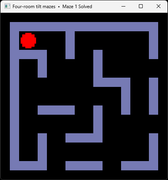 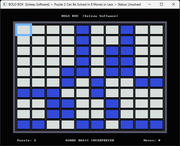 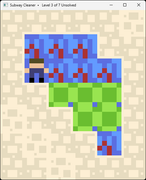 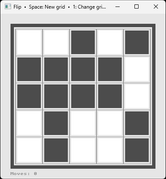 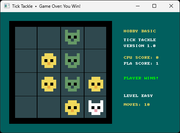
Gameplay Videos: ▶ Watch games in action Useful links: • Online Guide — learn Hobby BASIC the easy way • Full Feature Overview — all capabilities in one page • YouTube Video Tour — see it in action • Chrome blocking? — fix here • Download — the latest version |
|||
|
19 Aug 2026, 13:30 |
|
| Goto page Previous 1, 2, 3, 4, 5, 6, 7 < Last Thread | Next Thread > |
Forum Rules:
|