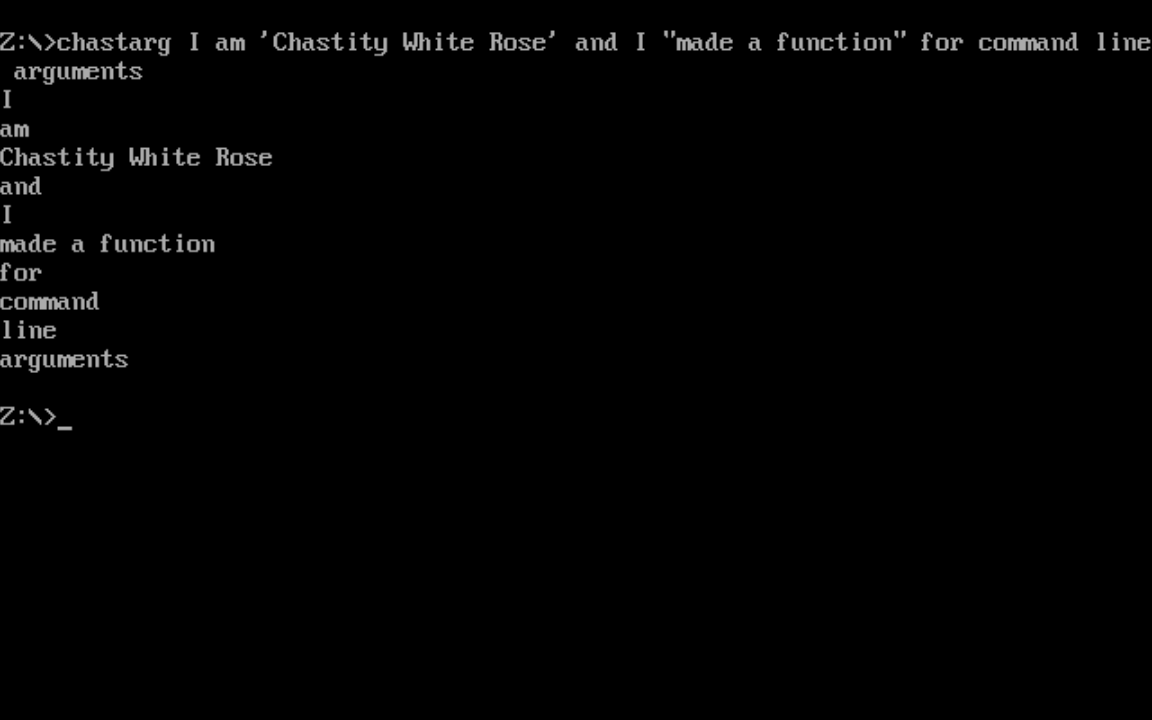
The chastearg program, which is shortened to chastarg to respect DOS 8.3 filename limits, is a tool for separating command line arguments into multiple lines except preserving those that are quoted and therefore counting as one argument. Quoted strings will print on the same line.
A key aspect of how this works is the new "getarg" function that I wrote. If you take a look at this small program that uses it, it is very simple.
org 100h     ;DOS programs start at this address

;this loop will get all the command line arguments and print them on separate lines

call getarg ;this first call will get the command string

arg_loop:
call getarg
cmp ax,0 ;did the getarg function return 0?
jz arg_loop_end ;if ax was zero, there are no args
call putstring
call putline
jmp arg_loop
arg_loop_end:

ending:
mov ax,4C00h ; Exit program
int 21h

include 'getarg.asm'
include 'chastelib16.asm'

db 0x48 dup 0 ;add extra bytes to make it 512 bytes exactly
But the getarg function itself is a little bit complicated. I tried my best to comment it so that hopefully other DOS programmers can benefit from this useful function.
;The getarg function was something I badly needed in order to make my assembly code for DOS easier to read.
;It will automatically process the command line arguments if they are available.
;
;The first time it is run, it returns the whole command string or zero if no args are given
;DOS does not allow the program name to be part of the arguments
;
;Each time after that, it will give you the next argument which is a subtring of the original.
;When no more arguments are available, it will always return zero
;The program calling this is expected to check for this error and then terminate
;or print a message depending on the goals of that program

;A word of warning though, this function has multiple return statements and is long
;However, it is fully featured in that it can recognize quoted strings as being the same argument
;This brings full compatibility between my DOS and Linux programs which expect consistent behavior

getarg:

mov bx,[arguments_start] ;get the address of start of arguments
cmp bx,0 ;is this address zero? (meaning this function was not called before)
jz get_arg_data ;if it was zero, then get the argument data for the first execution of this function

;if the start was not zero, then clearly arguments exist and addresses have been saved
cmp bx,[arguments_end]  ;is the address of the start and end the same?
jnz find_next_string  ;if they are not the same, find the next sub string
mov ax,0 ;otherwise, return ax as zero and check this in the main program

ret

find_next_string:

mov bx,[arguments_start] ;get address of current arg

skip_spaces:

cmp byte[bx],' ' ;is this byte a space?
jnz skip_spaces_end ;if it is not a space, we can end this loop
inc bx ;otherwise, go to next byte
jmp skip_spaces ;and keep looping till we find non-space
skip_spaces_end:
mov ax,bx ;copy this non-space address to ax register

;we have found a non-space which is the start of a printable string
;but we still have to find the next space and terminate it with a zero!

;however, there is a special case where we want a string to contain spaces. In this case, I have another routine!

;check for quoted strings
cmp byte[bx],0x22 ;is this a double quote -> "
jz scan_quoted_string
cmp byte[bx],0x27 ;is this a single quote -> '
jz scan_quoted_string

find_space:
cmp byte [bx],' ' ;is this a space?
jz found_space ;if this was a space, end the loop and terminate with zero

;we must also check to see if we have reached the terminating zero of the arguments string
cmp byte[bx],0 ;is this byte a zero?
jz no_more_args ;if yes this string is already terminated

inc bx
jmp find_space ; this char was not space, go to the next char
found_space:
mov byte[bx],0 ;terminate this string

inc bx ;but go to the next byte
mov [arguments_start],bx ;and set the new start address for the next call

ret ;We can return ax safely knowing the string ends in a zero

scan_quoted_string:

mov cl,byte[bx] ;mov this quote type to cl
inc bx ;go to next byte
mov ax,bx ;set ax to this address which is assumed to be the start of a quoted string

find_end_quote:
cmp byte[bx],cl ;is this the same quote we started with?
jz found_end_quote ;if it is, end this loop

;we must also check to see if we have reached the terminating zero of the arguments string
;this avoids a crash if I forgot to add the second quotation mark in the arguments
cmp byte[bx],0 ;is this byte a zero?
jz no_more_args ;if yes this string is already terminated

inc bx
jmp find_end_quote
found_end_quote:
mov byte[bx],0 ;terminate this string

inc bx ;but go to the next byte
mov [arguments_start],bx ;and set the new start address for the next call

ret

no_more_args:

mov [arguments_start],bx ;mov the start to where the string ended

;now that the start and end addresses are the same
;this function will always return zero
ret

;this will happen first time this function is called to get the argument data
get_arg_data:
mov ax,0      ;zero ax (upper half of ax)
mov al,[80h] ;load length of the command string from this address
cmp ax,0
jz getarg_end

mov bx,0x81  ;mov into bx the address of the start of the argument string
mov [arguments_start],bx ;save the start of the arguments to this variable
add bx,ax    ;add the length of the command string to this address
mov byte[bx],0 ;terminate this with a zero to avoid segfaults when printed with putstring
mov [arguments_end],bx ;save the end of the arguments to this variable
mov ax,[arguments_start] ;copy the address of the arguments start to ax

getarg_end:
ret

;start and end default to address of zero, which means we have not tested the arguments yet
arguments_start dw 0
arguments_end dw 0
 Index
> DOS > chastarg with getarg function
Index
> DOS > chastarg with getarg function


 31 May 2026, 14:23