 Index
> DOS > DOS version of chastext
Index
> DOS > DOS version of chastext |
| Author |
|


|
chastitywhiterose 07 May 2026, 15:28
I wrote a DOS version of the chastext program for simple search and replace. It works as shown in this screenshot and video:
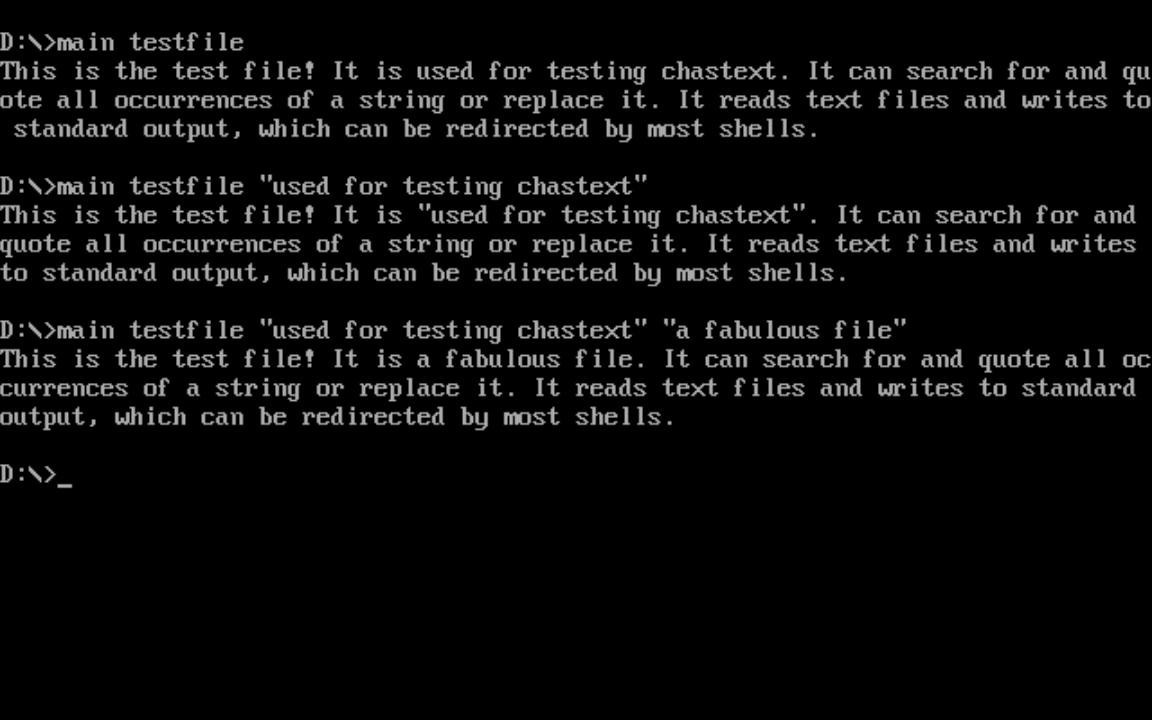
https://www.youtube.com/watch?v=Rwvaa-qaGp8 I am not trying to recreate sed or awk but a simple find/replace is a worthwhile project for learning something new after I have mastered my chastehex and chastecmp programs. I can manipulate binary files flawlessly because they are predictable so now I am testing my limits on text based processing. Code: org 100h ;DOS programs start at this address mov word [radix],16 ; can choose radix for integer output! mov ch,0 ;zero ch (upper half of cx) mov cl,[80h] ;load length in bytes of the command string cmp cx,0 jnz args_exist mov ax,help ;if no arguments were given, show a help message call putstring jmp ending ;and end the program because there is nothing to do args_exist: ;Point bx to the beginning of arg string ;however, this always contains a space mov bx,81h skip_start_spaces: cmp byte [bx],' ' ;is this byte a space? jnz skip_start_spaces_end ;if not, we are done skipping spaces inc bx ;otherwise, go to next char dec cx ;but subtract 1 from character count jmp skip_start_spaces skip_start_spaces_end: mov [arg_string_index],bx ; save the location of the first non space in the arg string ;find the end of the string based on length mov ax,bx add ax,cx mov [arg_string_end],ax ;now we know where the string ends. ;now bx points to the first non space character in the arguments passed to the DOS program ;and we know that [arg_string_end] is where it ends ;the next step is to filter the arguments into separate zero terminated strings ;each space will be changed to a zero (normally) ;but we also need to account for spaces inside quotes that are considered part of the string ;Linux handles this normally but DOS needs me to write the code to mimic this behavior ;because the program needs to function identically for DOS or Linux mov cl,' ' ;set the default filter character (argument terminator) to a space mov ch,0 ;are we currently checking spaces 0 or quote characters 1 as terminators? ;this loop is the new and improved argument filter ;it keeps track of whether we are inside or outside a quote ;and also which type of quote started the quote ;the actual quote marks are not part of the string unless they ;are the opposite quote type than what started the string ;The important thing is that spaces can exist inside of quoted strings ;as one argument rather than each new word being a new argument ;could be important for filenames containing spaces, etc. argument_filter: cmp bx,[arg_string_end] ;are we at the end of the arg string? jz argument_filter_end ;if yes, stop the filter and terminate with zero cmp ch,1 ;are we inside a quoted string? jz quote_check ;if yes, don't do anything to the spaces cmp byte[bx],cl ;compare the byte at address bx to the string terminator jnz ignore_char ;if it is not the same, we ignore it mov byte[bx],0 ;but if it matches, change it to a zero ignore_char: cmp byte [bx],0x22 ;is this a double quote -> " jz start_quote cmp byte [bx],0x27 ;is this a single quote -> ' jz start_quote jmp quote_no ;it was not a quote start_quote: mov ch,1 ;set ch to 1 to set that we are inside a quote now mov cl,[bx] ;save this quote type as the new terminator mov byte[bx],0 ;but delete the first quote with zero ;check for single or double quotes quote_check: cmp [bx],cl ;is this character the same type of quote that started this sub string? jnz quote_no ;if it is not, then skip to quote_no section ;but if it was matching, change this byte to zero ;and change cl back to a space mov cl,' ' ;cl is now a space mov ch,0 ;ch is 0 because now we have ended the quoted string mov byte[bx],0 ;delete the end quote with zero quote_no: inc bx ;go to the next character jmp argument_filter ;jump back to the beginning of argument filter argument_filter_end: mov byte [bx],0 ;terminate the ending with a zero for safety ;special case!!! ;If the first argument passed began with a quoted string ;it would have been changed to a 0 instead. This requires us to add one to the ;starting argument string index mov bx,[arg_string_index] cmp byte[bx],0 jnz first_argument_was_not_quote inc word[arg_string_index] ;add 1 so it points to the next byte before we process arguments first_argument_was_not_quote: ;now that the argument string is prepared, we will try to use the first argument as a filename to open mov ah,3Dh ;call number for DOS open existing file mov al,0 ;file access: 0=read,1=write,2=read+write mov dx,[arg_string_index] ;string address to interpret as filename int 21h ;DOS call to finalize open function mov [filedesc],ax ;save the file handle jc file_error ;if carry flag is set, we have an error, otherwise, file is open file_opened: mov ax,dx ;call putstring ;call putline jmp use_file ;skip past error message and start using the file ;this section prints error message and then ends the program if file error found file_error: ;prints error code2=file not found mov ax,dx call putstr_and_line mov ax,file_error_message call putstring mov ax,[filedesc] call putint jmp ending ;how we use the file depends on the number of arguments given ;if no arguments other than the filename exist, we do a regular hex dump ;otherwise we look for two more arguments: the search and replace strings use_file: call get_next_arg ;get address of next arg and return into ax register cmp ax,[arg_string_end] ;this time, if ax equals end of string, we begin the textdump main loop without search or replace strings jz textdump ;jump to textdump section ;otherwise, we save the address at ax to our search string mov [string_search],ax ;call putstr_and_line call get_next_arg ;get address of next arg and return into ax register cmp ax,[arg_string_end] ;this time, if ax equals end of string, we hex dump and then end the program later jz textdump ;jump to hexdump section ;otherwise, we save the address at ax to our replacement string mov [string_replace],ax ;call putstr_and_line ;all other arguments that may exist after this are irrelevant textdump: ;this is the beginning of the textdump main loop of chastext ;first, check to see if there is a search string ;if there is a search string, skip the normal putchar cmp word[string_search],0 ;do we have a search string? jnz putchar_skip ;but if there is not a search string ;we will read one character, then display it to stdout ;and then jump to the beginning of the textdump loop to print them until EOF ;we start the loop with a call to read exactly 1 byte mov ah,3Fh ;call number for read function mov bx,[filedesc] ;store file handle to read from in bx mov cx,1 ;we are reading one byte mov dx,byte_array ;store the bytes here int 21h ;call putint ;check the number of bytes read cmp ax,1 ;check to see if exactly 1 byte was read jz file_success ;if true, proceed to display ;mov ax,end_of_file ;call putstring jmp file_close ;otherwise close the file and end program after failure ; this point is reached if 1 byte was read from the file successfully file_success: mov al,[byte_array] call putchar jmp textdump ;if search string doesn't exist, just jump and repeat the loop ;otherwise we continue into the next section that compares the input with the search string putchar_skip: ;this is the beginning of search mode ;it handles the file by seeking and reading to search every position for the search string ;first, seek to the file_address we initialized to zero ;this variable will be added to depending on actions taken mov ah,42h ;lseek call number mov al,0 ;seek origin 00h start of file,01h current file position,02h end of file mov bx,[filedesc] mov cx,0 ;upper word of offset zero because not planning for larger than 64kb files mov dx,[file_address] ;lower word of offset int 21h ;obtain the length of the search string using my strlen function mov ax,[string_search] call strlen ;get the length of the search string ;use the length of the string we are searching for as the number of bytes to read at this location mov dx,byte_array ;store the bytes here mov cx,ax ;we are reading this many bytes to have a string to compare mov bx,[filedesc] ;store file handle to read from in bx mov ah,3Fh ;call number for read function int 21h mov bx,byte_array ;move the address of bytes read into bx add bx,ax ;add number of bytes read (return value of read function in ax) mov byte[bx],0 ;terminate the string with zero mov [bytes_read],ax ;store how many bytes were read with that last read operation cmp ax,cx ;if the number of bytes is not what we expected to read, end this loop jnz textdump_end ;move our two strings into the si and di registers for comparison ;with my custom written strcmp function mov si,[string_search] mov di,byte_array call strcmp ;compare these two strings cmp ax,0 ;test if they are the same (if ax returned zero) jnz not_match ;if they are not a match go to that section for printing a character ;but if they are a match, then we either quote them ;or replace them if a replacement string is available ;but regardless of which action we do, since a match was found, let us add this count to the file address ;so that we read from beyond this point next time the textdump loop starts mov ax,[bytes_read] add [file_address],ax cmp word[string_replace],0 ;check to see if a replacement string is available jz print_quotes ;if not, skip to the part where we just quote the strings that match ;otherwise, we will print the replacement string instead of the original! mov ax,[string_replace] call putstring ;print the string jmp textdump ;restart the main loop print_quotes: ;print quotes around matched string mov al,'"' call putchar mov ax,byte_array call putstring ;print the string mov al,'"' call putchar jmp textdump ;restart the main loop not_match: mov al,[byte_array] call putchar add [file_address],1 ;add 1 to the file address so we don't read this same position again jmp textdump textdump_end: ;print the remaining bytes, if any, left after the main loop ended mov ax,byte_array call putstring main_end: ;this is the end of the program ;we close the open file and then use the exit call file_close: ;close the file if it is open mov ah,3Eh mov bx,[filedesc] int 21h ;debugging section I use just to test values ;call putline ;mov ax,[string_search] ;call putstr_and_line ;mov ax,[string_replace] ;call putstr_and_line ending: mov ax,4C00h ; Exit program int 21h ;the strlen and strcmp are named after the equivalent C functions ;but are written from scratch by me based on their expected behavior ;a function to get the length of string in ax and return the integer in ax strlen: mov bx,ax ; copy ax to bx. bx will be used as index to the string strlen_start: ; this loop finds the length of the string as part of the putstring function cmp [bx],byte 0 ; compare byte at address bx with 0 jz strlen_end ; if comparison was zero, jump to loop end because we have found the length inc bx jmp strlen_start strlen_end: sub bx,ax ;subtract start pointer from current pointer to get length of string mov ax,bx ;copy the string length back to ax ret ;strcmp compares the string at si to the one at di ;ax returns 0 if the strings are the same and 1 if different ;the algorithm is simple but I will explain it for those who are confused ;ax is initialized to zero ;a byte from each string is loaded into the al and bl registers ;the bytes are compared. if they are different, then we jump to the end ;However, if they are the same, then we check if one of them is zero ;for this purpose it doesn't matter whether we compare al or bl with zero ;because it is known that they are the same if the jnz did not take place ;if it is zero, this also jumps to the end of the function ;If neither jump took place, then we jump to the start of the loop ;but when the function finally ends bl will be subtracted from al ;this ensures that the function returns zero if the final characters are the same strcmp: mov ax,0 strcmp_start: ;read a byte from each string mov al,[di] mov bl,[si] cmp al,bl jnz strcmp_end cmp al,0 jz strcmp_end inc di inc si jmp strcmp_start strcmp_end: sub al,bl ret ;function to move ahead to the next argument ;only works after the filter has been applied to turn all spaces into zeroes get_next_arg: mov bx,[arg_string_index] ;get address of current arg find_zero: cmp byte [bx],0 jz found_zero inc bx jmp find_zero ; this char is not zero, go to the next char found_zero: ;once we have found a zero, check to make sure we are not at the end find_non_zero: cmp bx,[arg_string_end] jz arg_finish ;if bx is already at end, nothing left to find cmp byte [bx],0 jnz arg_finish ;if this char is not zero we have found the next string! inc bx jmp find_non_zero ;otherwise, keep looking arg_finish: mov [arg_string_index],bx ; save this index to the variable mov ax,bx ;but also save it to ax register for use in printing or something else ret help db 'chastext by Chastity White Rose',0Dh,0Ah db '"cat" or "type" a file without changing it:',0Dh,0Ah,9,'chastext file',0Dh,0Ah db 'search for a string and quote it:',0Dh,0Ah,9,'chastext file search',0Dh,0Ah db 'replace string:',0Dh,0Ah,9,'chastext file search replace',0Dh,0Ah db 'Find or replace any string!',0Dh,0Ah,0 ; About the chastelib variant ;instead of including chastelib16.asm as a header file ;I copy pasted it except that I excluded functions that were not used. ;Notably, the strint function is excluded because strint_32 is used instead ;start of chastelib ; This file is where I keep my function definitions. ; These are usually my string and integer output routines. ;this is my best putstring function for DOS because it uses call 40h of interrupt 21h ;this means that it works in a similar way to my Linux Assembly code ;the plan is to make both my DOS and Linux functions identical except for the size of registers involved putstring: push ax push bx push cx push dx mov bx,ax ;copy ax to bx for use as index register putstring_strlen_start: ;this loop finds the length of the string as part of the putstring function cmp [bx], byte 0 ;compare this byte with 0 jz putstring_strlen_end ;if comparison was zero, jump to loop end because we have found the length inc bx ;increment bx (add 1) jmp putstring_strlen_start ;jump to the start of the loop and keep trying until we find a zero putstring_strlen_end: sub bx,ax ; sub ax from bx to get the difference for number of bytes mov cx,bx ; mov bx to cx mov dx,ax ; dx will have address of string to write mov ah,40h ; select DOS function 40h write mov bx,1 ; file handle 1=stdout int 21h ; call the DOS kernel pop dx pop cx pop bx pop ax ret ;this is the location in memory where digits are written to by the intstr function int_string db 16 dup '?' ;enough bytes to hold maximum size 16-bit binary integer int_string_end db 0 ;zero byte terminator for the integer string radix dw 2 ;radix or base for integer output. 2=binary, 8=octal, 10=decimal, 16=hexadecimal int_width dw 8 intstr: mov bx,int_string_end-1 ;find address of lowest digit(just before the newline 0Ah) mov cx,1 digits_start: mov dx,0; div word [radix] cmp dx,10 jb decimal_digit jge hexadecimal_digit decimal_digit: ;we go here if it is only a digit 0 to 9 add dx,'0' jmp save_digit hexadecimal_digit: sub dx,10 add dx,'A' save_digit: mov [bx],dl cmp ax,0 jz intstr_end dec bx inc cx jmp digits_start intstr_end: prefix_zeros: cmp cx,[int_width] jnb end_zeros dec bx mov [bx],byte '0' inc cx jmp prefix_zeros end_zeros: mov ax,bx ; store string in ax for display later ret ;function to print string form of whatever integer is in ax ;The radix determines which number base the string form takes. ;Anything from 2 to 36 is a valid radix ;in practice though, only bases 2,8,10,and 16 will make sense to other programmers ;this function does not process anything by itself but calls the combination of my other ;functions in the order I intended them to be used. putint: push ax push bx push cx push dx call intstr call putstring pop dx pop cx pop bx pop ax ret ;the next utility functions simply print a space or a newline ;these help me save code when printing lots of things for debugging space db ' ',0 line db 0Dh,0Ah,0 putspace: push ax mov ax,space call putstring pop ax ret putline: push ax mov ax,line call putstring pop ax ret ;a function for printing a single character that is the value of al char: db 0,0 putchar: push ax mov [char],al mov ax,char call putstring pop ax ret ;a small function just for the common operation ;printing an integer followed by a space ;this saves a few bytes in the assembled code putint_and_space: call putint call putspace ret ;a small function just for the common operation ;printing an integer followed by a space ;this saves a few bytes in the assembled code putint_and_line: call putint call putline ret ;a small function just for the common operation ;printing an integer followed by a space ;this saves a few bytes in the assembled code putstr_and_space: call putstring call putspace ret ;a small function just for the common operation ;printing an integer followed by a space ;this saves a few bytes in the assembled code putstr_and_line: call putstring call putline ret ;end of chastelib arg_string_index dw 0 arg_string_end dw 0 file_error_message db 'Could not open the file! Error number: ',0 filedesc dw 0 file_address dw 0 ;file address defaults to zero AKA beginning of file end_of_file db 'EOF',0 ;where we will store data from the file bytes_read dw 0 string_search dw 0 ; place to hold the search string pointer string_replace dw 0 ; place to hold the replacement string pointer byte_array db 0x73 dup 0
Last edited by chastitywhiterose on 24 May 2026, 05:27; edited 3 times in total |
|||||||||||||||||||||
 07 May 2026, 15:28
 |
|


|
bitdog2u 12 May 2026, 14:35
The HELP DB "text ended with two Line Feeds and so the cursor dropped down 2 lines, printed a TAB, then started writing off the screen.
I run a real DOS machine, with DOS 6.22 and maybe your DOS box doesn't look like mine does. Most text Lines I've seen ends in 13,10 and never has a CRLF in the middle of a line. The code assembled with FASM and ran fine, I finally figured out how to search & replace. An example in the Syntax message would help, and the >> IO to outFile needs to be shown. one > overwrites outFile, and two >> appends, or "CAT" one might say. But no one knows what that means. The "cat" probably means to append, but TYPE.COM does that already. Search for a string didn't do anything for me. I searched for "cat" in chastext.asm and it altered the file changing location to lo"cat"ion The code required a copy/paste and that screws up ALL PROPER FORMATTING of an .ASM file. There was no margin, I couldn't tell code from a Label: they were all mixed together on the left. If you had a .ZIP posted to download, the formatting would stay intact ? You had this int_string db 16 dup '?' I didn't know that DUP worked in FASM, now I'm going to have to use the heck out of that....... Syntax= CHASTEXT inFile.ext "string of words one" "string of words two" > outFile.ext Would swap the second string where the first string was found, & that would be a useful program, probably. Then I could replace: "ASSUME OFFSET BYTE PTR" with "SCREW MASM" |
|||
|
12 May 2026, 14:35 |
|
|
chastitywhiterose 12 May 2026, 15:13
Basically I don't indent my labels separate from the rest of the code because I figured they were obvious since they end with :
Yes, DUP does work in FASM and it is one of my favorite features when I need to repeat a byte multiple times. Obviously '?' is a placeholder for unknown digits that will be placed there in my integer conversion function. And I can understand why you didn't know what "cat" meant. It is the Linux equivalent of the type command for DOS but I guess I am so familiar with Linux that I forgot not everyone uses that command despite its popularity in Unix like systems. https://man7.org/linux/man-pages/man1/cat.1.html Since I run my program in DOSBOX rather than a real DOS OS, there may be differences I am unaware of. If I can find a way to test it with FreeDOS that might allow more consistency. In any case thank you for trying it and giving me your feedback! |
|||
|
12 May 2026, 15:13 |
|
|
bitdog2u 13 May 2026, 03:12
I could just alter the SYNTAX MESSAGE so it works in DOS and you could try it in LINUX to see what happens.
PM Private Message me your Email address and I will send it. Or post it here if that is what you want. I am just not familiar with LINUX commands like "cat" but I do know now. No one in my little town does any programming that I am aware of, with no outside info I called WINDOWS SE the Special Edition for 3 years before I was straightened out. So the "cat" function does do what it was supposed to do, I was just expecting something else is all. Documentation on IO redirect < inFile wasn't clear to me. Does the inFile have to be read to EOF to close the file ? Can you give me a quickie explaination ? The AH=40h > IOout is very fast. |
|||
|
13 May 2026, 03:12 |
|
|
bitdog2u 13 May 2026, 12:22
Here is a help message that worked in DOS.
I don't know if it's right ? is Search a string of words, or one word ? is Replace a string of words, or one word? You use the word string, so its confusing. A word is a string of letters, but a string is a bunch of words, which is what I do until I know different. You got the .COM size to 1024 so it fits in hard drive sectors of 512 great, but users have to be told practically everything. So a larger Syntax message might be what is needed for sharing. I haven't looked over the code real well yet, but I don't understand why "cat" is needed when type.com is available. I make stuff that I don't already have, or I improve an existing program, but my documentation has to state why it's a BETTER SOLUTION, cuz the user won't figure that out before they delete my program cuz they can't get it to do anything useful. help db 'chastext by Chastity White Rose',13,10 db 'Find or Replace any string!',13,10 db '"cat" a file:',9,9,'chastext inFile.ext >> outFile.ext',13,10 db 'Search for a string:',9,'chastext inFile Search > outFile',13,10 db 'Replace string:',9,'chastext inFile Search Replace > outFile',13,10 db 'Search is the word to search for, Replace is word that replaces it.',13,10,0 |
|||
|
13 May 2026, 12:22 |
|
|
chastitywhiterose 14 May 2026, 11:40
Hey bitdog. I did update the help message in the latest update, and I included the main.asm for download. I fixed the line endings to be hex 0D 0A. As it turns out, DOSBox was letting me get away with doing them wrong, but DOSBox-X failed miserably with incorrect line endings without the 0D byte.
I haven't written a full documentation for this program yet, but to answer your question, an equivalent cat or type program isn't "needed." Still, it made development easier for me because I program in Linux and on DOS. Having the program be able to function as these means I don't have to type different commands based on whether I am natively on Linux or in my DOS emulators. Of course, we don't NEED to be writing assembly language either, but it sure is fun! But beyond that, it makes sure that the program is correctly reading the bytes of the file, which was an important step before the other features of quoting it or replacing it. This program is meant to be a generic text tool that I will use in my own programming and for having fun by replacing words with other words just to be stupid. As for your other question, a string can refer to one or more words. If you use quotes around two or more words, then it will be counted by the program as the search string. Writing the code to detect whether part of the command string was in quotes or not was hard work, but now it works identically to the Linux version, which does this already. Thank you again for your feedback! |
|||
|
14 May 2026, 11:40 |
|
|
bitdog2u 14 May 2026, 19:47
You are welcome, if you want something tested on a real DOS machine, PM Private message me with it attached and your Email address if you can. Tell me what you want, and I will try for you. I usually add a bunch of crap, but I can return a proper.asm and a butchered.asm
I started looking at Linux code and it was mostly .C language. I haven't done that in 25 years, & when I found Fasm I moved on. So, you doing ASM and Linux C must help make your Linux stuff small and FAST comparatively speaking. FULL DOCUMENTATION may be an OOPs. I make a little list of what the user HAS TO KNOW to use my program, then BABYSIT them through the syntax, + what it does, AND THAT IS ALL. Then they get past the SHOULD I DELETE IT PART, and find README#2.TXT for a bit more info and the program should have some LEARN AS YOU GO info. In the old days THE FULL DOCUMENTATION was truly a headache, you would be 20 pages in and still not know what the program does. That kind of bloatware.txt is often more for the programmer than the user. If you were trying someone else's program, what would you want ? #1 how to escape. #2 what it does, in what environment. #3 how to make it work. And viruses are an issue with me. So if the persons Name/Handle isn't in the program & the short info doesn't look convincing from a competent person, I hesitate on running it. DIS.com disassembles its self and a string search for INT will find all the INT 21h FILE MANIPULATION CODE where the virus devil hides, and then I can run it. So DIS.com is the only program I've ever written that gives the user what I want as a user 
Linux unicode or something.DOC ends text lines with 10=0Ah Like you were using, so your code works there ok ( I am guessing here ) but your migration to the Fasm DOS forum here, needs a 13,10 for most DOS stuff, is what I was trying to say. In my DIS104.ZIP there is bswap.com which takes input in decimal form, finds the character in inFile and swaps it with any following command line numbers. It changes 10 to 13,10 EOL CRLF stuff, and using numbers any and all of the 256 CPU alphabet can be had. It's kinda like your Chastext.com program. Then I started a WORDSWAP.com Next project for me was going to be what you are making. a STRING SWAPPER. So let me know when it out, and I'll give it a work out. When I made TTYPE.com I made a letter to my love, and the descriptive words can be inserted as input #1-9 so every place in the file where %1 was, input #1 would appear in the out file. So it could make a perverted letter, or a sad letter, but mostly it was for humor, and it did that pretty well for a while, until I ran out of DIRTY WORDS to put in it
Chastity is the moral virtue or state of abstaining from sexual activity, that I could not quite master. WEAK MINDED was my gift at birth, I am going to learn how to work that to my advantage. No, really. So I don't bring up the subject or the confessions start rolling out. If my mattress could talk, OOH the stories it could tell. So if I was you, I would GRAB the handle, BITROSE a BIT ROSE and a BIT | EXTRA would be my entery line. | = the more command in DOS. I go by Mr. E. in other circles, & it leaves them with a mystery. Nick names were invented to be SHORTr than the real name, and some kind of COOL NICK is the right way to go was my thinking. I once made a word stripper, that would isolate every word in a file and put it on a sperate line, then ALPH SORT it and remove duplicates for the out file. So my spell checker had what it needed for MEDICAL RECORDS or LEGAL stuff, the SMUT.TXT was a read & a half. I ended up with BEER as a phone number, so it wasn't all bad. |
|||
|
14 May 2026, 19:47 |
|
|
chastitywhiterose 18 May 2026, 17:38
bitdog2u wrote: I could just alter the SYNTAX MESSAGE so it works in DOS and you could try it in LINUX to see what happens. The IO redirection pretty much acts the same in Linux as it does in DOS. "< infile" would basically make the program get its "standard input" from the file instead of the keyboard. Whether it reads to the end of file depends on what the program is doing. In the case of "type" or "cat", this would be the expected behavior, although these programs, as well as mine, chastext takes input files as arguments anyway. Redirecting the output such as "> outfile" is where the magic is really at. Most often I find myself redirecting large outputs so I can scroll through them in a text editor easily. The less command also serves this purpose sometimes too. And yes, the AH=40h call is blindingly fast. This write call mimics the Linux write system call. I find that certain system calls are available on Linux and DOS equally because such operations are fundamental. My own assembly programs are limited to READ,WRITE,OPEN,CLOSE, LSEEK, and EXIT. Those are the Linux kernel names for them but Ralf Brown tends to use the same names for similar calls in Ralf Brown's Interrupt List. The interrupts might be different and use different registers, but they are completely compatible once these small translations are made. Also, I made some improvements to my chastext program for DOS just today. I added a lot more comments to it. I feel bad because I don't usually know if people can understand my stuff and so I am taking all feedback into account. I even recently published a book about DOS programming to help explain much of what I have learned. |
|||
|
18 May 2026, 17:38 |
|
|
chastitywhiterose 18 May 2026, 17:52
bitdog2u wrote: Chastity is the moral virtue or state of abstaining from sexual activity, that I could not quite master. I consider myself blessed to have been given a mind suited for computer programming and chess instead of sexual activity. That is one of the few things in which I have life easy. I go by this name in real life and online, although it is not my legal name. Once a long time ago I went by the name 10binary in many forums, which of could literally means two. How ironic then that I am single and therefore only one. |
|||
|
18 May 2026, 17:52 |
|
|
bitdog2u 19 May 2026, 10:35
Darn it, I should not have gone that far, it's none of my business really. I was just about to delete it, and I will if you want. A rose is a rose by any other name.
I would help you make/use any of my stuff, ideas, or pieces of code, for any Linux projects you have, if you want. If you think I can help, PM me a request? |
|||
|
19 May 2026, 10:35 |
|
|
chastitywhiterose 20 May 2026, 14:26
Don't worry bitdog. I am not offended. I am not sure how you can help with my projects but I will let you know if I think of something.
|
|||
|
20 May 2026, 14:26 |
|
< Last Thread | Next Thread > |
Forum Rules:
|