 Index
> Windows > How do I write a service for Windows?
Index
> Windows > How do I write a service for Windows? |
| Author |
|



|
revolution 09 Feb 2026, 13:27
The format for .sys files is native.
Code: format pe64 native ret |
|||
 09 Feb 2026, 13:27
 |
|

|
Core i7 09 Feb 2026, 14:22
revolution, apparently, I didn't explain the problem well. Basically, the scheme is this:
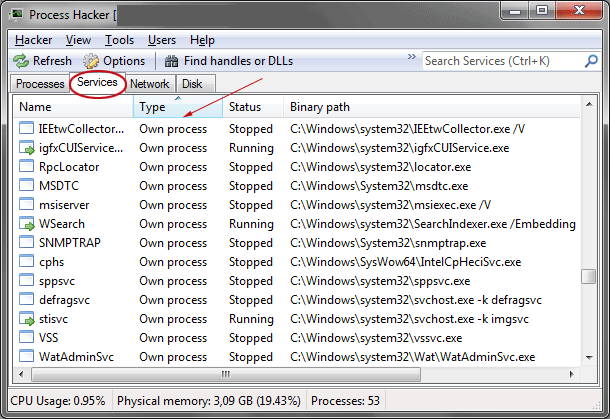
I have a user-mode application and a service to which I want to send commands using the ServiceControl() function. The service returns information to me either through the Clipboard or through Pipes. This is my personal service, which I create with the "SERVICE_WIN32_OWN_PROCESS = 0x10" flag, and immediately delete it when finished. If you run the "ProcessHacker" software, you'll see that all services with the "WIN32_OWN_PROCESS" flag have the *.exe extension, not *.sys. Therefore, I also need to create an EXE, but I'm not sure what format to specify in the "gui\console\native" code header. I suspect I need a GUI. Sorry for my English - this is a translator.
|
||||||||||
|
09 Feb 2026, 14:22 |
|
|||||||||
|
revolution 09 Feb 2026, 14:29
For .exe files that don't want a console attached use GUI.
|
|||
|
09 Feb 2026, 14:29 |
|
|
Core i7 10 Feb 2026, 02:23
I looked at the PE-header of one of the services in the system32 folder,
and rightly so—it turns out a GUI format is needed. Here's a link with a description of all the services' functions: https://learn.microsoft.com/en-us/windows/win32/services/service-functions |
|||
|
10 Feb 2026, 02:23 |
|
|
revolution 10 Feb 2026, 03:17
A Windows .exe GUI format just tells the loader not to attach a console and redirect stdin, stdout and stderr to the console. Other than that the behaviour is the same as for CONSOLE format.
|
|||
|
10 Feb 2026, 03:17 |
|
|
Core i7 10 Feb 2026, 03:34
That's true, but if you specify CONSOLE for the service, a console window will probably appear on the screen. Although this isn't certain, since starting with Windows 7, all services run in a private session(0), and I don't know whether the service console is passed to the user session(1). However, the GUI format definitely won't show any extra windows, unless you describe the window itself in the resources section.
|
|||
|
10 Feb 2026, 03:34 |
|
|
revolution 10 Feb 2026, 04:59
IIRC background services can't open windows in the user's session, there isn't a base desktop for them to paint onto. Since a console is just another window then the console won't appear anywhere.
Can a console .exe successfully run as a service? Maybe the loader will detect that the console window failed to initialise and abort the load? One way to find out is to try it. |
|||
|
10 Feb 2026, 04:59 |
|
|
Core i7 10 Feb 2026, 05:38
revolution wrote: IIRC background services can't open windows in the user's session The service from session(0) can send a window to the user session(1,2,N) via WTSSendMessage(), but I think this is a useless function, since it is better to use IPC mechanisms for exchanging information. |
|||
|
10 Feb 2026, 05:38 |
|
< Last Thread | Next Thread > |
Forum Rules:
|