 Index
> MenuetOS > Midi synth/sequencer
Index
> MenuetOS > Midi synth/sequencer |
| Author |
|




|
bzt 08 Dec 2025, 17:39
MenuetOS always amazes me! Awesome. I have a question though.
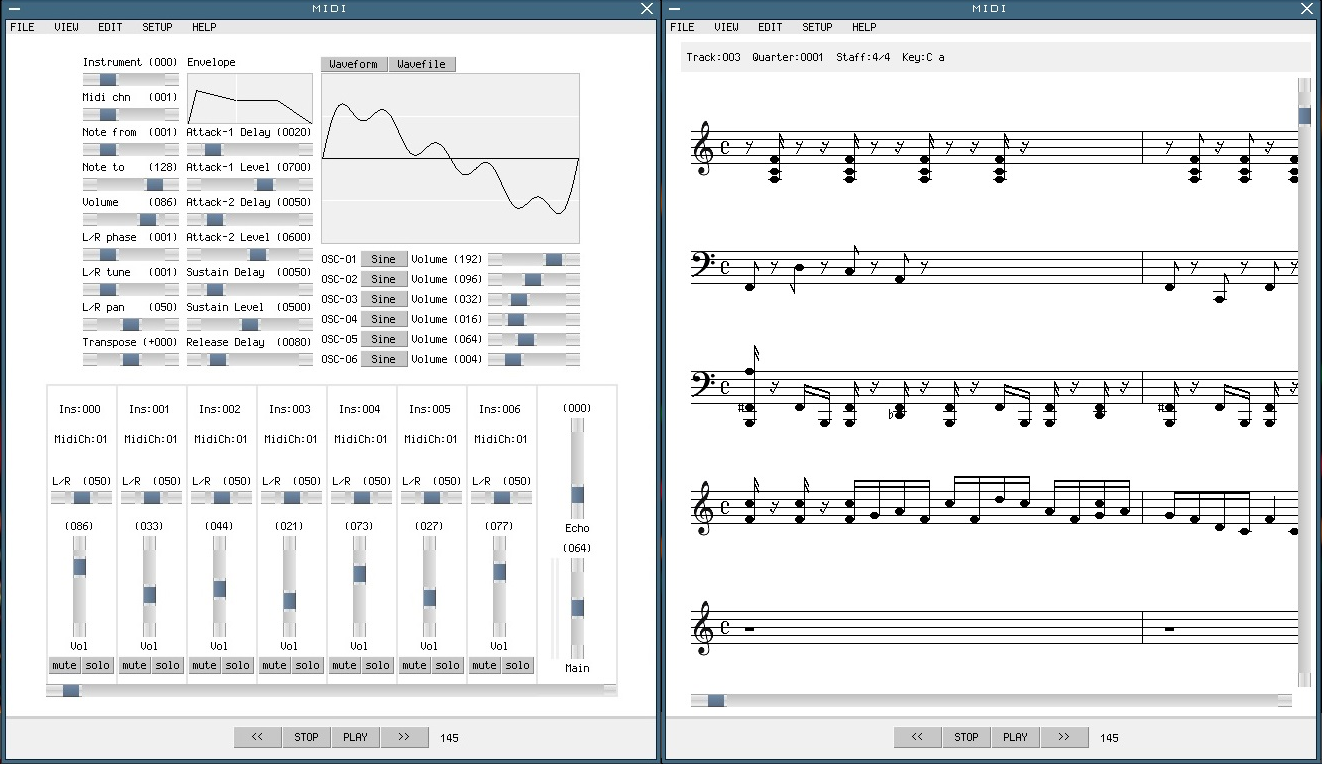
Ville wrote: You can use upto 256 instruments But my real question is, how do you generate the PCM waveforms for these instruments? I can see on the left screenshot that wave banks are tweakable, but how do you get them in the first place? Do you use a sound font? Or did you also port some synthetizer like fluidsynth or an OPL emulator? Or did you just wrote an arbitrary wave generator with customizable parameters? Either way, very very impressive! MIDI playback without a dedicated hardware is quite some feat! (Actually my Linux box with the latest MuseScore and Rosegarden software is not up to the task of playing MIDI files... I had to grab a quick-and-dirty player source with built-in OPL emulator from github and compile that myself) |
|||
 08 Dec 2025, 17:39
 |
|
|
Ville 09 Dec 2025, 14:56
There are different ways to map the synthesizers instrument from the midi track.
1) By midi channel and note position (keyboard split). 2) By tracks instrument setting and note position. 3) Using General Midi mapping, where drum midi channel 10 instruments (35 bass drum - 81 triangle) are mapped to synth instruments 135-181, so you dont have to worry about splitting the keyboard for each drum. You can select which mapping to use from the drop-down menu. The audio-wave is generated from 1) Waveform generator, which generates waves from preset options, like basic sine, square, sawtooth etc. with additive synthesis. 2) Waveform file from usb stick or hd. Parameters (envelope, wave settings, phase, pan, etc) are set by user for each instrument. Playing the notes is pretty straight forward. Notes are just fetched in time order and the synth/sampler instrument is selected based on the above rules. The wave-form is written to the audio buffer according to instruments pan, volume, phase, envelope settings, etc. This happens in real-time, writing the notes to audio buffer a few seconds ahead of current play position, so you can modify the synth/mixer settings in real-time while playing. (I wrote all code.) btw, I wish they would have kept the easy to approach protocol for Midi 2.0 and simply multiplied the bit-widths and added new features as system exclusive messages. But I quess thats a different conversation  |
|||
|
09 Dec 2025, 14:56 |
|
|
bzt 10 Dec 2025, 10:20
Ville wrote: Waveform generator, which generates waves from preset options, like basic sine, square, sawtooth etc. with additive synthesis. 1. Soundfont is a collection of parameters for a standardized set of synth methods (typical example fluidsynth) 2. OPL is a software emulation of the YM3812 / YM262 / etc. chips, so here an instrument is a set of register values (for example, but ymfmidi reads the actual register values from this file) 3. Custom waveform generator (for example like this player) With all these, you have some kind of "presets" to combine and transform basic waveforms. The difference is how this is implemented. For 1. you have some high level abstraction and variable length parameter records, for 2. you have fixed sized records with register values, and for 3. well, custom, so whatever. (FYI IMHO option 1. is unnecessarily overcomplicated should be avoided, 2. is the best compromise between quality and complexity, but only needed if recreating that old Adlib/SoundBlaster vibe is the aim, therefore most of the time option 3. is more than sufficient.) Ville wrote: Waveform file from usb stick or hd. Pretty neat, MIDI players usually stuck in chiptune wavegen hell and never use high quality PCM samples for some reason. So really awesome! |
|||
|
10 Dec 2025, 10:20 |
|
|
Ville 11 Dec 2025, 18:05
The waveform generator is a custom synthesizer, which is likely closest to OPL. The synthesizer reads parameters from user definable registers, which control how oscillators and all other wave properties behave. And the parameters are saved as fixed length record for all instruments.
bzt wrote: 2. is the best compromise between quality and complexity So yes, Ive come to the same conclusion. |
|||
|
11 Dec 2025, 18:05 |
|
|
Ali.Z 14 Dec 2025, 08:29
do you intend to make a tracker at some point
 (e.g. like ft2) (e.g. like ft2)_________________ Asm For Wise Humans |
|||
|
14 Dec 2025, 08:29 |
|
|
Ville 15 Dec 2025, 12:06
I cant promise anything, but the tracker interface is very interesting. It provides a completely different view for the creative process.
|
|||
|
15 Dec 2025, 12:06 |
|
|
bzt 18 Dec 2025, 01:51
Ville wrote: I cant promise anything, but the tracker interface is very interesting. It provides a completely different view for the creative process. Here's my battle-proven code that converts MIDI tracks into tracker rows (the used tracker row format is 99.9% the same as ft2's .xm format). You won't be able to use this code as-is because it's in C, but it will help you to understand the concept behind trackers, the nuances in the differences. The source is full of comments and explanations. I've written quite a lot on this topic in the manual too, which might be useful. It explains how a tracker interface is built up and used, and there's also a side-by-side comparison example (which uses the note sheet from the MIDI spec as an example). As for the format itself, the predecessor Amiga MOD is a pretty simple format, see .mod specification. You must be familiar with that to make sense of the ft2's .xm spec. Note that about 50%-60% of that latter spec is totally unnecessary (as they're specific to a particular tracker and not widely used): safe to skip ADPCM (nobody uses it due to poor quality), skip "stripped module" part, pattern compression, etc. it's okay to only focus on instruments (samples, envelopes) and patterns (note sheets), forget the rest. Oh, important note, not obvious from the spec: tracker's "channel" is not the same as MIDI's "channel", nor as in a WAVE file "channels". For trackers "channel" is the mixer's capacity. Last edited by bzt on 18 Dec 2025, 02:18; edited 1 time in total |
|||
|
18 Dec 2025, 01:51 |
|
|
Ali.Z 18 Dec 2025, 02:13
bzt wrote: ft2's .xm spec check this, they claim to have 1:1 clone of ft2 and pro tracker 2: https://16-bits.org/ _________________ Asm For Wise Humans |
|||
|
18 Dec 2025, 02:13 |
|
|
bzt 18 Dec 2025, 02:36
I can confirm that that ft2-clone is pretty good (but not 1:1, it knows more than the old DOS version). However lately I prefer MilkyTracker (really featurefull).
For a very small, totally bloat-free and dependency-free player I'd recommend to take a look at pocketmod, it's in C and .mod only (so not .xm), but it's just 700 SLoC and heavily commented, good read. (The most used is probably libxmp, but that's not exactly an easy to follow source.) |
|||
|
18 Dec 2025, 02:36 |
|
|
Ali.Z 18 Dec 2025, 02:47
yes milky tracker is really good, midi, generator, etc.
I forgot to mention uFmod, I used it few times, not the best player, some xm's dont seem to be played correctly, however it is an honorable mention that it is written in fasm. https://ufmod.sourceforge.io/ _________________ Asm For Wise Humans |
|||
|
18 Dec 2025, 02:47 |
|
|
Ville 19 Dec 2025, 20:52
bzt wrote: I've written quite a lot on this topic in the manual, Another project would be adding support for other track and synth formats, maintaining compatibility with the original sounds. And in principle, you could already write a general midi synth setup (or other audio setup) for the current midiplay, since it saves mixer settings, all 256 synths and sample addresses to a single file. |
|||
|
19 Dec 2025, 20:52 |
|
|
Ville 27 Dec 2025, 08:31
Tracker display for midiplay is now included to 1.57.60. It has basic functionality, so you can edit notes and loops in both tracker and piano roll. Tracker loop length and quantize level are saved as general text event (0xff,0x01) to midi1 -file.
|
|||
|
27 Dec 2025, 08:31 |
|
< Last Thread | Next Thread > |
Forum Rules:
|