 Index
> Linux > AMD's random number generator can't generate a 0 (+ app)
Index
> Linux > AMD's random number generator can't generate a 0 (+ app) |
| Author |
|


|
Jessé 11 May 2026, 05:13
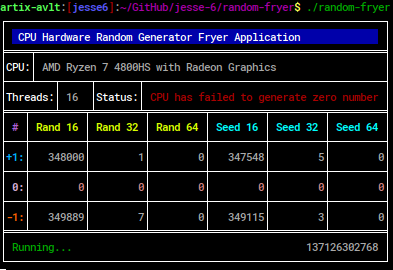
Recently, while doing some assembly code to render data intro charts, and using 'rdrand' and 'rdseed' to provide that data to the displayed, I've figured out by accident what appears to be a bug (problem) only with AMD processors (maybe Zen2 only problem): they can't generate a number 0 at a given size! Running the same programs on an Intel processor, and the 0's are there with no problem.
You can help me figure out this by using my application to seek for any 0 number generated, and maybe post your results at this forum thread... I also must mention that this application is a very deep showcase on how to control and render data to the console screen at arbitrary positions, which I remember someone here was trying to achieve the same under Linux cli, and he asked for help on this subject before. Attached, I've provided that exact chart test application that showcases the AMD's RNG 0 problem: you'll probably, on an AMD host, never see the first bar change colors from green (which uses a TSC method I've created to generate random numbers), and also never see the base chart scale up from 0. On Intel processor, no problem, and the chart scale its base (minimum) beyond 0. The first bar renders how many zeroes are being generated by rdrand (red), rdseed (blue) and TSC-custom technique (green), as well as other bars render the other 65535 numbers from the 16-bit space. Note: it requires fastcall_v1 macro kit if anyone wants to compile and test it as is. Cheers!
|
|||||||||||
 11 May 2026, 05:13
 |
|


|
Jessé 11 May 2026, 05:16
So far, my results...
|
||||||||||
|
11 May 2026, 05:16 |
|
|||||||||
|
revolution 11 May 2026, 05:28
Do the lowest 16-bits ever equal all-zero for 32/64-bit outputs?
|
|||
|
11 May 2026, 05:28 |
|
|
revolution 11 May 2026, 05:41
I hope this is not something stupid from AMD that decided zero is not a random number.
Maybe some C?O person executed RDRAND, got zero, declared it was broken and made the engineers "fix" it.  |
|||
|
11 May 2026, 05:41 |
|
|
Jessé 11 May 2026, 06:05
Haha, good point, I was thinking the same when this problem has presented itself to me.
I'll probably will e-mail AMD about this, and if they answered, I'll be back here to share what they said. |
|||
|
11 May 2026, 06:05 |
|
|
sylware 11 May 2026, 10:22
At the time I was wandering in information system security, there was that rule of thumb: never ever use hardware accelerated crypto...
|
|||
|
11 May 2026, 10:22 |
|
|
revolution 11 May 2026, 11:36
For trusted hardware: Hardware accelerated crypto is definitely the way to go IMO.
For untrusted hardware: Don't do any crypto with it, software or hardware. For best security with RDRAND, it might be backdoored, it might not. IDK, but never use it in isolation, always mix it with other sources. It doesn't hurt to add non-random data into an already random seed. It isn't possible to un-random a random value with non-randomness, it just mixes up the random bits a bit more. If the application isn't for crypto then none of this matters, use RDRAND for anything. Go for it. Last edited by revolution on 12 May 2026, 11:35; edited 1 time in total |
|||
|
11 May 2026, 11:36 |
|
|
sylware 11 May 2026, 12:31
'trusted hardware' does not exist, unless it is YOUR hardware, of YOUR design (based on best know how), with tight control of the manufacturing process.
|
|||
|
11 May 2026, 12:31 |
|
|
macomics 11 May 2026, 15:41
sylware wrote: 'trusted hardware' does not exist, unless it is YOUR hardware, of YOUR design (based on best know how), with tight control of the manufacturing process. |
|||
|
11 May 2026, 15:41 |
|
|
sylware 12 May 2026, 11:17
I said 'trusted hardware', not trusted hardware................
We all know "trusted" hardware does not exist, it is a spectrum: "trusted" is actually some amount of "trust" decided based on some contexts and specifics. At the time, when I was wandering in information system security groups: all this 'security hardware' was rumored to have flaws: entropy/maths/bugs/etc which users cannot cleanly fix, or actually even fix. |
|||
|
12 May 2026, 11:17 |
|
|
alCoPaUL 13 May 2026, 05:04
maybe because any number multiplied by zero is zero and any number divided by zero is overflow...
|
|||
|
13 May 2026, 05:04 |
|
|
Jessé 15 May 2026, 10:38
alCoPaUL wrote: maybe because any number multiplied by zero is zero and any number divided by zero is overflow... How about Intel results, which seems normal (0s being generated at requested sizes)? Last edited by Jessé on 15 May 2026, 11:00; edited 1 time in total |
|||
|
15 May 2026, 10:38 |
|
|
Jessé 15 May 2026, 11:00
Just to update you about this situation, AMD has replied me, but it seems that the guy from their team misread my results entirely, or used AI to formulate that reply (because his answer seems too similar to the one I got from ChatGPT when I checked if someone had previously figured this out before me).
So I reply again with a mode detailed reply, and also a snippet of the code that rises the problem. |
|||
|
15 May 2026, 11:00 |
|
|
alCoPaUL 15 May 2026, 14:21
maybe amd thought of the eventual use of their rng, which is not just spewing any number directly from a routine but a part of a formula or something like that..
moreover, amd invented x86_64.. _________________ Assembly Language Quines https://bitbucket.org/alcopavl/ia-64_quine/src/main/ https://bitbucket.org/alcopavl/x86x64/src/main/ https://github.com/alcopaul/beth_GviLLErMo_GIMO |
|||
|
15 May 2026, 14:21 |
|
|
AsmGuru62 15 May 2026, 15:39
I am curious about the quality of random numbers generated by such CPU opcodes.
Anyone did any testing? Like the famous "Big Crush" battery of tests? |
|||
|
15 May 2026, 15:39 |
|

|
sylware 16 May 2026, 11:15
I don't talk for recent hardware, but at the time, anything generated from those had entropy flaws which could be propagated to brute force algorithms and then reduced dramatically the breaking time, namely, to something reasonable on a big computer.
Heard about prime numbers farming too (mostly via crypto currency). But I only did scratch the surface here, maybe a fluke. |
|||
|
16 May 2026, 11:15 |
|
|
Jessé 23 May 2026, 17:43
In addition to being an assembly language programmer, I am also an electronics engineer/technician (with probably "similar level of experience", or even more), and therefore, with knowledge of both areas, I can think of hundreds of different ways of being able to build something that generates random numbers, and of high quality (for example, based on white noise generators, which are the thermal noise of semiconductors, try to predict this with supercomputers). Therefore, I don't think this is by far the most difficult part to do on an x86-64 processor, for the Engineering elite, present in the Intel and AMD teams, for example.
Furthermore, I must say that I have not yet received any further feedback from AMD regarding the case. But they have already escalated my case internally with them, so I am still here waiting for a precise update from them, to share it here. And, since 9 days before posting here, until the present moment, not a single 0 came out of the 2 AMDs that I had access to! With the new update I made to my application to test this, it is now also possible to benchmark the random number generator, and it is also now possible to run the test on processors that do not have the 'rdseed' instruction. As for the benchmark, it is surprising how different the results are between different processors (e.g.: a Core i5 from 2012 generates 12.6 M numbers per second, while a Core i7 7700 from 2017 generates "only" 750 k numbers per second, and my AMD Ryzen 7 around 2.6 M numbers per second, and the AMD generator being completely inert to clock variation, and the Core i5 from 2012 100% dependent on the clock, as it seemed to me in the tests I did). Which leads me to realize that the random number generator circuit must have large differences, and probably completely different versions/revisions, even for models from the same manufacturer. So far, I also have not found decent information on how their RNG unit works. |
|||
|
23 May 2026, 17:43 |
|
|
revolution 24 May 2026, 00:56
Jessé wrote: So far, I also have not found decent information on how their RNG unit works. It had an astable noise generator (a single bit), feeding into a clocked sampler, then a de-bias circuit, into a serial shifter. That created an internal 128-bit seed. From the seed there was a high speed AES CSPRNG in counter mode that output the bits for RDRAND, and got reseeded periodically by the internal seed when it had enough bits accumulated. The RDSEED instruction would output some raw bits from the internal seed directly. The circuits may have changed since then, so maybe today they are totally different. Back then RDRAND could generate output at the full CPU clock rate, RDSEED was slower. There was discussion at the time about it not being "properly" random because of the PRNG in the pipeline, but no one could show any measurable problem. There are lots of places to hide a backdoor in there, and it would be extremely hard to detect without reverse engineering the silicon. |
|||
|
24 May 2026, 00:56 |
|
< Last Thread | Next Thread > |
Forum Rules:
|