 Index
> Tutorials and Examples > Hobby BASIC, a simple yet powerful BASIC interpreter
Index
> Tutorials and Examples > Hobby BASIC, a simple yet powerful BASIC interpreterGoto page Previous 1, 2, 3, 4, 5, 6, 7 Next |
| Author |
|


|
revolution 21 Oct 2016, 12:13
filox wrote: Sorry but where i can find sources of Hobbybasic? |
|||
 21 Oct 2016, 12:13
 |
|


|
system error 22 Oct 2016, 13:32
This is good. Keep it coming, bro!
|
|||
|
22 Oct 2016, 13:32 |
|
|
sleepsleep 26 Oct 2016, 12:36
hi filox,
you could try pm picnic for source etc |
|||
|
26 Oct 2016, 12:36 |
|
|
Picnic 26 Oct 2016, 13:37
Post removed by author.
Last edited by Picnic on 27 Apr 2026, 10:03; edited 10 times in total |
|||
|
26 Oct 2016, 13:37 |
|
|
filox 18 Nov 2016, 13:19
Picnic wrote: Hi filox, the source is not available, at least not yet. Hobby Basic has still some way to go. I want to extend the command list, find methods to make the intepreter faster, add features like user procedures with parameters and local variables and some other ideas i have. This is done somewhat slowly, the only days i can steal some time to work are the weekends. Hi picnic, if u can share code with us, we can help you possibly to improve it faster and i'm interested in it for educational scope  |
|||
|
18 Nov 2016, 13:19 |
|
|
Picnic 21 Nov 2016, 15:50
Post removed by author.
Last edited by Picnic on 27 Apr 2026, 10:04; edited 40 times in total |
|||
|
21 Nov 2016, 15:50 |
|
|
Picnic 21 Dec 2016, 12:34
Post removed by author.
Last edited by Picnic on 27 Apr 2026, 10:03; edited 89 times in total |
|||
|
21 Dec 2016, 12:34 |
|
|
avcaballero 21 Dec 2016, 13:20
Hello, it is very interesting. I was very fond of qbasic. I'd just say that it would be nice to see your page in English, Greek is a bit hard for me
 |
|||
|
21 Dec 2016, 13:20 |
|
|
Picnic 28 May 2018, 13:49
Post removed by author.
Last edited by Picnic on 27 Apr 2026, 10:03; edited 57 times in total |
|||
|
28 May 2018, 13:49 |
|
|
Robocod 19 Dec 2018, 21:23
Source code?
|
|||
|
19 Dec 2018, 21:23 |
|
|
sts-q 20 Dec 2018, 09:33
|
|||
|
20 Dec 2018, 09:33 |
|
|
Picnic 05 Mar 2020, 09:56
Post removed by author.
Last edited by Picnic on 27 Apr 2026, 10:03; edited 27 times in total |
|||
|
05 Mar 2020, 09:56 |
|
|
Picnic 22 May 2020, 13:13
Code:
    ! ----------------------------------------------------------------------------------------
    !  DRAW.BAS
    !  Hobby BASIC Interpreter
    !  Example program from the Hobby BASIC collection
    !
    ! ----------------------------------------------------------------------------------------
    !  APPLICATION DESCRIPTION
    ! ----------------------------------------------------------------------------------------
    !
    !  ANSI Art Studio Version 0.9.5 - The graphics editor for Hobby BASIC games.
    !  Create, edit, and export ANSI art with advanced tools and color management.
    !  Used to design all ANSI graphics in the Hobby BASIC game collection.
    !
    !  Features:
    !  - Full ANSI art creation and editing suite
    !  - RGB color scheme management and export
    !  - Multi-frame animation support
    !  - Selection tools with transform operations
    !  - Export to executable BAS scripts
    !  - Real-time character and color information
    !
    !  Controls:
    !  - Mouse: Draw, select, and manipulate elements
    !  - F1-F12: Quick access to tools and functions
    !  - Arrow Keys: Navigate animation frames
    !  - Ctrl+Z: Undo last action
    !  - Insert: Load RGB scheme
    !  - Q: Exit application
    !
    !  For help and instructions, please refer to the online guide
    !  https://hobbybasic-guide.netlify.app/#drawing-tool
    !
    ! ----------------------------------------------------------------------------------------
    !  TECHNICAL SPECIFICATIONS
    ! ----------------------------------------------------------------------------------------
    !
    !  Supported Formats: .ANS (ANSI art), .BAS (exported scripts)
    !  Color Depth: 16-color ANSI palette with RGB customization
    !  Canvas Sizes: 80x50 (8x12 pixel font) or 80x75 (8x8 pixel font)
    !  Export: Generates ready-to-run Hobby BASIC scripts
    !
    ! ----------------------------------------------------------------------------------------
    !  COMPATIBILITY NOTE
    ! ----------------------------------------------------------------------------------------
    !
    !  For Windows 10/11:
    !  Enable "Use Legacy Console" in Properties for proper display
    !  (Right-click title bar → Properties → Options tab)
    !
    ! ----------------------------------------------------------------------------------------
The Working Environment 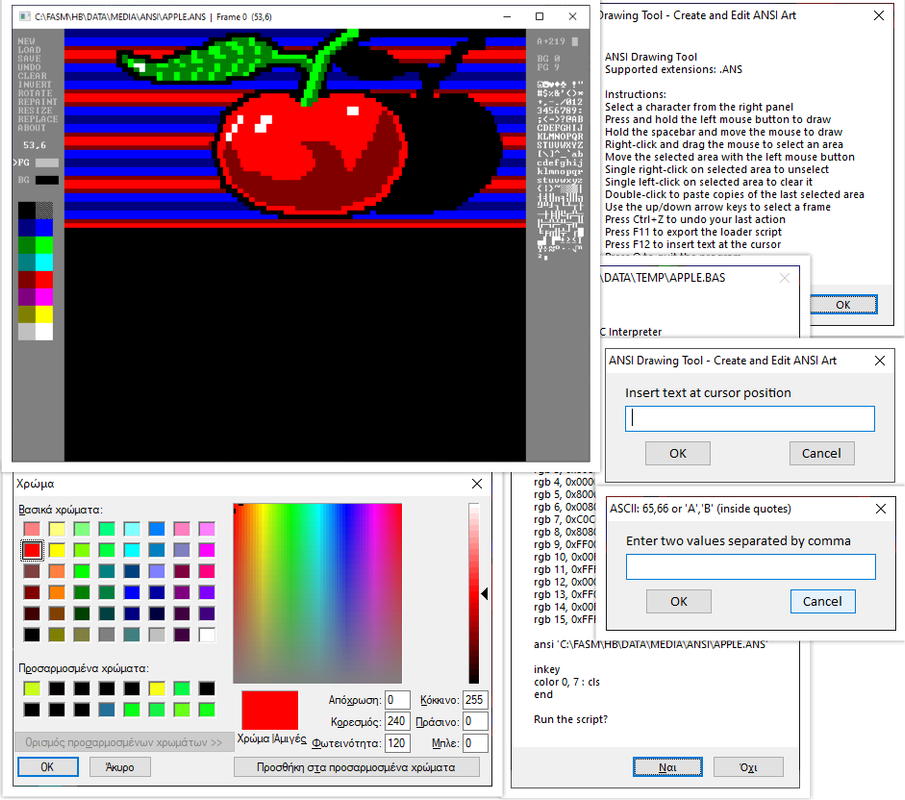 Last edited by Picnic on 26 Apr 2026, 15:18; edited 30 times in total |
|||
|
22 May 2020, 13:13 |
|
|
bitRAKE 22 May 2020, 15:05
I think I ran all of them on Windows 10.
About the mouse one: didn't indicate which button was double-clicked, and the middle button displays as the left button. This might be a limitation of the API - I don't know. I did find an error in the XONIX game. I was able to meet the edge at the same time as the red spot. This causes the area not to be filled until I completed another closing move. This typically is just a "one-off" error. Also, an error in DRAW.BAS, line 336, changed to "if p > 269 then break", and it seems to work. Was only missing 1200 baud modem sounds.
Well done! _________________ ¯\(°_o)/¯ AI understands the way 2+2 understands 4. |
|||
|
22 May 2020, 15:05 |
|
|
Picnic 22 May 2020, 20:51
Post removed by author.
Last edited by Picnic on 27 Apr 2026, 10:04; edited 10 times in total |
|||
|
22 May 2020, 20:51 |
|
|
bitRAKE 23 May 2020, 05:21
Another oddity is not being able to select a character from the codepage that characters are displayed with. The saved images display correctly, but limited character selection as seen in the picture. I was even able to crash the console by selecting different fonts. Windows 10 might be to blame here as they try to push everyone to Powershell.
Putting this in a batch file will compile all the examples: Code: FOR %%G IN (.\EXAMPLES\*.BAS) DO (HB "%%G" -bind ".\BIN\%%~nG.EXE")
_________________ ¯\(°_o)/¯ AI understands the way 2+2 understands 4. |
||||||||||
|
23 May 2020, 05:21 |
|
|||||||||

|
Picnic 23 May 2020, 13:13
Post removed by author.
Last edited by Picnic on 27 Apr 2026, 10:04; edited 13 times in total |
|||
|
23 May 2020, 13:13 |
|
|
Picnic 19 Jan 2021, 12:47
Post removed by author.
Last edited by Picnic on 27 Apr 2026, 10:04; edited 30 times in total |
|||
|
19 Jan 2021, 12:47 |
|
|
sleepsleep 19 Jan 2021, 17:05
Quote:
this feature sounds exciting and dangerous at the same time, |
|||
|
19 Jan 2021, 17:05 |
|
| Goto page Previous 1, 2, 3, 4, 5, 6, 7 Next < Last Thread | Next Thread > |
Forum Rules:
|