flat assembler
Message board for the users of flat assembler.

Index > Tutorials and Examples > FASM x64 Win32 GUI Controls — Custom Draw ListView Example

Goto page 1, 2  Next
Author
Thread Post new topic Reply to topic
jochenvnltn


Joined: 15 Jul 2011
Posts: 108
jochenvnltn 13 Aug 2026, 12:40
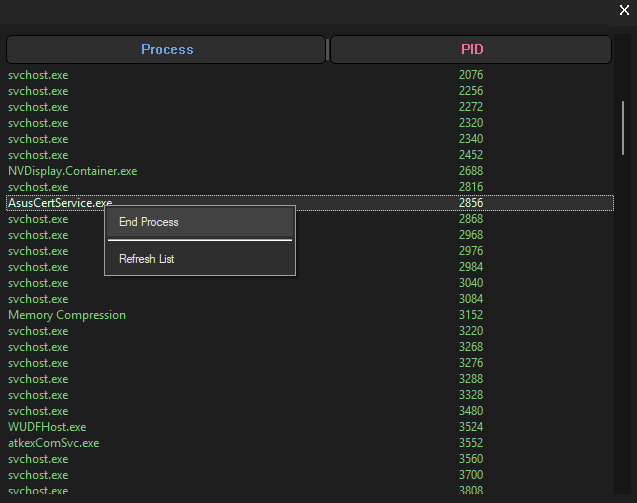
**FASM x64 Win32 GUI Controls — Custom Draw ListView Example**

Hi everyone,

I have been working on a series of **pure FASM x64 Win32 GUI examples**, with the goal of eventually going through the common Windows controls one by one and showing how they actually work underneath.

One thing I noticed very quickly is that there is surprisingly little practical material available for **custom-drawing Win32 controls in 64-bit assembly**.

There are many C/C++ examples, plenty of documentation describing the APIs, and countless high-level GUI frameworks — but when you want to do things such as:

* `NM_CUSTOMDRAW`
* control subclassing
* custom header painting
* dark controls
* DPI-aware custom layouts
* owner/custom-painted window areas
* proper x64 structure layouts
* correct Win64 message handling

...in **pure FASM x64**, examples become much harder to find.

So rather than keeping these experiments private, I want to turn them into a collection of complete, commented examples that other assembly programmers can study, modify, and reuse.

The idea is simple:

**Understand Windows. Don't just memorize Windows.**

This first larger example focuses on the **ListView control**.

### What is included

**Main window**

* Pure Win64 FASM
* Unicode `W` APIs throughout
* Borderless `WS_POPUP` window
* Fully custom-painted dark client area
* Custom dark title bar
* Custom close button
* Window dragging through the custom title bar
* Manual resize hit-testing through `WM_NCHITTEST`
* Resize support on:

* left
* right
* top
* bottom
* all four corners
* Centralized child-control layout
* Correct repainting during resize

**Modern DPI support**

* `DPI_AWARENESS_CONTEXT_PER_MONITOR_AWARE_V2`
* Initial DPI obtained with `GetDpiForWindow`
* `WM_DPICHANGED` support
* DPI-scaled title-bar height
* DPI-scaled close button
* DPI-scaled resize borders
* DPI-scaled margins
* DPI-scaled header font
* Correct use of Windows' suggested rectangle when the DPI changes
* Works properly when moving between monitors with different scaling

**ListView**

* Native `SysListView32`
* `LVS_REPORT`
* `LVS_SINGLESEL`
* `LVS_EX_FULLROWSELECT`
* Unicode ListView messages
* Multiple columns
* Automatic vertical/horizontal scrolling
* Dark ListView background
* Dark text background
* Custom text colors

**Dark scrollbar**

Instead of writing an entire custom scrollbar implementation, the example uses the Windows theme system:

`SetWindowTheme(..., "DarkMode_Explorer", ...)`

This gives the native ListView scrollbar a dark appearance while keeping all normal Windows scrollbar behavior.

**ListView Custom Draw**

The example handles:

* `WM_NOTIFY`
* `NM_CUSTOMDRAW`
* `CDDS_PREPAINT`
* `CDDS_ITEMPREPAINT`
* `CDRF_NOTIFYITEMDRAW`
* `CDRF_NEWFONT`

Normal items receive custom text/background colors.

Selected rows also receive their own custom colors instead of the normal Windows blue selection bar.

The example also demonstrates the important detail of modifying `NMLVCUSTOMDRAW.uItemState` so Windows does not paint its default blue selection over our custom selection colors.

**Header control**

The ListView header is retrieved with:

`LVM_GETHEADER`

and then subclassed using:

`SetWindowLongPtrW`

The original header procedure is preserved and normal messages are passed back through:

`CallWindowProcW`

The header itself is custom painted with GDI.

It includes:

* Dark header background
* Rounded header buttons using `RoundRect`
* Custom header font
* Custom text colors
* Different text colors for different columns
* Custom vertical separators
* Centered header text
* Ellipsis support
* Proper GDI object selection/restoration
* Correct cleanup of created GDI objects

**Responsive columns**

The ListView columns are not permanently fixed-width.

When the main window is resized, the ListView grows/shrinks and the column widths are recalculated proportionally.

The final column therefore continues all the way to the right side of the ListView instead of leaving an ugly empty area.

### Why I am posting these examples

The intention is not merely to produce a pretty ListView.

I want the source to show the actual Windows mechanisms involved:

`WM_NOTIFY`

`NMHDR`

`NMLVCUSTOMDRAW`

`WM_PAINT`

`BeginPaint / EndPaint`

`GetClientRect`

`SetWindowLongPtrW`

`CallWindowProcW`

`WM_NCHITTEST`

`WM_DPICHANGED`

GDI brushes, fonts, rectangles, hit testing, subclassing, DPI scaling, message flow, x64 structures, and the Win64 calling convention.

Later examples can build on the same foundation and cover other controls such as:

* TabControl
* TreeView
* Toolbar
* StatusBar
* Buttons
* ComboBox
* Header controls
* and others

The goal is eventually to have a collection where somebody interested in **native Win64 GUI programming with FASM** can find complete working examples instead of having to translate fragments of C code and guess the required 64-bit structures and offsets.

Where structures are unclear or undocumented, another very useful technique is to verify the actual Windows layout directly with **WinDbg `dt`** and then reproduce that layout correctly in FASM.

Everything will remain focused on native Windows programming and on explaining what Windows is actually doing underneath.

This ListView example has already grown far beyond the usual five-line “create a ListView” demonstration, but that is exactly the point:

**one control, explored properly.**

Next I plan to keep expanding the collection until the major Win32 controls have received the same treatment.


Description:
Filesize: 29.4 KB
Viewed: 1469 Time(s)

latest_listview.png


Last edited by jochenvnltn on 16 Aug 2026, 20:47; edited 3 times in total
Post 13 Aug 2026, 12:40
View user's profile Send private message Reply with quote
Roman


Joined: 21 Apr 2012
Posts: 2132
Roman 13 Aug 2026, 12:47
In fasmw include\api\user32 not have SetProcessDpiAwarenessContext,GetDpiForWindow,SetWindowLongPtrW

Not exist Process32FirstW and Process32NextW in kernel32.inc

i compiled example. Just writed this my hands.


Last edited by Roman on 13 Aug 2026, 14:09; edited 1 time in total
Post 13 Aug 2026, 12:47
View user's profile Send private message Reply with quote
revolution
When all else fails, read the source


Joined: 24 Aug 2004
Posts: 21104
Location: In your JS exploiting you and your system
revolution 13 Aug 2026, 12:54
Maybe some include missing?
Code:
$ fasm -m 99999 ListView_1.7_PROCESSLIST.asm
flat assembler  version 1.73.31  (99999 kilobytes memory)
ListView_1.7_PROCESSLIST.asm [58]:
        invoke SetProcessDpiAwarenessContext, DPI_AWARENESS_CONTEXT_PER_MONITOR_AWARE_V2
~/fasm/include/win64wx.inc [10] invoke [0]:
  \{ \common fastcall [proc],arg \}
~/fasm/include/win64wx.inc [129] fastcall [117]:
             match args,list \\{ fastcall proc,args \\}
~/fasm/include/win64wx.inc [129] match [0]:
             match args,list \\{ fastcall proc,args \\}
~/fasm/include/macro/proc64.inc [300] fastcall [292]:
    call proc
processed: call[SetProcessDpiAwarenessContext]
error: undefined symbol 'SetProcessDpiAwarenessContext'.    
Post 13 Aug 2026, 12:54
View user's profile Send private message Visit poster's website Reply with quote
Roman


Joined: 21 Apr 2012
Posts: 2132
Roman 13 Aug 2026, 12:57
In my projects i usualy put my FasmAPI libs folder.
To compile the example without any problems.
Post 13 Aug 2026, 12:57
View user's profile Send private message Reply with quote
jochenvnltn


Joined: 15 Jul 2011
Posts: 108
jochenvnltn 13 Aug 2026, 14:49
Roman wrote:
In my projects i usualy put my FasmAPI libs folder.
To compile the example without any problems.

Those missing API are from user32.dll. You need to add them to your user32.inc in your FASM folder.
Post 13 Aug 2026, 14:49
View user's profile Send private message Reply with quote
alCoPaUL


Joined: 20 Jun 2023
Posts: 22
Location: NYC
alCoPaUL 13 Aug 2026, 14:59
Modern Approach Is Just To Combine The Separate GUI & The Signals Processing Custom Protocol (Usually Console/String/Numeric Fuctions), but still keeping them apart..

Like you do the Presentation In Microsoft Visual Basic 6.0 and you interface the clicks, the scrolls, the whatever thing you do in the form with Microsoft's masm32 ml.exe/link.exe assembled and linked .exe files but could be an exe file handling the Digital Signals Going Through The Microsoft Visual Basic 6.0 form events or whatever..
Post 13 Aug 2026, 14:59
View user's profile Send private message Visit poster's website Reply with quote
jochenvnltn


Joined: 15 Jul 2011
Posts: 108
jochenvnltn 13 Aug 2026, 20:59
revolution wrote:
Maybe some include missing?
Code:
$ fasm -m 99999 ListView_1.7_PROCESSLIST.asm
flat assembler  version 1.73.31  (99999 kilobytes memory)
ListView_1.7_PROCESSLIST.asm [58]:
        invoke SetProcessDpiAwarenessContext, DPI_AWARENESS_CONTEXT_PER_MONITOR_AWARE_V2
~/fasm/include/win64wx.inc [10] invoke [0]:
  \{ \common fastcall [proc],arg \}
~/fasm/include/win64wx.inc [129] fastcall [117]:
             match args,list \\{ fastcall proc,args \\}
~/fasm/include/win64wx.inc [129] match [0]:
             match args,list \\{ fastcall proc,args \\}
~/fasm/include/macro/proc64.inc [300] fastcall [292]:
    call proc
processed: call[SetProcessDpiAwarenessContext]
error: undefined symbol 'SetProcessDpiAwarenessContext'.    


Use FASMW, and add the missing API to your user32.inc file. It should compile fine after this ! Smile
Post 13 Aug 2026, 20:59
View user's profile Send private message Reply with quote
jochenvnltn


Joined: 15 Jul 2011
Posts: 108
jochenvnltn 13 Aug 2026, 21:29
@revolution : Would it be possible to create a thread called something like "FASM Win64 Controls" ?
Then every new windows control added becomes like sub thread underneath ?
When you open "FASM Win64 Controls" You can just click on either "Listview", "Combobox", "listbox" etc ... Smile
Post 13 Aug 2026, 21:29
View user's profile Send private message Reply with quote
revolution
When all else fails, read the source


Joined: 24 Aug 2004
Posts: 21104
Location: In your JS exploiting you and your system
revolution 13 Aug 2026, 23:33
jochenvnltn wrote:
Would it be possible to create a thread called something like "FASM Win64 Controls" ?
Yes. Everyone can create new threads. Please give a descriptive title and place it in the most appropriate forum.
Post 13 Aug 2026, 23:33
View user's profile Send private message Visit poster's website Reply with quote
jochenvnltn


Joined: 15 Jul 2011
Posts: 108
jochenvnltn 13 Aug 2026, 23:48
I added a right click menu to end the selected process or refresh the process list ! [Thread Updated] Smile
Post 13 Aug 2026, 23:48
View user's profile Send private message Reply with quote
jochenvnltn


Joined: 15 Jul 2011
Posts: 108
jochenvnltn 16 Aug 2026, 07:51
So any thoughts comments about the project ?
Everyone just takes the download and without saying anything just leave ?
Why ?
Post 16 Aug 2026, 07:51
View user's profile Send private message Reply with quote
revolution
When all else fails, read the source


Joined: 24 Aug 2004
Posts: 21104
Location: In your JS exploiting you and your system
revolution 16 Aug 2026, 08:13
jochenvnltn wrote:
So any thoughts comments about the project ?
Everyone just takes the download and without saying anything just leave ?
Why ?
I commented that it won't assemble.

If that is fixed than people will be able to try it.
Post 16 Aug 2026, 08:13
View user's profile Send private message Visit poster's website Reply with quote
Roman


Joined: 21 Apr 2012
Posts: 2132
Roman 16 Aug 2026, 11:19
And I commented too.
You must do folder and put in this folder asm code and kernel32.inc and user32.inc

Because in standart fasmw 1.7316 not have this functions.

include\api\user32 not have SetProcessDpiAwarenessContext,GetDpiForWindow,SetWindowLongPtrW

Not exist Process32FirstW and Process32NextW in kernel32.inc
Post 16 Aug 2026, 11:19
View user's profile Send private message Reply with quote
Roman


Joined: 21 Apr 2012
Posts: 2132
Roman 16 Aug 2026, 11:23
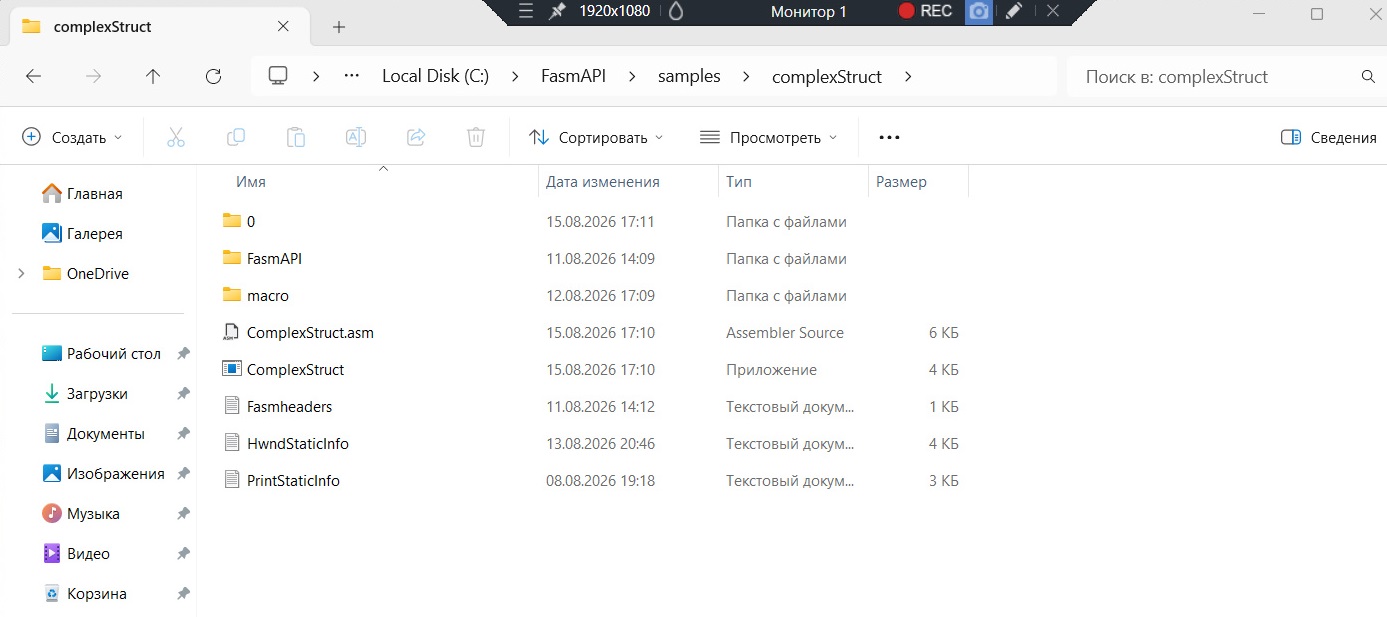
For example my project looking like this.
In folder FasmAPI i put kernel32.inc,user32.inc , directx11.inc, and some etc libs.


Description:
Filesize: 121.6 KB
Viewed: 1271 Time(s)

bandicam 2026-08-16 14-21-43-494.jpg


Post 16 Aug 2026, 11:23
View user's profile Send private message Reply with quote
jochenvnltn


Joined: 15 Jul 2011
Posts: 108
jochenvnltn 16 Aug 2026, 11:26
revolution wrote:
jochenvnltn wrote:
So any thoughts comments about the project ?
Everyone just takes the download and without saying anything just leave ?
Why ?
I commented that it won't assemble.

If that is fixed than people will be able to try it.


What are you talking about ?
I said day's ago that your user32.inc is missing some API !
I told you this yesterday "Use FASMW, and add the missing API to your user32.inc file. It should compile fine after this ! "

You say "When all else fails, read the source" on your profile, did you bother to google "SetProcessDpiAwarenessContext" ? Also i uploaded my own user32.inc (which has also been downloaded 11 times by now) So add the missing API to your user32.dll or use mine !
Post 16 Aug 2026, 11:26
View user's profile Send private message Reply with quote
Roman


Joined: 21 Apr 2012
Posts: 2132
Roman 16 Aug 2026, 11:32

jochenvnltn
call Bill Geyts Smile

Apply dll functions names this is his privilege Smile
Post 16 Aug 2026, 11:32
View user's profile Send private message Reply with quote
jochenvnltn


Joined: 15 Jul 2011
Posts: 108
jochenvnltn 16 Aug 2026, 11:34
Roman wrote:
And I commented too.
You must do folder and put in this folder asm code and kernel32.inc and user32.inc

Because in standart fasmw 1.7316 not have this functions.

include\api\user32 not have SetProcessDpiAwarenessContext,GetDpiForWindow,SetWindowLongPtrW

Not exist Process32FirstW and Process32NextW in kernel32.inc


So why not add the missing API to your kernel32.inc and use my user32.inc i uploaded with the missing API yesterday ?
Post 16 Aug 2026, 11:34
View user's profile Send private message Reply with quote
jochenvnltn


Joined: 15 Jul 2011
Posts: 108
jochenvnltn 16 Aug 2026, 11:36
Roman wrote:

jochenvnltn
call Bill Geyts Smile

Apply dll functions names this is his privilege Smile


The API are already in the windows DLL's !
All you need to do is add them to kernel32.inc & user32.dll.. pff
Post 16 Aug 2026, 11:36
View user's profile Send private message Reply with quote
revolution
When all else fails, read the source


Joined: 24 Aug 2004
Posts: 21104
Location: In your JS exploiting you and your system
revolution 16 Aug 2026, 11:38
Asking others to alter their fasm install isn't realistic IMO. Each time a new version of fasm installed all the changes are lost.

For good feedback it is important to make it as easy as possible for others to contribute when they have time and are willing.
Post 16 Aug 2026, 11:38
View user's profile Send private message Visit poster's website Reply with quote
jochenvnltn


Joined: 15 Jul 2011
Posts: 108
jochenvnltn 16 Aug 2026, 11:46
revolution wrote:
Asking others to alter their fasm install isn't realistic IMO. Each time a new version of fasm installed all the changes are lost.

For good feedback it is important to make it as easy as possible for others to contribute when they have time and are willing.


Like i said ... The API are already in the windows DLL's !
Can i help it that it's not in the INC files ?
When you add the API's the the right INC files, the program compiles fine..
I am not going to waste my time here explaining what API INC files are and what thy do !
Post 16 Aug 2026, 11:46
View user's profile Send private message Reply with quote
Display posts from previous:
Post new topic Reply to topic

Jump to:  
Goto page 1, 2  Next

< Last Thread | Next Thread >
Forum Rules:
You cannot post new topics in this forum
You cannot reply to topics in this forum
You cannot edit your posts in this forum
You cannot delete your posts in this forum
You cannot vote in polls in this forum
You cannot attach files in this forum
You can download files in this forum


Copyright © 1999-2026, Tomasz Grysztar. Also on GitHub, YouTube.

Website powered by rwasa.